Page 50 | Stellar
®
Heavy-Duty Telescopic Crane Owner’s Manual
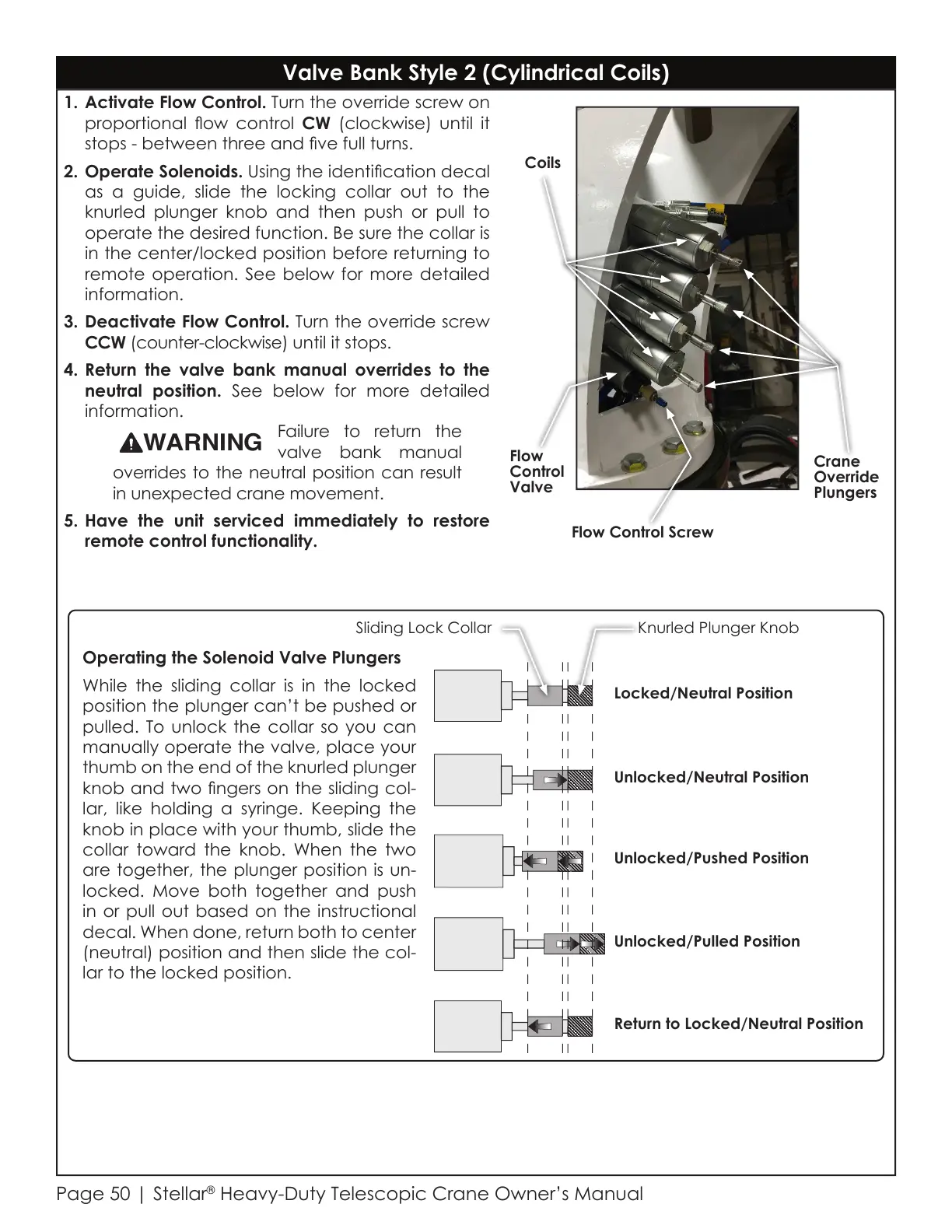
1. Activate Flow Control. Turn the override screw on
proportional ow control CW (clockwise) until it
stops - between three and ve full turns.
2. Operate Solenoids. Using the identication decal
as a guide, slide the locking collar out to the
knurled plunger knob and then push or pull to
operate the desired function. Be sure the collar is
in the center/locked position before returning to
remote operation. See below for more detailed
information.
3. Deactivate Flow Control. Turn the override screw
CCW (counter-clockwise) until it stops.
4. Return the valve bank manual overrides to the
neutral position. See below for more detailed
information.
Failure to return the
valve bank manual
overrides to the neutral position can result
in unexpected crane movement.
5. Have the unit serviced immediately to restore
remote control functionality.
Flow
Control
Valve
Coils
Flow Control Screw
Crane
Override
Plungers
Valve Bank Style 2 (Cylindrical Coils)
Sliding Lock Collar Knurled Plunger Knob
Locked/Neutral Position
Unlocked/Neutral Position
Unlocked/Pulled Position
Unlocked/Pushed Position
Return to Locked/Neutral Position
Operating the Solenoid Valve Plungers
While the sliding collar is in the locked
position the plunger can’t be pushed or
pulled. To unlock the collar so you can
manually operate the valve, place your
thumb on the end of the knurled plunger
knob and two ngers on the sliding col-
lar, like holding a syringe. Keeping the
knob in place with your thumb, slide the
collar toward the knob. When the two
are together, the plunger position is un-
locked. Move both together and push
in or pull out based on the instructional
decal. When done, return both to center
(neutral) position and then slide the col-
lar to the locked position.
Courtesy of CraneMarket.com



 To Next Page