11
In particular protect the controller against overheating by avoiding direct sun radiation or indirect heating up
nearby a radiator.
4.3 ELECTRICAL CONNECTION OF THE MACHINE
The connection of the stepping motors, the end switches and the emergency-stop switch has to processed
conform to the construction manual enclosed.
The low-voltage plug of the power supply has to be connected to the connection socket of the unit control at the
backside of the machine.
The computer will be connected to the desktop 3D-system with an USB- or parallel connection cable. The
necessary socket is located at the backside of the machine, too. Depending on the variant of interface module
there is either an USB- or a parallel socket.
The LED lights of the unit control are visible from the outside. The LED lights flash in case of:
System ok / power amplifier switched
on / emergency-stop switch switched
off
4.4 OPTIONAL ACCESSORY
CAUTION: If you use any accessory which was not made or sold by STEPCRAFT please check if it is compatible
with your system before the first use.
In case of doubts please contact the corresponding manufacturer, if required.
4.4.1 SYSTEM-GUIDED TOOLS
CAUTION: Please read the operating instructions of every single system-guided tool before use!
In addition please observe the following items:
The machine is equipped with a 43 mm / 1.69 inch tool holder with a thickness of 10 to 12 mm, of 0.39 to 0.48
inch respectively. The supply line of the system-guided tool (if applicable) is fixed to the cable collector of the X-/
Z-axis and there it is forwarded by means of a "flying" guiding.
Please imperatively make sure that the supply line is long enough and won’t be clamped anywhere.
The following original system-guided tools are available today:
Spindle for milling and engraving for a huge variety of
materials, i.e. wood, plastic or non-ferrous metals like
brass or aluminum
Head for generative manufacturing with plastic filament
like PLA or ABS. Type of process: Fused Deposition
Modeling (FDM)
Cutter holder / foil knife
Tool for cutting foils and paper
Cutter for styrofoam. Works with a hot wire.
Special holder for ball pens to draw on paper, fabric
etc.
Tool is to be able to scratch minimum details in plastic,
brass, copper, aluminum, steel, high-grade steel
4.4.2 ADDITIONAL ACCESSORY
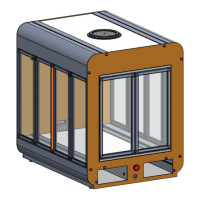
When using accessories please always make sure to have the additional operating instructions of the
corresponding products and check if the parts are compatible to the STEPCRAFT desktop 3D-system and to the
control before using them for the first time.
The following original accessories are available:


 To Next Page