Quick Start of T6 AC Servo
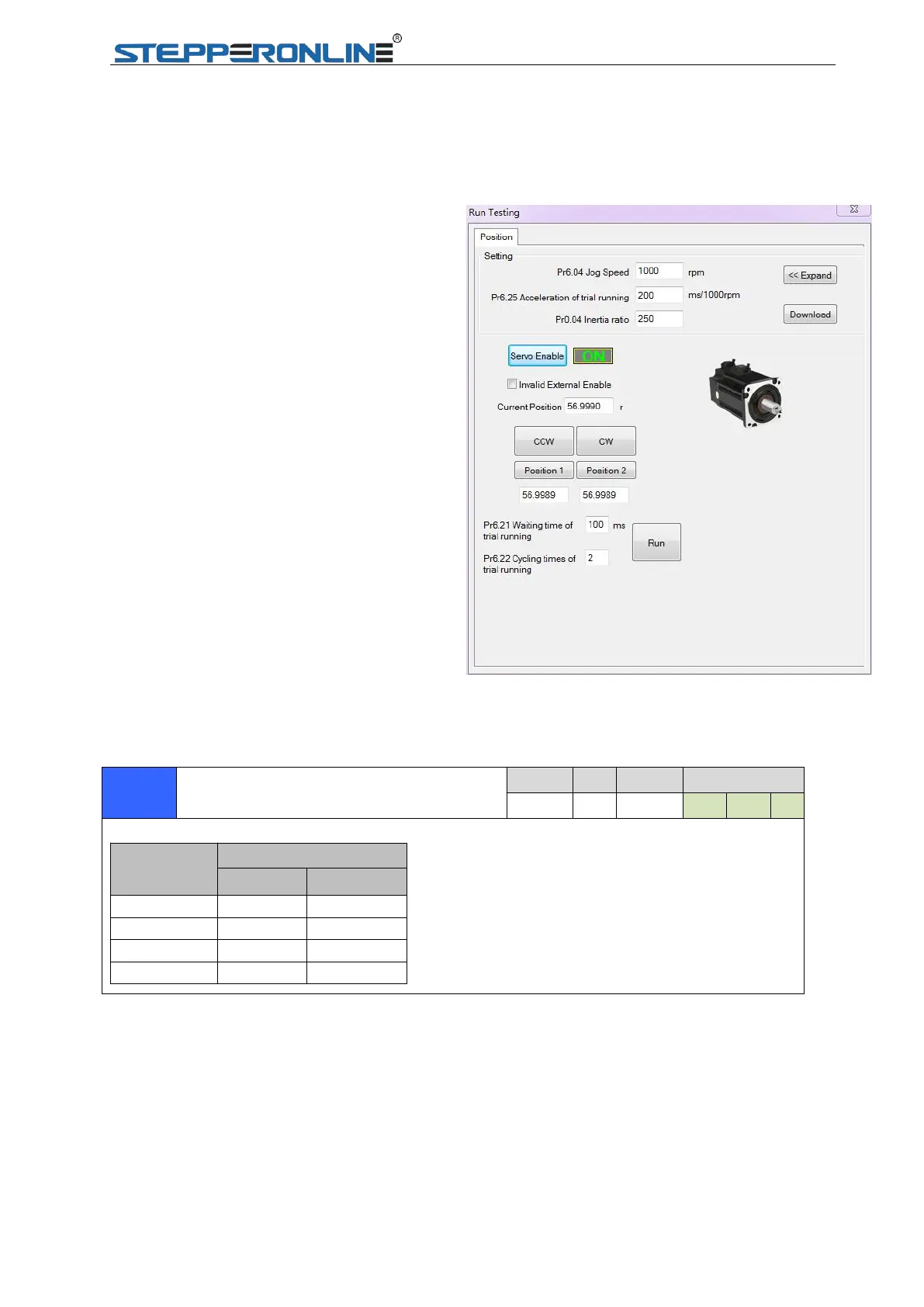
Run Testing
Use “run testing” of software protuner to tune the drive. Make sure the shaft of motor is free before
running it, and please release the brake firstly if motor is with brake.
Control mode setting (Pr0.01)
Then connect the wire correctly and use controller to check whether motor run normally or not.
Mode of real-time auto-gain tuning setting (Pr0.02)
Select different operation mode in real-time automatic adjustment mode,
When you set up the combination mode of 3.4.5, you can
select either the 1st or the 2nd with control mode switching
input(C-MODE).
When C-MODE is open, the 1st mode will be selected.
When C-MODE is shorted, the 2nd mode will be selected.
1.Set parameters for run testing:
Specially pay attention to Pr0.03 Stiffness
and Pr0.04 Inertia ratio which strongly
corresponding to better performance
2.Run testing guidance
Click button “Servo enable”
Click “CCW” to make motor run in CCW
direction , click ”Position 1” to save the
testing position limit 1
Click “CW” to make motor run in CW
direction, click ”Position 2” to save the testing
position limit 2
Click ”Run” to start Testing progress
3.During the Run Testing progress,the
wave show monitor the performance of
the current parameters setting.


 To Next Page