Temperature Control
• The Temperature Controller provides the ability to set the desired
temperature level and display the current cabinet temperature. The
electronic controller has been programmed to maintain an average of the
set temperature.
• The compressor will start up when the internal cabinet temperature
increases 0.5 to 1.5 degrees above the set temperature and will run until
the temperature is 0.5 to 1.5 degrees below the set temperature.
• When your Fridge/Freezer is rst connected to the AC or DC power
input, press the power switch ON and the digital read out will show the
current cabinet temperature. To set your Fridge/Freezer to the desired
temperature, follow these steps:
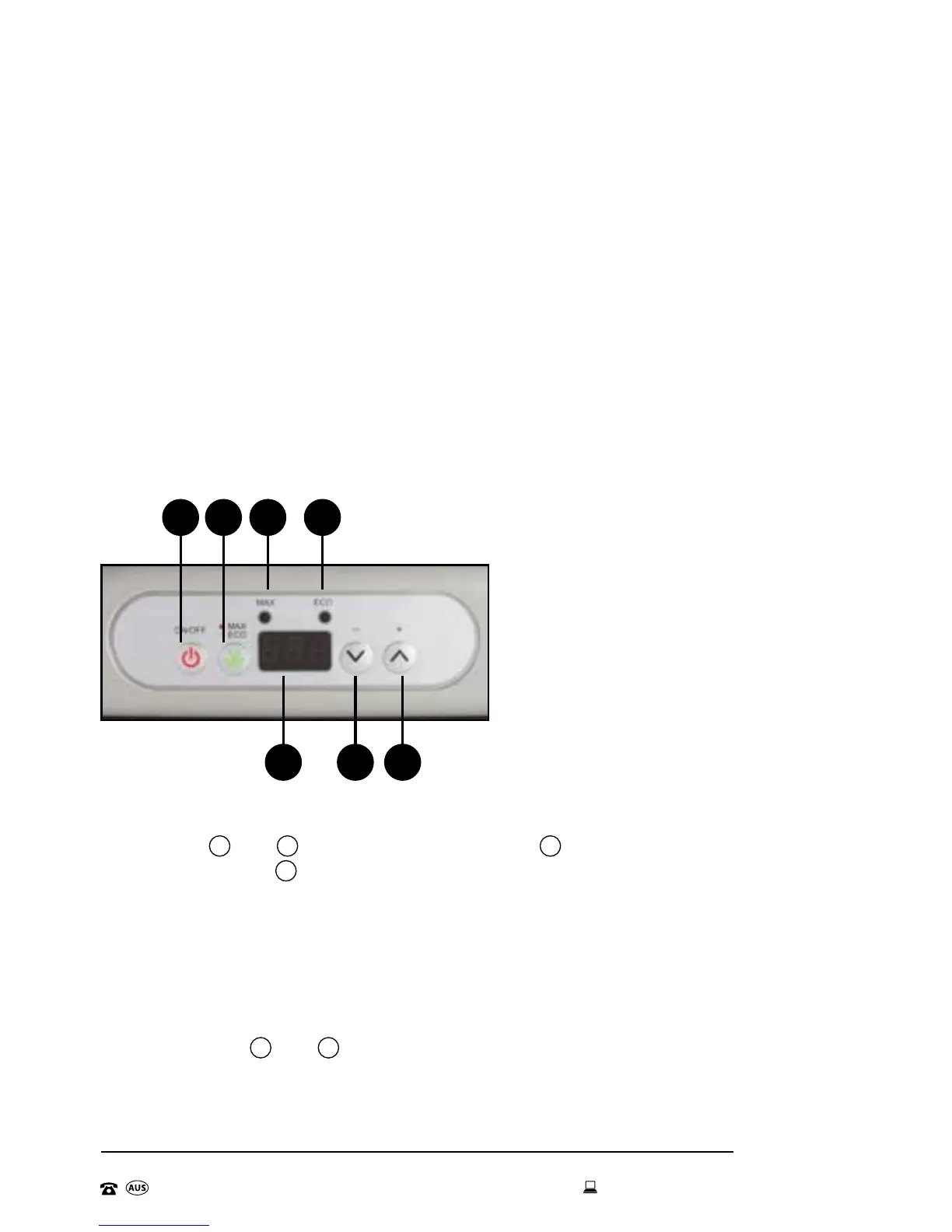
• Press the
^
and
^
TEMPERATURE buttons,
^
will reduce the
temperature and
^
will increase the temperature.
• Once the display shows your desired temperature, release the button.
The desired temperature will flash for 5 seconds to confirm your setting.
• The display will then return to show the current internal cabinet
temperature.
• Pressing both
^
and
^
at the same time will switch the temperature
display from ºC to ºF.
1 Power Switch
2 Running Mode Switch
3 Max Mode Indicator
4 Eco Mode Indicator
5 Temperature Display
6 Temperature Control
65 6
1 32 4


 To Next Page