Rev: 2018 – 7A ©2018 Store It Cold, LLC 17
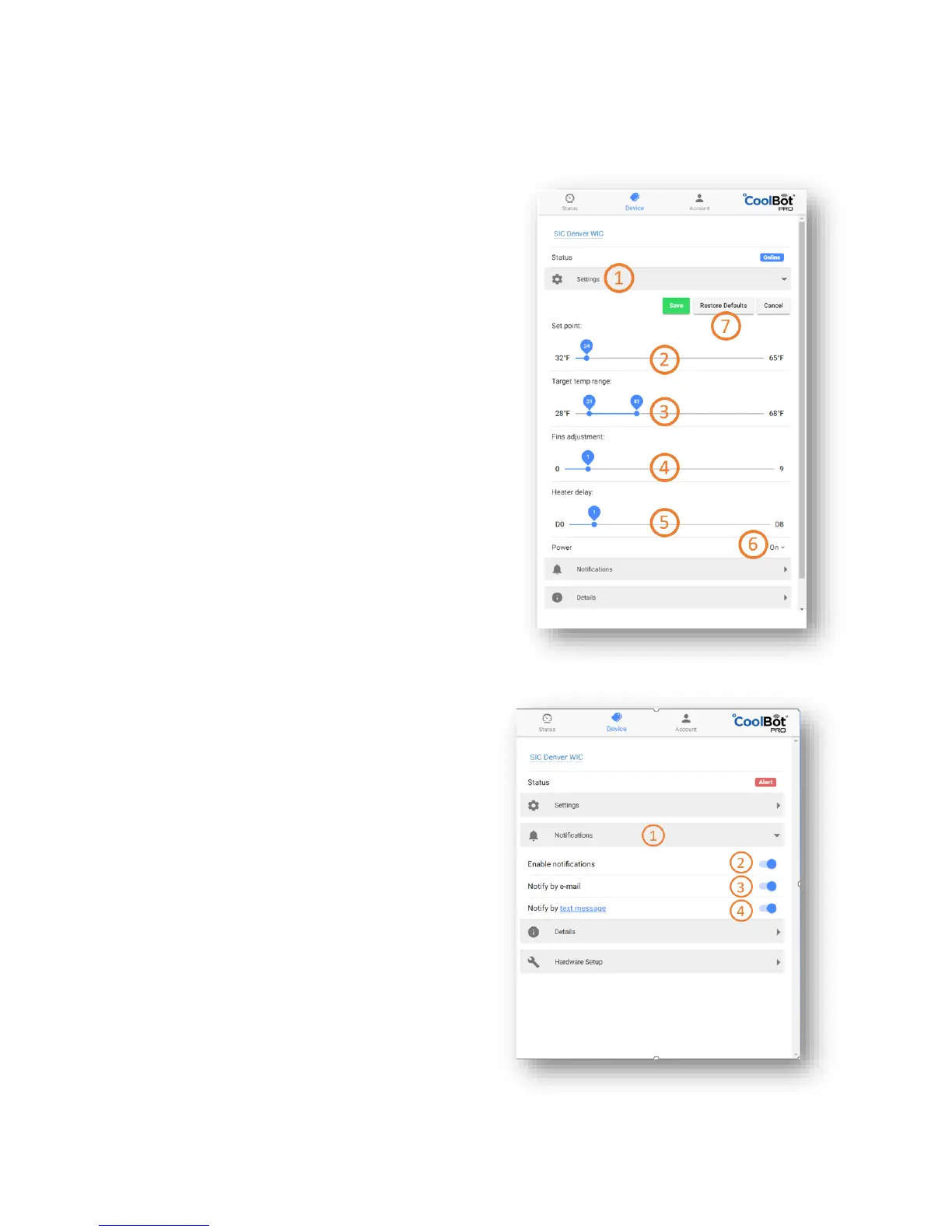
Settings Menu
After clicking on the Settings Expandable Menu click on EDIT to enter the edit screen
1. Current Menu – Settings
2. Set Temperature Point – Slide to adjust
3. Target Temperature Range
Low and High Temperature - Slide to adjust.
No less than 3°F from Set Temperature (+/-)
4. Fins Set Point – Slide to adjust
Please see CHANGING SETTINGS ON
THE COOLBOT PRO before adjusting
5. Heater Delay – Slide to adjust
Please see CHANGING SETTINGS ON
THE COOLBOT PRO before adjusting
6. Power ON/OFF CoolBot Pro – click to choose
This will ONLY turn ON and OFF your CoolBot Pro
NOTE: Your A/C unit will keep running and the Room
will be held at 60°F (or the lowest setting of your A/C)
7. Confirmation Icons – click to confirm
Notifications Menu
1. Current Menu – Notifications
2. Enable all notifications
3. E-mail Notifications – Slide to select
ON (blue) / OFF (gray)
4. SMS Notifications – Slide to select
ON (blue) / OFF (gray)



 To Next Page