Rev: 2018 – 7A ©2018 Store It Cold, LLC 20
3. Reconfigure Wi-Fi – This option will walk you step by step through the entire Wi-Fi configuration process
(just like the first time you set up your CoolBot Pro to connect to your Wi-Fi Network).
Press the left arrow to go back to the rest menu.
If you are setting up your Wi-Fi again, then a Jumper reset “CJ” or an “Fr” will be necessary directly at the
CoolBot (see From the CoolBot Pro Controller section) so the Jumper resets and the CoolBot displays “E0”
meaning that it is ready for a Wi-Fi set up again.
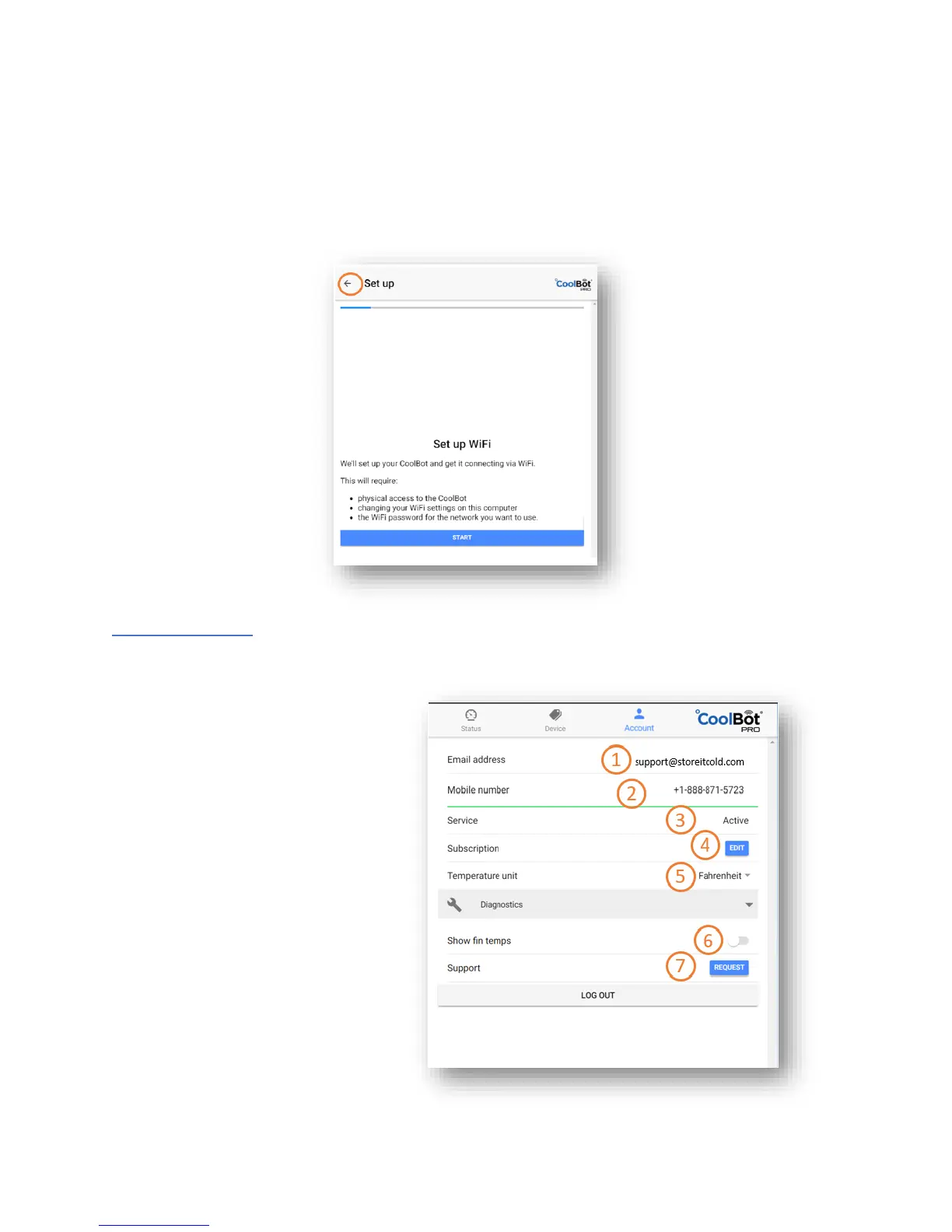
THE ACCOUNT TAB
On the Account tab, you can manage your subscription and manage your profile settings.
1. Email address
associated with the account
2. Mobile Number
to receive SMS Notifications
3. Status of your Service
4. Press EDIT to make changes
to your subscription or
to update billing information
5. App Temperature Display Units
6. Display Fins Temperature
on the Temperature Graph
– Slide to select
ON (blue) / OFF (gray)
7. Support information



 To Next Page