EasyManua.ls Logo

Store It Cold CoolBot PRO - The Devices Tab

Store It Cold CoolBot PRO
26 pages
Print Icon
To Next Page IconTo Next Page
To Previous Page IconTo Previous Page
Loading...
Rev: 2018 7A ©2018 Store It Cold, LLC 16
Can't connect to server
We tried but it's not resolvable or not accepting connections
Check Internet connection
on app device
Device offline
Reboot device, check Wi-Fi,
etc.
Room sensor error
Check cable
Fins sensor error
Heater error
Hardware error
Multiple failures
Check cables/ power/ etc.
Room temp too hot
Check A/C, room, etc.
Room temp too cold
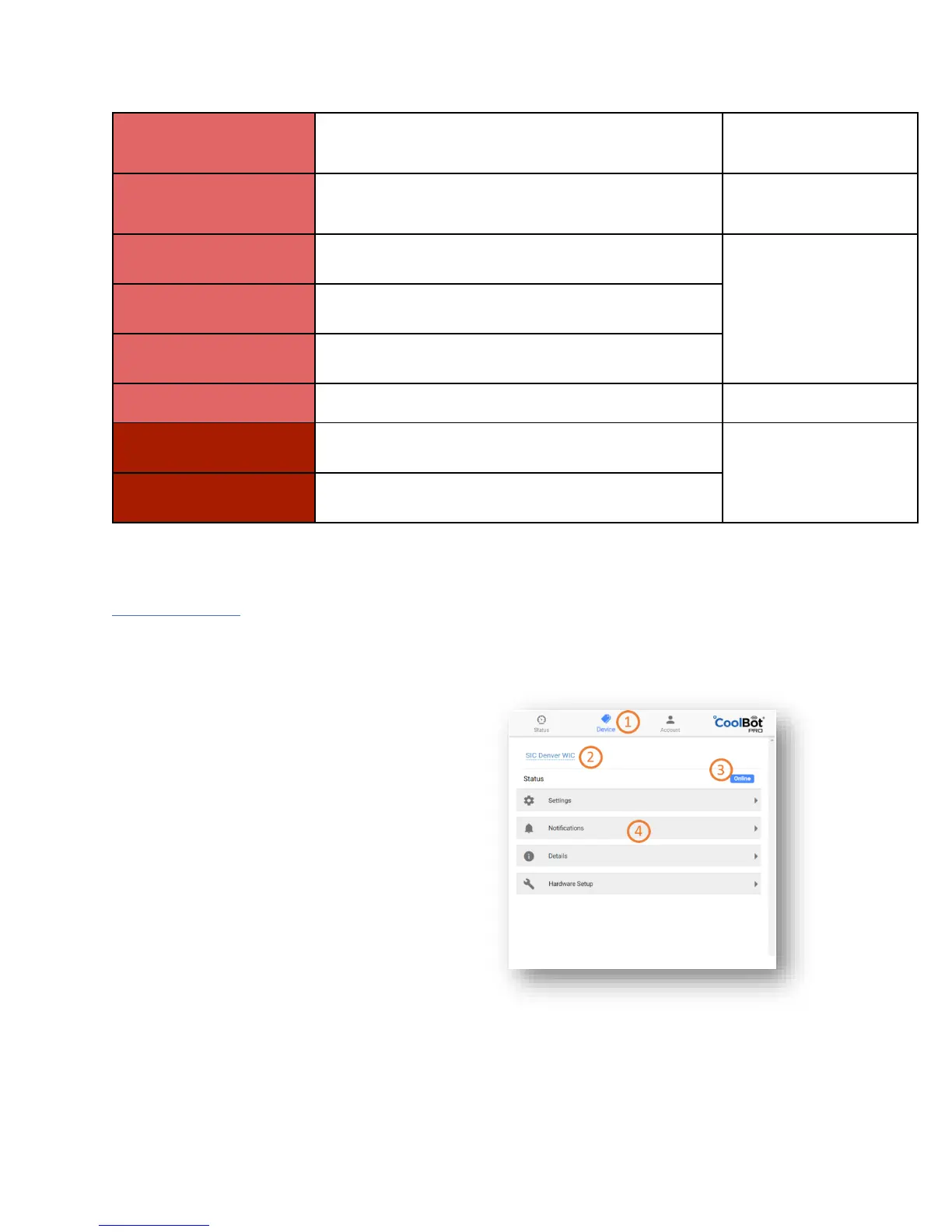
THE DEVICES TAB
On the Devices tab, you can see more details about the device, set the CoolBot Pro’s settings, and turn on
Notifications for when the temperature goes outside of a set range or the CoolBot loses its network connection
1. Current Tab Device Tab
2. CoolBot Pro Name Click to change
3. CoolBot Pro Status Icon
4. Expandable Menus Click to expand

Other manuals for Store It Cold CoolBot PRO

Related product manuals