8
1
2
3
4
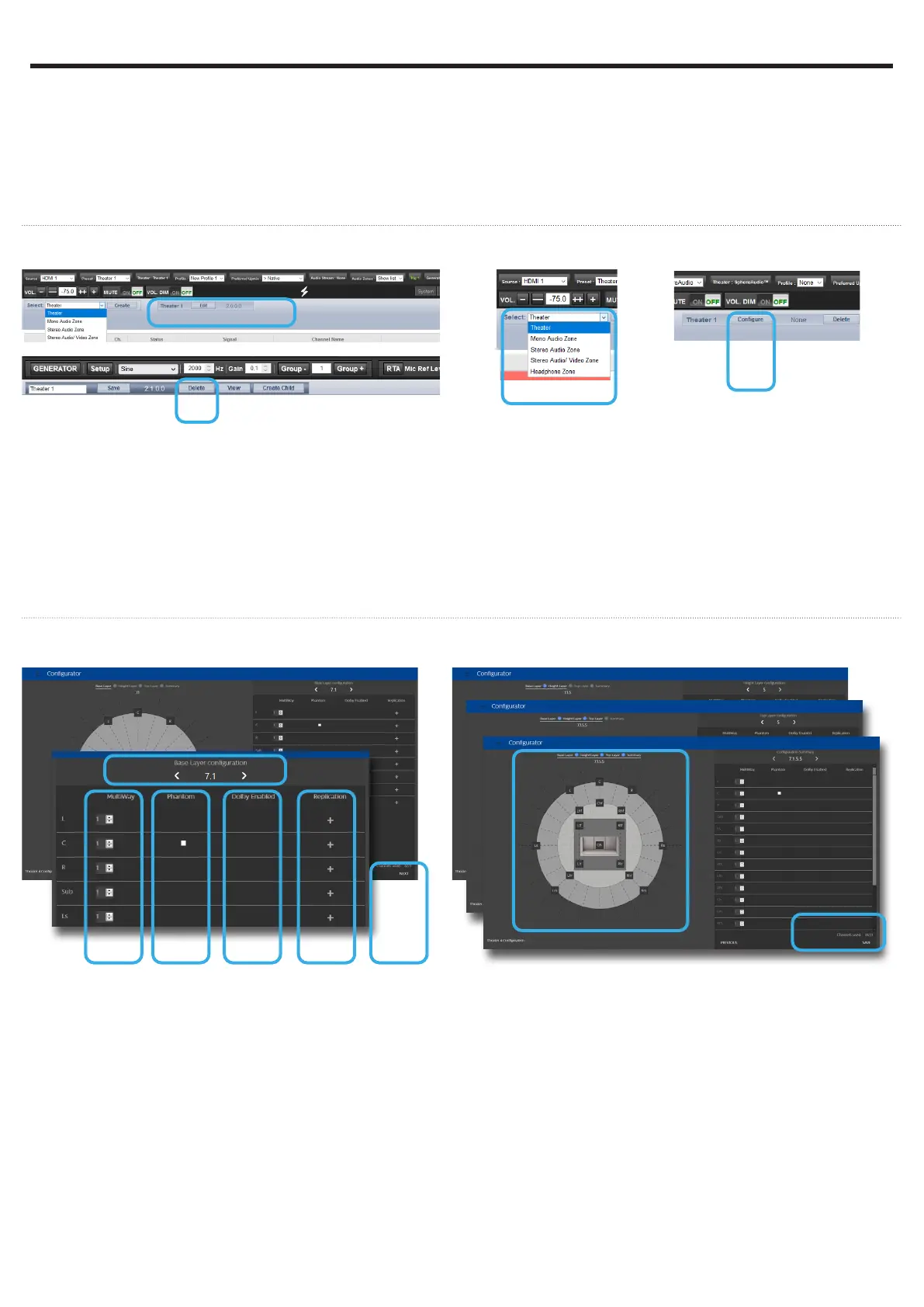
Firstly, select the Main Speakers tab. By default a 2.1
channels theater is defined. If it doesn’t meet your
need, delete it and create a new theater following
below steps:
1. Click on the Edit button next to Theater 1.
2. Once selected, click on the Delete button. This will
make sure this Theater is definitely removed from
the system.
3. You now can create a new Theater corresponding
to your room and speakers setup by selecting
Theater in the drop-down list and then Create.
4. Once created, you need to Configure it.
Note: you can define Theaters and additional Audio
Zones (2ch or mono). We will only cover Theaters
configuration in this Guide. Please consult the Owner
Manual for the other cases.
Create your Theater
Configure your Theater
When in the Theater Configurator, you will be able
to define each layer of the speaker installation: base,
height and top layers.
1. Use the left and right arrows to choose your
desired layout for the current layer.
2. For each speaker, you can define whether full
bandwidth or multiway, with up to 4 ways
definable.
3. The Center channel can be turned to Phantom
mode, the signal being played in Left and Right
channels.
4. Top speakers can be defined as Dolby Atmos
Enabled if up-firing speakers are used. In such
case, select the base speaker location. Keep
«None» for normal down-firing speakers.
5. For each speaker, you can define whether
replication is required. It is often used for multiple
subwoofers use or multiple rows of surround
speakers.
6. Press Next to reach the next layer and follow
again steps 1 to 6 until all three layers are defined.
7. At the end, a summary of the Speakers
Configuration is shown.
8. Click Save to exit and to go to Speakers editing
page.
In this part, we will cover the configuration of the
speakers in the installation. As systems might easily
get complicated, the Quick Guide will only focus on a
basic use case where full bandwidth passive speakers
are used. We will not treat the specific multi-ways
speakers.
Also, we will consider multiple rows of surround
speakers as well as multiple subwoofers.
If you need a different configuration to the one
explained here, we invite you to refer to the Owner
Manual providing details on all possible adjustments
of the ISP.
2
1
3 4 5 6
7
8
5 - THEATER DEFINITION (1/2)


 To Next Page