9
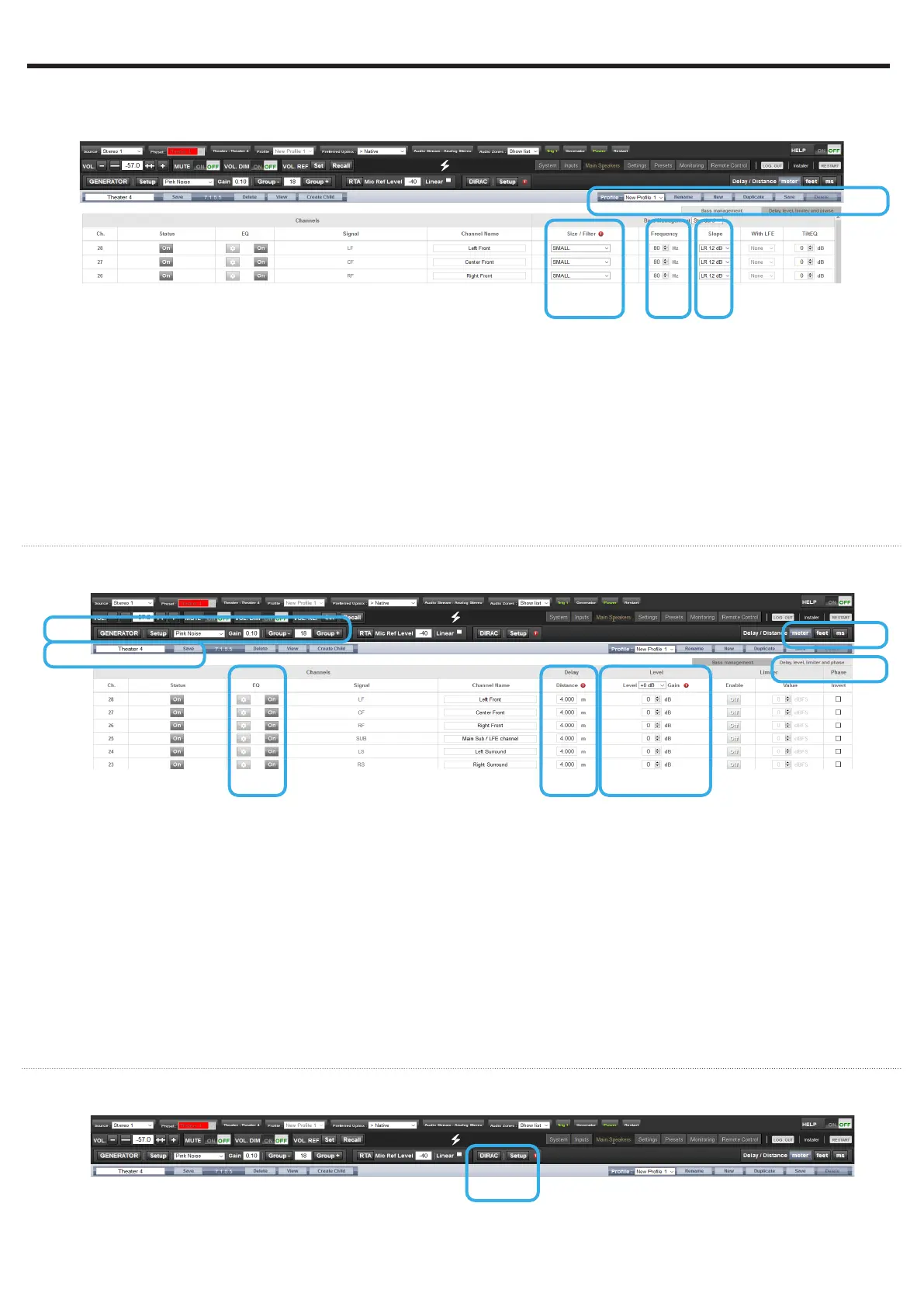
Adjust the Bass Management
Once configured, the Theater is presented in Edition
mode. In this Quick Guide we will only consider the
Standard Bass Management setup:
1. For each Theater, it is possible to define multiple
audio profiles (all Theater settings). By default, a
«New Profile 1» is created.
2. Define the size of each of your speakers between
Small, Large and «Large and Sub». Small will
filter the low frequencies and direct them to the
Subwoofer. Large will maintain full bandwidth,
while «Large and Sub» will also direct the Bass to
the subwoofer channel.
3. When in Small, adjust the filter crossover frequency
between speaker and subwoofer.
4. When in Small, adjust the slope between 12dB,
24dB, 36dB and 48 dB/octave (Linkwitz-Riley and
Butterworth types).
1
2 3
Adjust Levels and Delay
1. Select the Delay and Level tab.
2. Set the Distance/Delay of each of the installed
speakers (meter is the default unit, you can select
feet or ms).
Before proceeding to level adjustment, ensure the
Output Mapping matches your connections (see
section 6).
3. Select the Narrow Band pink noise signal and
activate the Noise Generator, having first made
sure the Master Volume is not at a too high level,
such as < -30dB. Using the Group +/- button,
navigate through each Speaker. Use the normal
pink noise for the subwoofer adjustment.
4. Adjust the Level for each Speaker using a SPL
Meter. We recommend to adjust the Levels with 75
to 85dB(C) average sound pressure as reference.
5. There are up to 20 Parametric EQs available for
each Speaker. Consult the Owner Manual for more
details.
6. Once adjusted, you can Save your Audio Profile.
7. Save the Theater to leave the Edit mode.
6
1
2
3
45
4
Dirac Live Calibration
1
1. Although an important feature of the ISP, we will
not cover the Dirac Live Calibration process in
this Quick Guide as not necessary to get a basic
setup working. Please refer to the Owner Manual,
shall you need to run through the Automated
Calibration process of your ISP using Dirac Live.
7
5 - THEATER DEFINITION (2/2)


 To Next Page