Programmer / Clock
14
5. A (Auto) symbol appears.
6. The cookpot symbol will
disappear from display.
7. The cookpot symbol will appear
on display.
8.
Fully automatic cooking
(example)
For use when a delayed start time is
required.
You want to set the length of cooking
time, and the time for the oven to switch
off. The programmer will automatically
calculate the cooking start time.
Turn the oven control to the
required temperature.
(Oven will begin normal cooking
mode.)
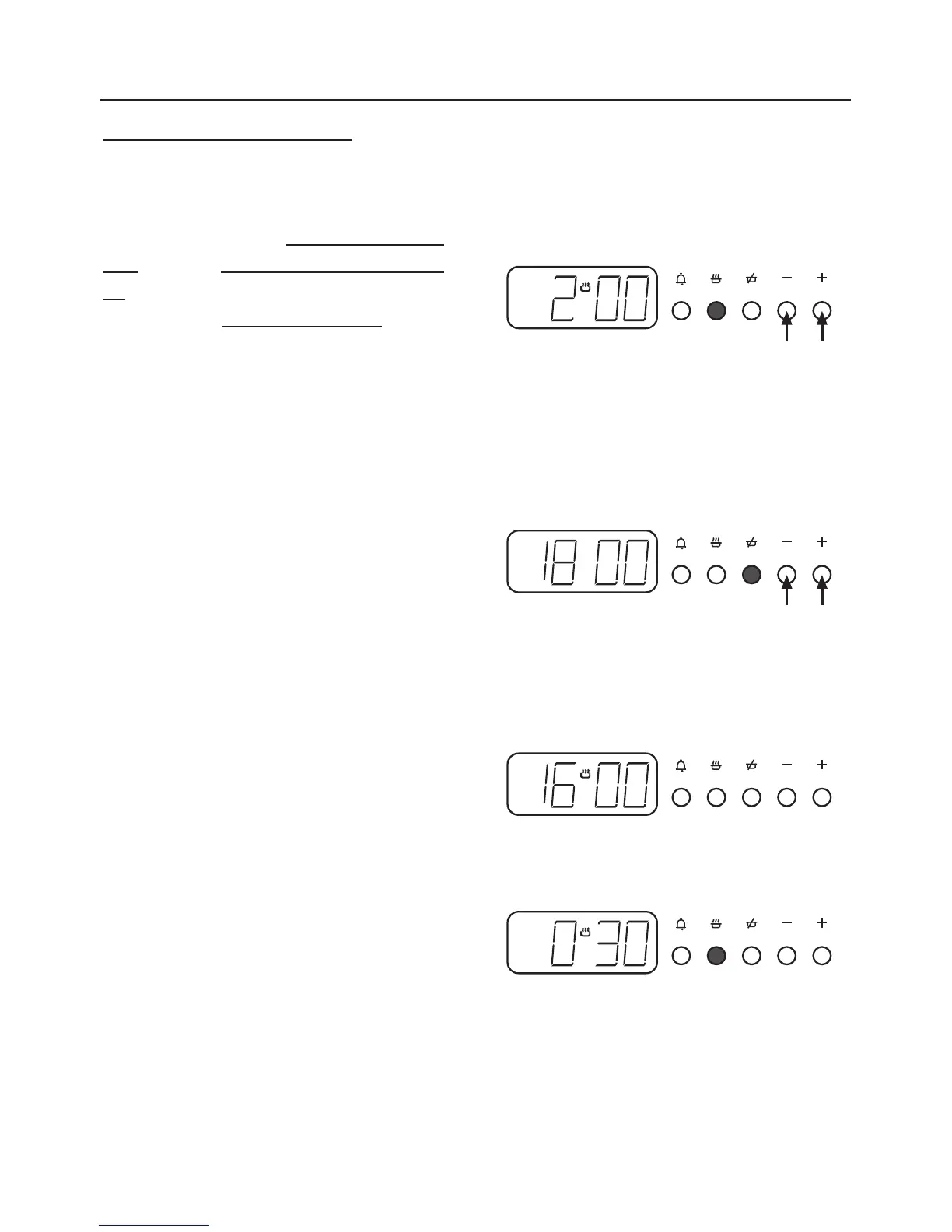
Press the cook time button, then use the
plus and minus buttons to set the
display to show the length of cooking
time required, eg; 2 hours as shown (5).
Press the ready time button, and the
present ready time will be displayed.
Using the plus and minus buttons you
can set the display to show the actual
time you want the oven to switch off,
eg; 18.00 hours (6.00 pm) (6).
The display will revert to show time of day.
The oven will automatically switch on
at the calculated start time of 16.00
hours (4.00 pm) (7).
A single press of the cook time button
shows the cooking time remaining
before the oven automatically switches
off (8).


 To Next Page