24
OPERATION GUIDE
2-450174-030A
WWW.VARI-LITE.COM
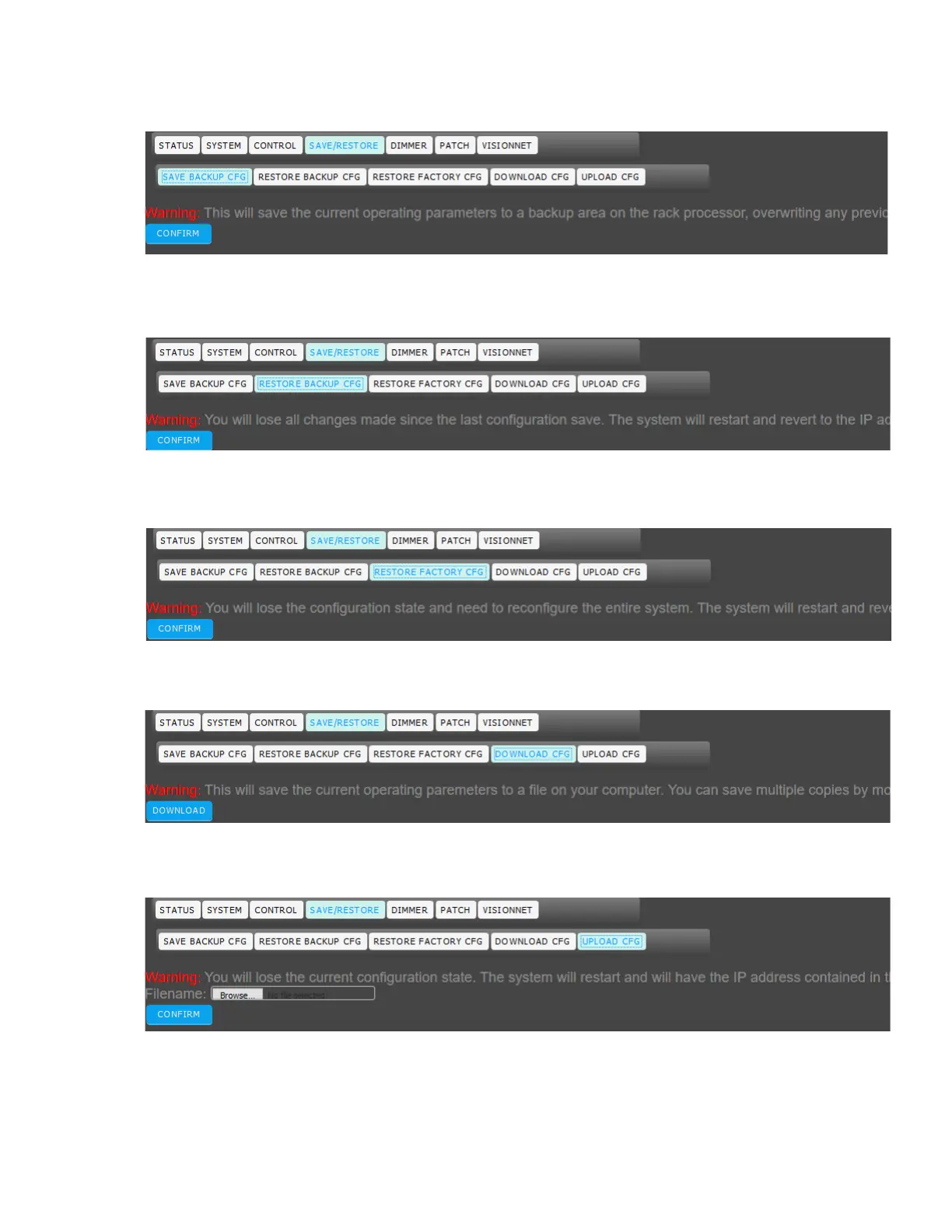
SAVE/RESTORE > SAVE BACKUP CFG
Note that this will save the current operating parameters to a backup area on the rack processor, overwriting
any previously saved parameters.
SAVE/RESTORE > RESTORE BACKUP CFG
Note that you will lose all changes made since the last configuration save. The system will restart and revert to
the IP address saved in the backup configuration if you accept.
SAVE/RESTORE > RESTORE FACTORY CFG
Note that you will lose the configuration state and need to reconfigure the entire system. The system will restart
and revert to the factory assigned IP address if you accept.
SAVE/RESTORE > DOWNLOAD CFG
Note that this will save the current operating parameters to a file on your computer. You can save multiple cop-
ies by modifying the filename the data is saved as.
SAVE/RESTORE > UPLOAD CFG
Note that you will lose the current configuration state. The system will restart and will have the IP address con-
tained in the upload configuration file if you accept.


 To Next Page