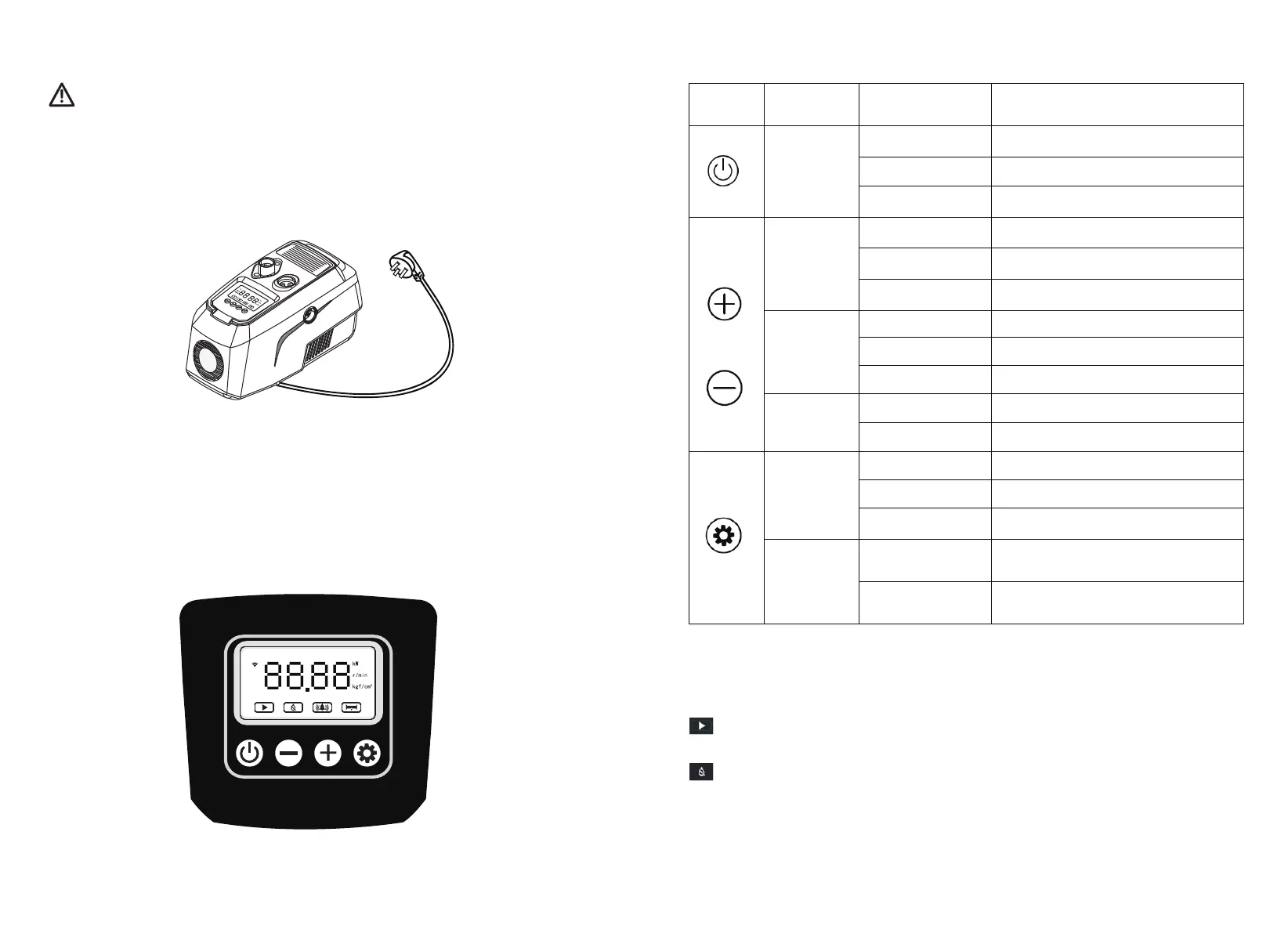
3.3 Connect Power Cable
4.1 Control Panel
4. COMMISSIONING
Note: the wiring of the product must be in strict accordance with the requirements of this manual,
otherwise the product will be damaged! Products must be properly and safely grounded in accordance with
current regulations.
The control panel of the HYDROBOX 900 is shown below:
Before connecting the power supply, make sure the voltage and frequency on the nameplate are
consistent with the power supply system.
Power outlets should be installed in dry areas, away from any possible water source.
Electrical installation must be performed by a professionally qualified electrician.
6 7
keyboard
Mode
Working State Function
Short Press
Automatic Switch betweenRun and Stop
Manual Switch between Run and Stop
Set Up Confirm and Return
Short Press
Automatic Adjust the Setting Pressure step-by-step
Manual Adjust the Pump Speed step-by-step
Set Up Adjust the Parameters step-by-step
Long Press
Automatic RapidContinuous Regulation
Manual RapidContinuous Regulation
Set Up RapidContinuous Regulation
Long press at
the same time
Automatic Enter Parameter Settings
Manual Enter Parameter Settings
Short Press
Automatic Cyclic Switch-over Data Display
Manual Cyclic Switch-over Data Display
Set Up Cancel And Return
Long Press
Automatic
Switch Between Automatic And Manual
Mode
Manual
Switch Between Automatic And Manual
Mode
Key Function:
4.2 Indicator Light
In automatic and manual mode, the lightis on when pump running and off when
pump stopping.
When there is no water in the pipeline, this fault light will be on. After the water
shortage lasts for 30 seconds, it will start three times. After confirming the water
shortage, it will stop completely. The red indicator light is continuously on, indicating
the state of "water shortage".At the same time, it enters the automatic detection
stage. At a certain interval, the pump start and the water shortage is determined
HYDROBOX 900
auto
manu


 To Next Page