7 Advanced Settings
The Advanced Mode button can be found in the System tab of both the Encoder or Decoder web UI. Advanced
Mode is a legacy user interface that contains a number of items that are useful to Chroma users. In general, it
should only be accessed during system setup, such as to change the IP address, during troubleshooting, or
when directed to by Support.
The below URLs, starting with /avenir/ should be appended the IP address or hostname of the Chroma. For
example:
/avenir/settings.php should be understood to mean http://10.9.8.7/avenir/settings.php (using sample IP
address 10.9.8.7).
7.1 Set IP address
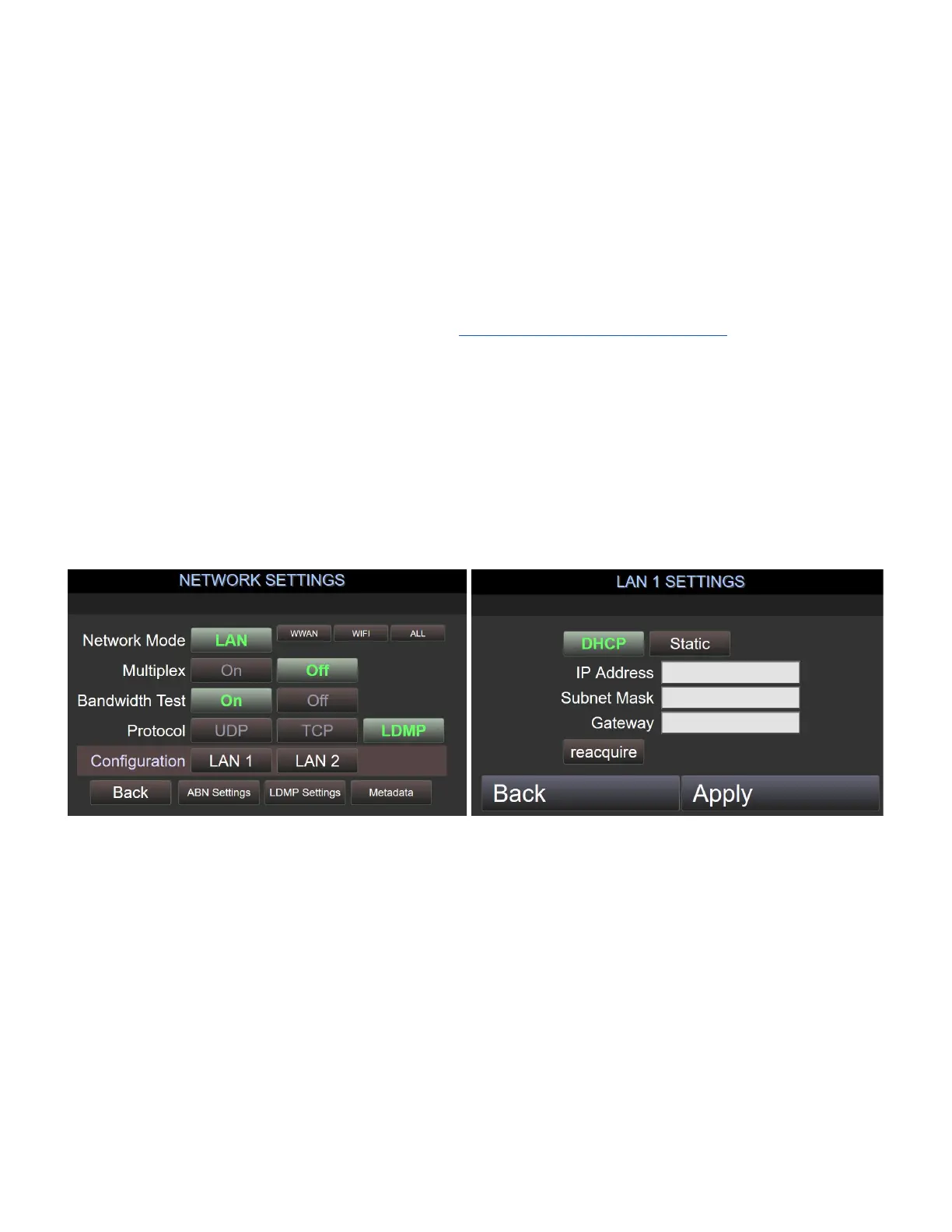
Navigate to the Network Settings by selecting the Network button on the Home page -> LAN1 [or LAN2] or
directly by appending the following URL’s to the base IP address (see example above)
/avenir/settings_network.php
/avenir/settings_lan1.php
/avenir/settings_lan2.php
Here, you can set a static IP address, subnet mask, and default gateway, or switch Chroma to DHCP mode.
7.2 Live Stream Status Display
Navigate to the Stream Status by selecting the Streaming link in the upper right or directly by appending the
following URL to the base IP address (see example above)
/avenir/stream.php



 To Next Page