Network
Encoder IP: IP address that the Encoder is using to send data from (source address)
Decoder IP: IP address that the Encoder is using to send data to (destination address)
Packet Size (MTU): IP Packet size (default = 1392)
Shuffle: Forward Error Correction Shuffle setting
Buffer: the amount of network buffer available; this will vary based on the complexity of the video and
limitations in the network connection; a negative value indicates a failed network connection
Bytes: size of the buffer in bytes
Packets Sent: number of total packets sent since last restart
Transmission: Indicates LDMP or UDP network mode.
Streaming
This region includes a start/stop button for the stream.
5.4 Network Page
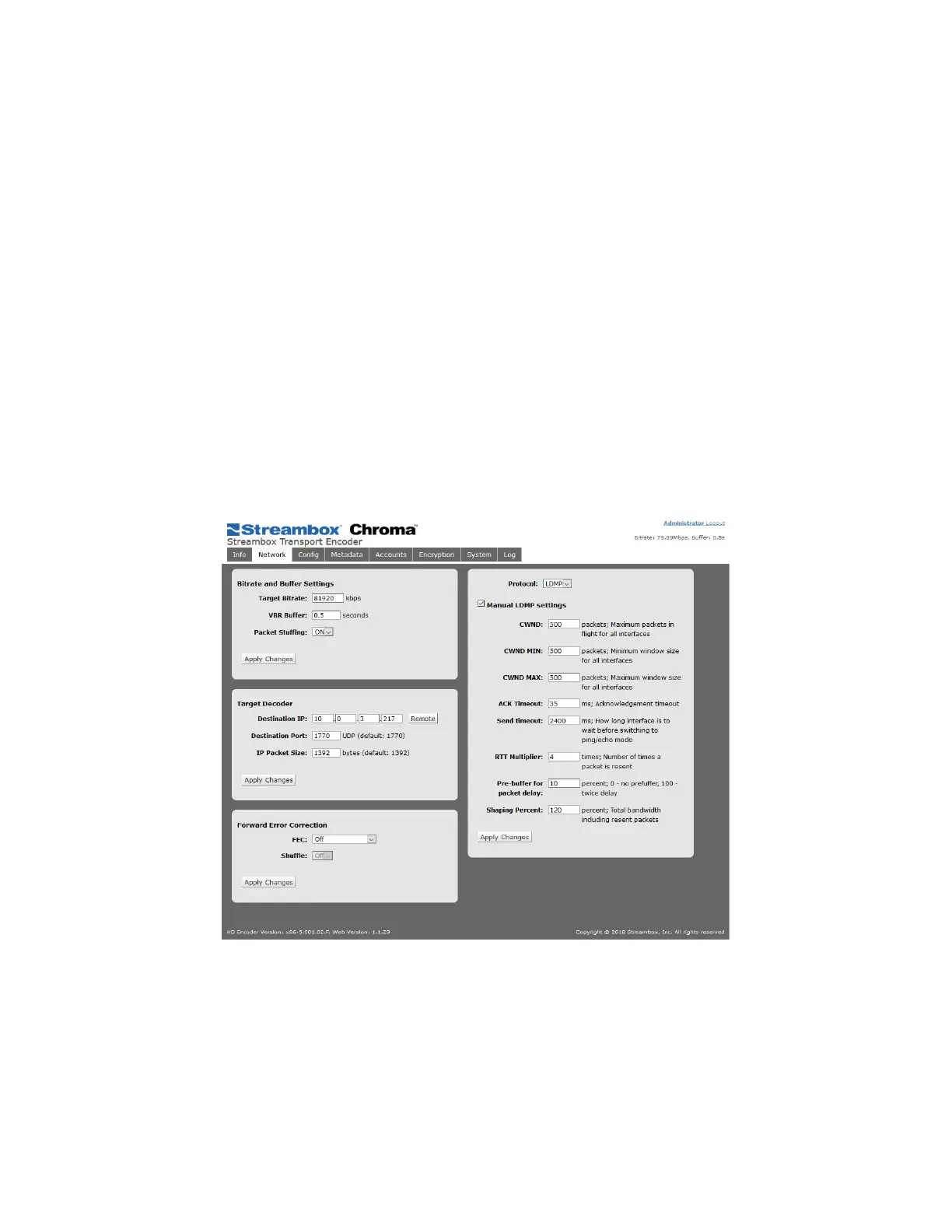
The network page allows access to the network settings such as bitrate, latency, and Decoder IP.
Figure 3 Encoder Web UI Network Page
For basic functionality of the system upon initial set up, two settings need to be set: the Decoder IP address
and target bitrate.
Bitrate and Buffer Settings
Target Bitrate: sets the total transfer rate that will not be exceeded when streaming
VBR Buffer: Variable bitrate buffer in seconds; amount of time in seconds that the Encoder has to process the
video before it is to be transported to the Decoder; values 0.1s to 5s; A lower setting decreases latency while a



 To Next Page