Lisa LCD 2
1
Getting started
1.1 Unpacking your device
Carefully take out of the package the device and the supplied materials. Make sure that all of the
following components are included:
1x Lisa LCD
Power supply
Power plug adapters (see IEC world-wide power plug overview):
o United States: US (Type B)
o Non-USA countries: EU (Type C), UK (Type G), US (Type B)
o Other types can also be order, please ask your sales contact for more information
Ethernet cable
1.2 Device appearance
Front view
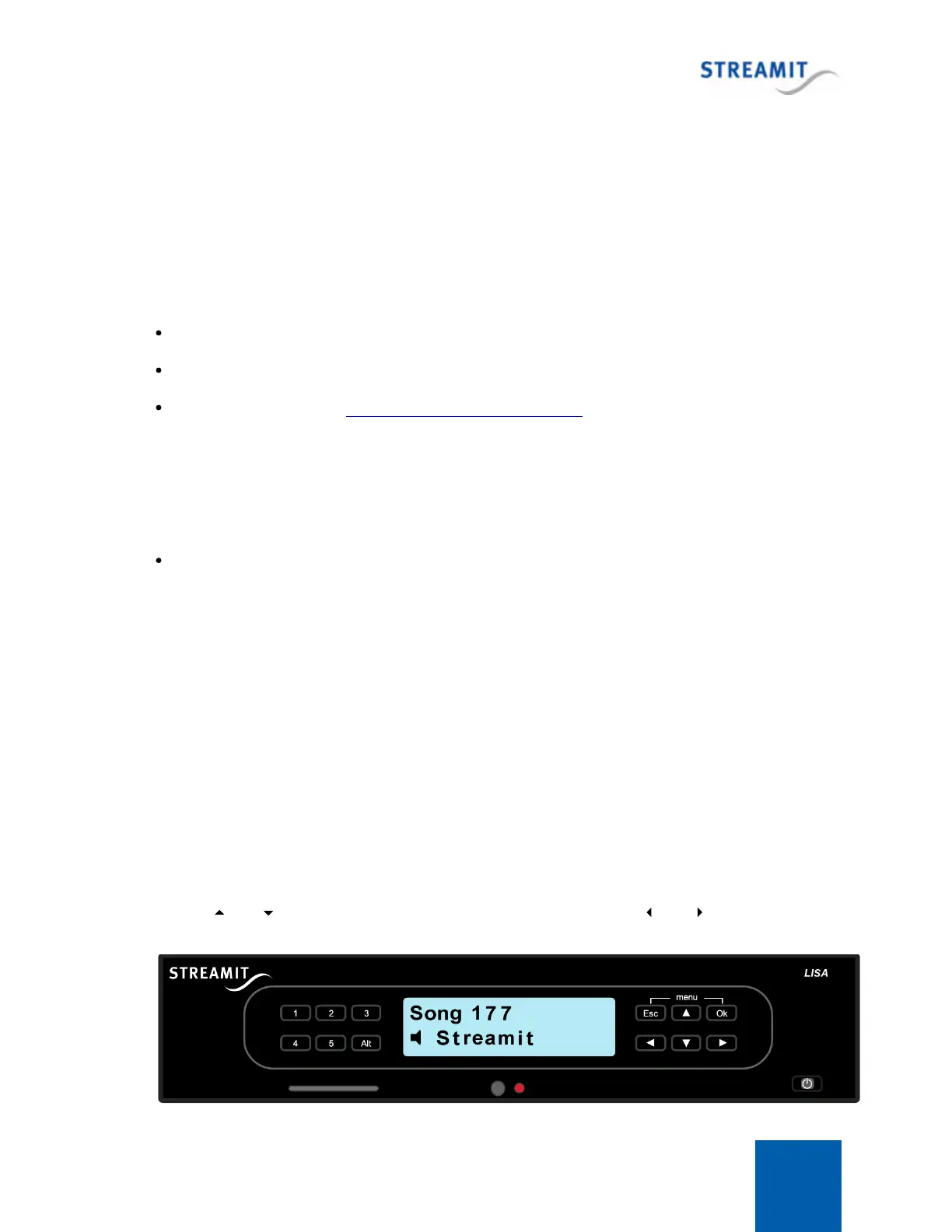
The front view of the Lisa LCD device is depicted below. Lisa LCD features a two lines display, a power
button, a slot for the SD memory card, IR receiver, status LED and a number of preset and functional
buttons.
The power button is used to switch the device on and off, while the “Alt” will toggle between streaming
and playing from card.
The numbered preset buttons (1-5) can be used to quickly switch between the first five presets when
playing from the internet or between the first five playlists when playing from card.
The function of the buttons on the right side of the keypad depend on the state of the Lisa. While
playing, and can be used to select different stations/playlist, while and will change the
volume level.



 To Next Page