52
Druk op de EXIT-knop om terug te keren naar de hoofdpagina.
Notice! You may receive a notication. This message indicates that the
internet may be unavailable or your device may be displaying a similar
message. You can ignore this message. In this case, choose the 'always
connect' option.
Now open your screen mirroring/smart view overview and connect to the
projector. The name of the projector can be found on the projection.
You are now connected.
For iOS devices: Make sure you have WiFi turned on on your phone. Now
open the WiFi network overview and connect to the projector. The
name of the projector can be found on the projection. The password is
''12345678''
Notice! You may receive a notication. This message indicates that the
internet may be unavailable or your device may be displaying a similar
message. You can ignore this message. In this case, choose the 'always
connect' option.
Now open your Airplay overview and connect to the projector. The
name of the projector can be found on the projection. You are now
connected.
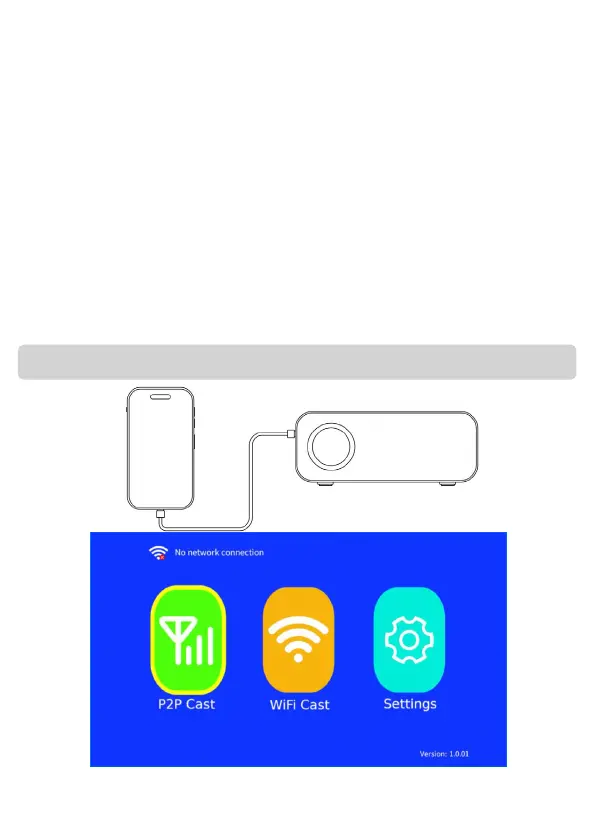
1. Connect your iPhone to the USB PORT of the Projector using an
original cable. Now select "P2P Cast" on the main page. Follow the
steps as displayed on the screen.
Screen mirroring using a wired connection (iOS only)
Notice: Compatibility cannot be guaranteed


 To Next Page