12 of 28
Operating Manual: ULT25NE 10327.1 | 12.22.2016
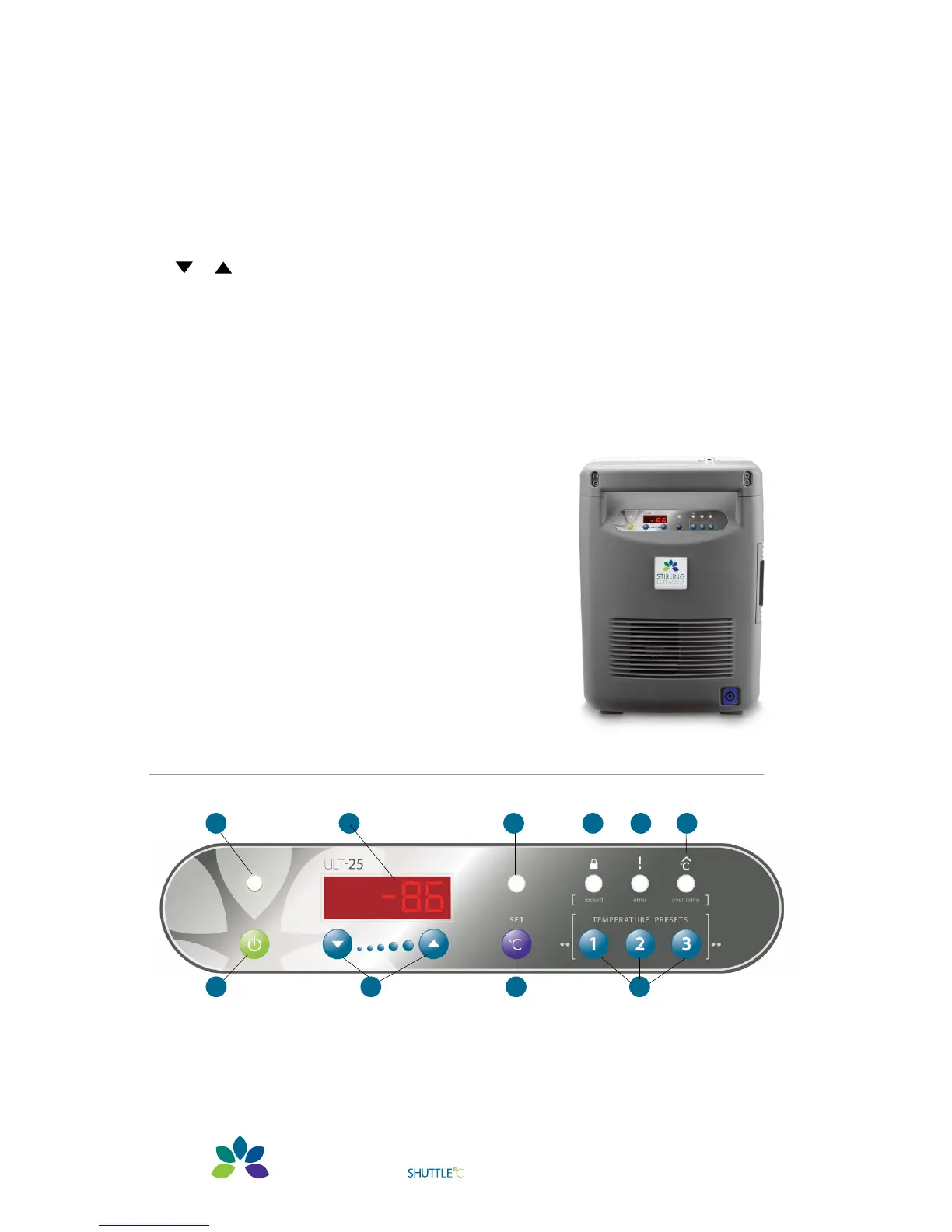
3.2 – Pictorial Tour, Control Panel
A. On/Off Indicator LED
B. On/Off button
— Turns freezer on and off
C. LCD display
— Alpha/numerical display; default display is chamber temperature.
D. / buttons
— Used to adjust Setpoint Temperature (when the display shows S ##).
E. Set Temp LED
— Temperature can be adjusted when lit.
F. Set Temp button
— This must be pressed to adjust the Set Temperature.
G. Locked LED
— Indicates when the control panel is locked.
H.
Error LED
— Indicates when there is an electrical, mechanical
or similar error condition.
I. Over Temp LED
— Indicates when the chamber is over/under
the setpoint.
The audible beeper can be set to delay warning.
J. Temperature Preset buttons
C
A
G
H
I
E
DB JF


 To Next Page