EN-16
DRAFT
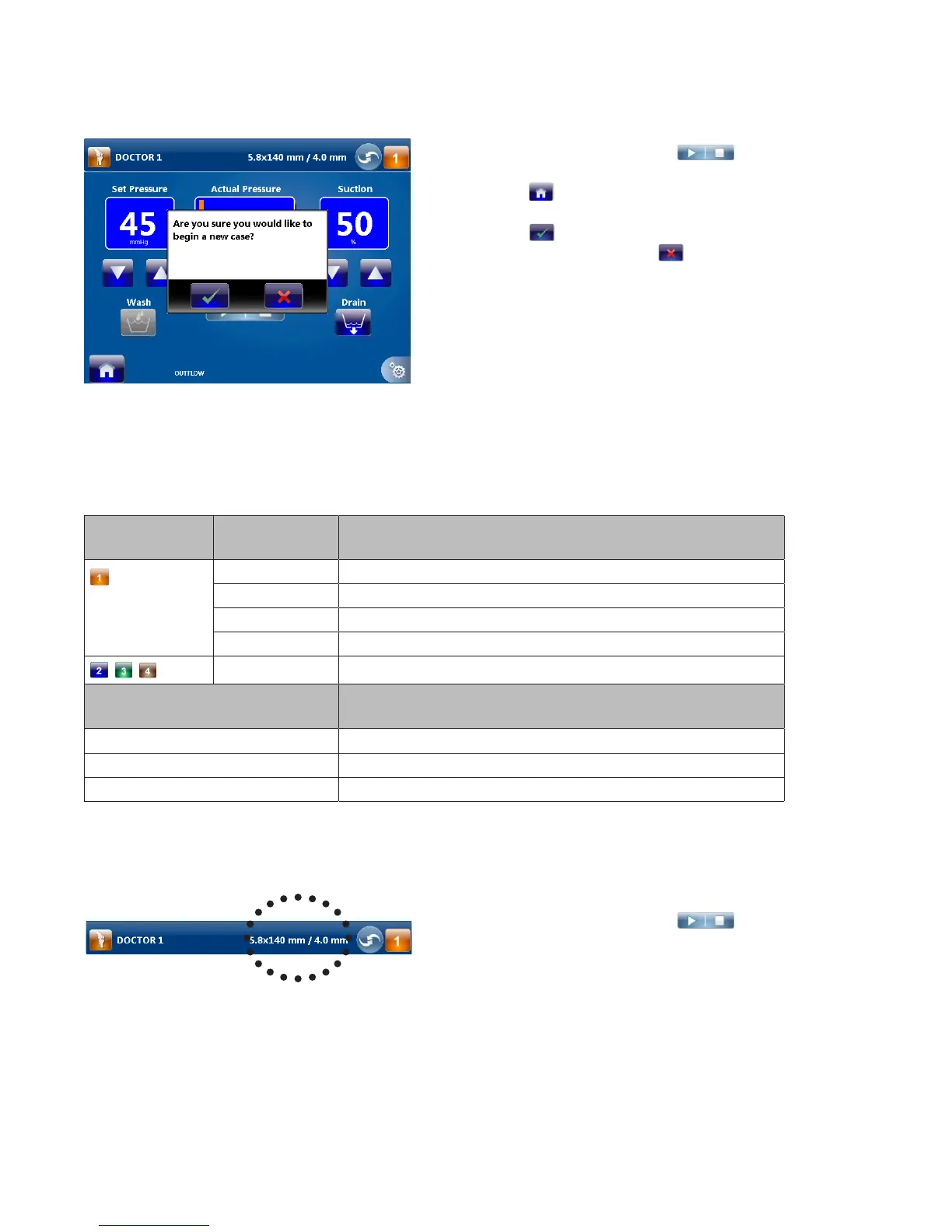
Changing the User Preference File or Joint Selections
1� If the pump is running, press
to
stop the pump�
2� Press
in the lower left-hand corner of
the screen�
3� Press
to return to the user preference
le selection menu� Press
to return to
the Run Screen�
4� Follow the instructions in the “Select the User
Preference File” and “Select the Joint” section
to change the user preference le and/or
joint�
Changing the Hardware Combination Selections
Note: Adjusting the settings will override the default and user preference le settings�
The system will select the following default hardware combination if “Standard Settings” is selected:
Hardware
option
Joint Default combination
Knee Stryker 5�8mmx140mm cannula with 4�0mm scope
Shoulder Stryker 5�8mmx140mm cannula with 4�0mm scope
Hip Stryker 5�0mmx165mm cannula (bridge) with 4�0mm scope
Small Stryker 4�0mmx75mm cannula with 2�7mm scope
— None
Alternate hardware combination
selections
Cannula diameter-scope diameter = x
Low Flow x ≤ 1
Medium Flow 1 > x ≥ 2
High Flow x > 2
Note: If the user preference le does not specify a hardware combination, follow these instructions to
change a hardware combination�
1� If the pump is running, press
to
stop the pump�
2� Press the hardware combination selection to
return to the hardware combination selection
menu�



 To Next Page