EasyManua.ls Logo

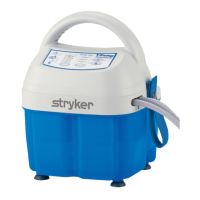
Stryker TP600 - User Manual

Stryker TP600
36 pages
Print Icon
To Next Page IconTo Next Page
Loading...
2014/06 E.3 101176 REV E
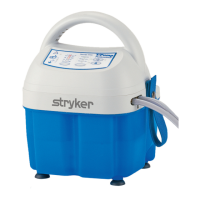
T/PUMP®
Series Localized Temperature
Therapy System
TP600 & TP700
Service Manual

Questions and Answers

  • D
    david40Aug 3, 2025
    What to do if Stryker TP600 Water Pump will not turn on?
    • R
      Richard BoydAug 3, 2025
      If your Stryker Water Pump isn't turning on, there are several potential causes: * Ensure the electrical cord is fully plugged into a properly grounded Hospital Grade receptacle. * Check the power cord for any visible damage and replace it if necessary. * For PC board issues, refer to troubleshooting steps for 'T/PUMP will NOT heat'. * A defective Membrane Panel might be the cause, requiring replacement.
  • D
    Donna BradfordAug 10, 2025
    What to do if Stryker TP600 will not pump?
    • K
      Kylie SmithAug 10, 2025
      If your Stryker Water Pump isn't pumping, it could be due to several reasons: * The water level might be low or the reservoir empty. Refill with room temperature water to the correct level. * There might be a loss of power to the motor. Check the power (TP650(C)/TP700(C) - 120V ± 10% or TP702 - 230V ± 10% ) across the motor connections. * It could be a defective motor or a defective impeller magnet/magnet driver assembly. Replace the motor if the fan isn't spinning when plugged in and in run mode. Otherwise, check the impeller for any obstructions or replace the Impeller magnet assembly. If the fan spins and the impeller magnet assembly is fine, check if the screw holding the driver magnet to the motor shaft is tight.
  • E
    emily92Aug 17, 2025
    How to unlock temperature or therapy time buttons on Stryker TP700 series Water Pump?
    • A
      Anthony RubioAug 18, 2025
      If the temperature or therapy time buttons on your Stryker TP700 Series Water Pump aren't working, it's possible they've been locked. To unlock them, press and hold the lock button for two seconds. If this doesn't work, the membrane panel may be defective and require replacement.
  • D
    Devon LangAug 27, 2025
    Why is the warning indicator on my Stryker TP600 in standby mode?
    • P
      Pamela CunninghamAug 27, 2025
      The warning indicator might be ON in Standby Mode on your Stryker Water Pump because the unit shut down due to an over-temperature condition. To resolve this, empty the reservoir and refill it with room temperature water. Ensure all clamps are open, then press the On/Standby button. Verify flow through the pad. The Warning light should turn OFF within 5 minutes.

Summary

Safety Precautions

Features

Keypad Features TP600 Series

Keypad Features TP700 Series

Keypad Features TP702 Series

Specifications

Operating Instructions

Start-Up Procedure

Step-by-step guide for filling, connecting, and powering up the T/Pump.

Water Temperature Control

Theory of Operation

Functional Check

Functional Check - Internal Required Equipment

List of equipment and precautions for performing internal functional checks on the T/Pump.

Physical Condition Check

Procedure for inspecting the physical integrity of the T/Pump unit, including cord and housing.

Flow & Operating Temperature Test

Steps to test the unit's flow rate and operating temperature accuracy with specified equipment.

Backup Limit Thermostat Test

Procedure to test the backup limit thermostat's over-temperature function and system response.

Leak Test

Method for checking the T/Pump for fluid leaks by tilting the unit.

Ground Resistance Check

Procedure to measure the unit's ground resistance to ensure electrical safety.

Disassembly; Reassembly

Troubleshooting

Warranty

Stryker TP600 Specifications

General IconGeneral
BrandStryker
ModelTP600
CategoryWater Pump
LanguageEnglish

Related product manuals