6400-099-700 Rev-AA EN
www.stryker.com 7
Instructions
WARNINGS:
• ALWAYS operate the equipment within the specified
environmental condition values. See the Specifications section.
• DO NOT attempt to insert or remove any cutting accessory while
the handpiece is operating.
• ALWAYS follow the recommended duty cycle to prevent the
equipment from overheating. See the Specifications section.
• Use adequate irrigation during cutting to prevent heat
generation.
• Before operating the handpiece, gently tug the attachment to
verify the attachment is secure.
• ALWAYS set the function switch to the SAFETY position while
the handpiece is idle, when passing the handpiece to another
person, or before inserting or removing a cutting accessory or
attachment.
• DO NOT press the pedal of a connected footswitch while the
function switch is set to the SAFETY position. An accidental
pedal press will override the SAFETY position and activate the
handpiece.
CAUTION: During an endoscopic procedure, DO NOT introduce the
handpiece through the same orifice as the endoscope.
NOTE: See the Cordless Driver and Universal Driver Attachments
Instructions For Use for specific attachment and accessory
instructions.
To Install an Attachment
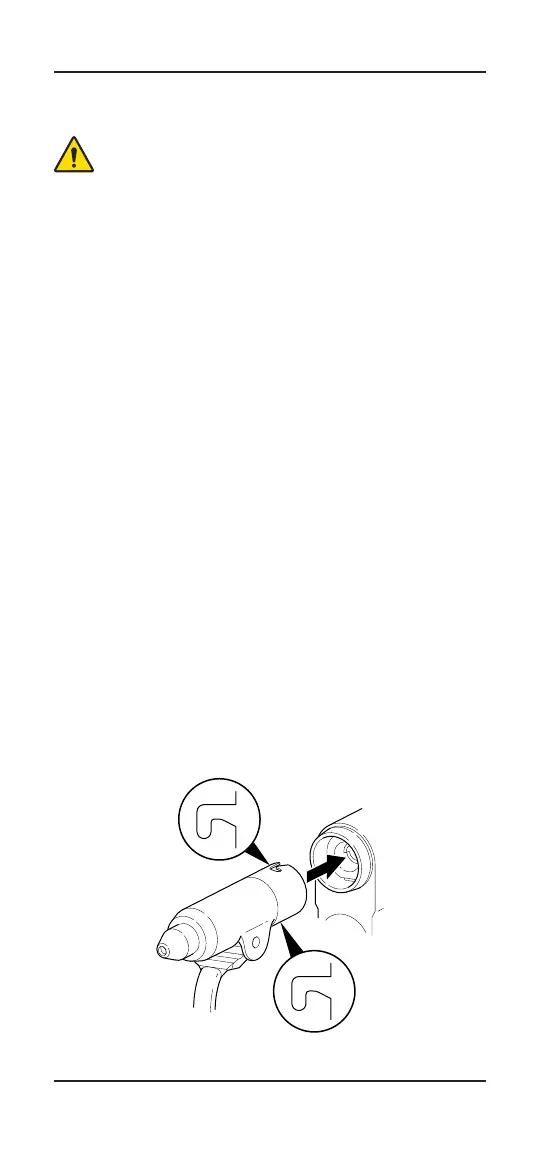
1. Vertically align the two J-slots on the attachment with the
attachment connector.
2. Insert the attachment into the attachment connector until it
snaps into place.
3. Gently tug the attachment to verify the attachment is secure.


 To Next Page