6
Connections / Examples of use
Connections using SL MIDI Controller.
Examples of use
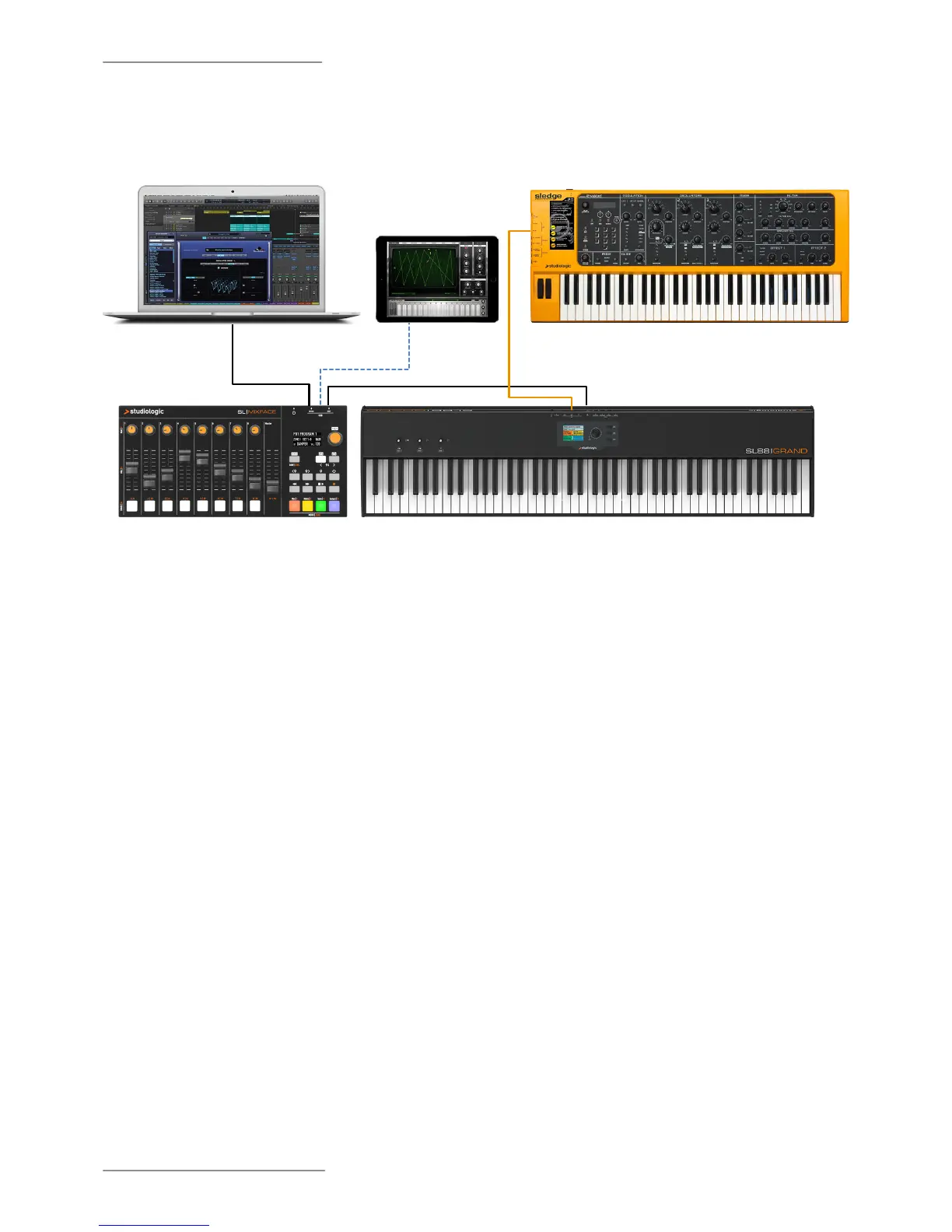
The example illustration shows how Mixface can be used in a system that includes a SL MIDI Controller.
The connections in the example are:
• Mixface USB HOST port connected with SL USB port;
• Mixface USB device port connected with computer USB port;
• Matching via Bluetooth Mixface with an iPad;
• MIDI Out 1 port of SL connected with Sledge's MIDI In port.
In this conguration the Zones are set in SL, choosing the destination ports corresponding to the instruments
that you want to control in CTRL mode; for example, Zone 1 is assigned to USB device port to control a VST plugin
on the computer, Zone 2 is set to MIDI OUT 1 to control Sledge and Zone 3 via the Bluetooth port can control a
MIDI app on the iPad.
In DAW mode, after correctly setting the DAW and the USB port, it is possible to manage the track controls and
the Transport buttons.
DAW MODE
Transport and
channel controls
CTRL MODE
VST / AU plugin
Instruments
(Program Change,
Control assignment and
keyboard range)
CTRL MODE
Hardware Instruments
(Program Change, Control
assignment and keyboard
range)
CTRL MODE
iOS instruments
(Program Change,
Control assignment and
keyboard range)
SL USB PORT
SL MIDI OUT PORT
SLEDGE
MIDI IN
MIXFACE USB HOST
MIXFACE BLUETOOTH
MIXFACE USB DEVICE
SL MIXFACE
SL GRAND/ STUDIO MASTER KEYBOARD


 To Next Page