8
Panel and user interface
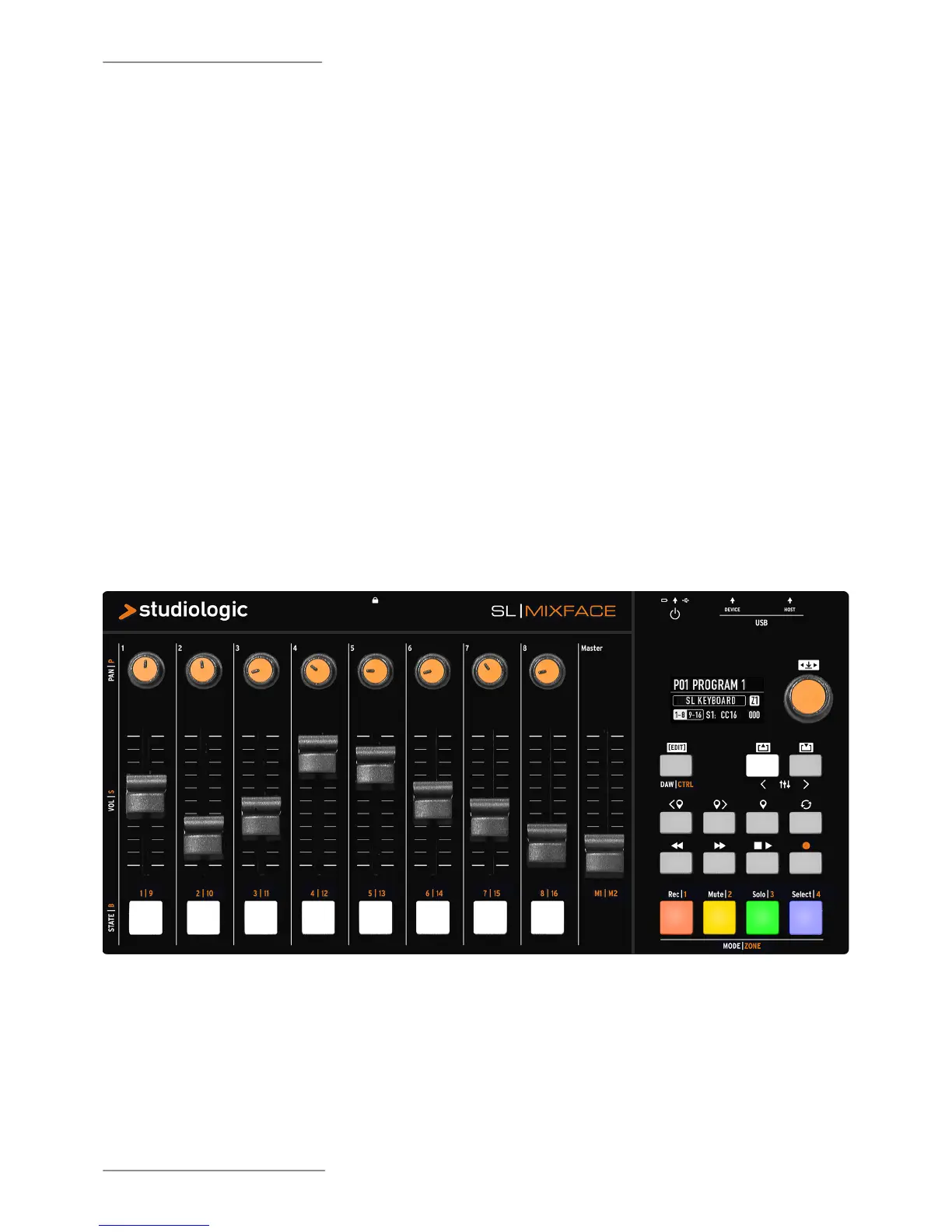
The Mixface control panel consists of:
• 1 Backlit display (TFT - LCD 320 x 240);
• 1 Rotary Encoder with built-in click;
• 3 Main buttons: DAW / CTRL (to select the two
operating modes and to access the EDIT menu by
long press) - IN & OUT / PREVIOUS & NEXT TRACK
(to navigate the EDIT menus or to select the set of
controls (1- 8 / 9-16 in CTRL mode) or to access the
tracks (when they are more than 8 in DAW mode);
• 8 buttons in the Transport section to control your
DAW;
• 4 Mode / Zones buttons to select the function of the
buttons below the sliders in the Mixer mode or to
select the Zones in the CTRL mode;
• 8 potentiometers in the Mixer section for PAN
management;
• 9 linear cursors (slider);
• 8 multi-function buttons.
To access to the EDIT menu, long press the DAW/CTRL
button; the navigation is possible by the main rotary
Encoder and the IN & OUT buttons, indicated by the
white background icons on the panel.
Through the Encoder, select the menu item or the
parameter to be edited, while the IN / OUT buttons
access the selected item or go back one level. Click in
the main Encoder or press the IN key to conrm.


 To Next Page