48 EN/11.2018/G67C © STULZ GmbH – all rights reserved
wib8000 original instructions
IP addresses
WIB8000 and MoRoS router must have IP addresses from the same subnet. In this example the pre-set rou-
ter net is selected:
WIB8000: 192.168.1.5
MoroS: 192.168.1.1
Subnet mask: 255.255.255.0
Settings WIB8000
The WIB8000 configuration for a connection with the MoRoS router does not differ from the configuration in
a normal network so that this can be carried out according to the WIB8000 manual.
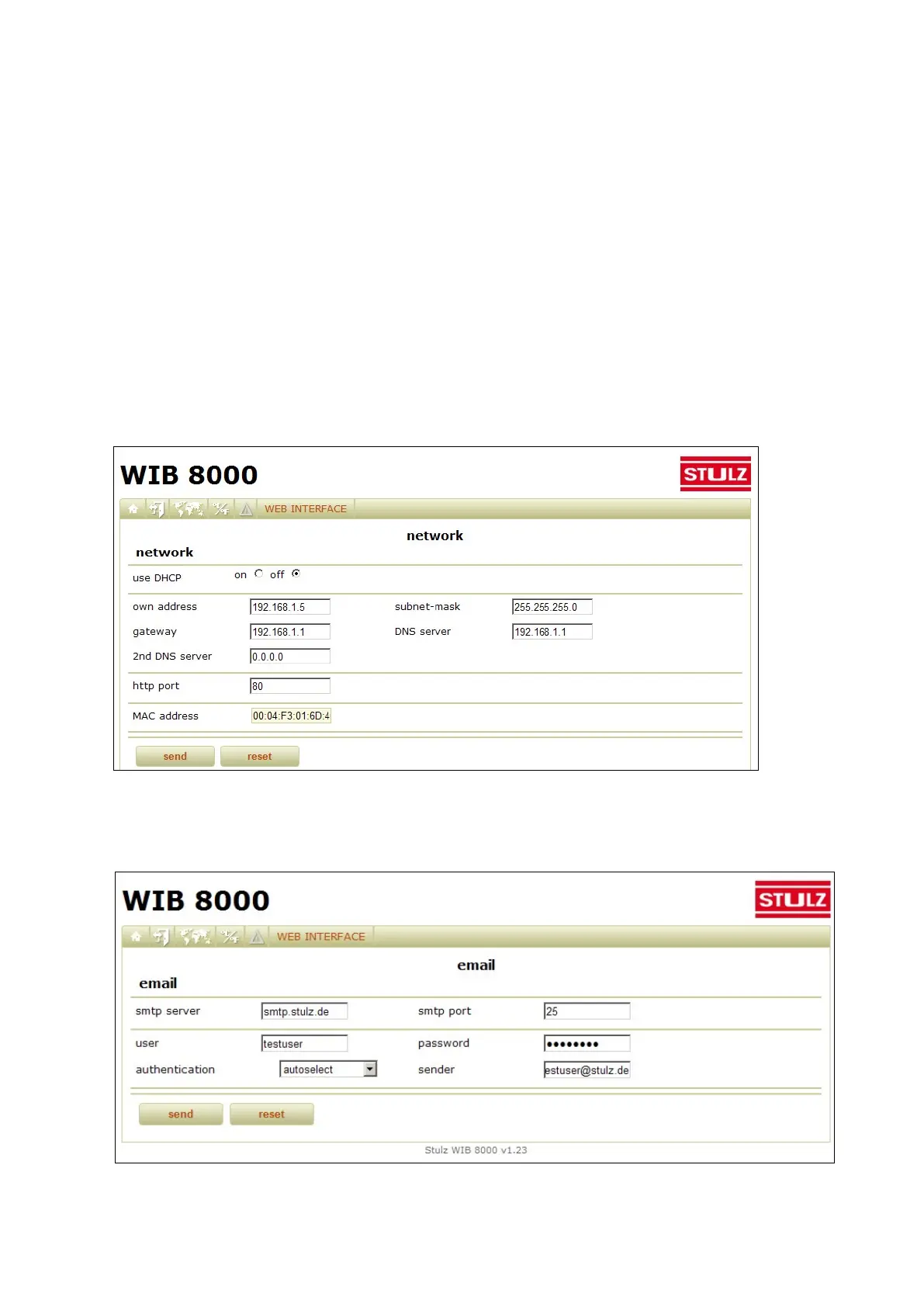
Network→Setup
The parameters of the IP net can be set in the menu „WEB INTERFACE→Network→Setup“.
Gateway and DNS server are represented by the router in this case, so enter the router IP address here.
Network→Email
Enter the settings for the mail server in the menu „WEB INTERFACE→Network→email“.
The email receivers can be configured in the menu „WEB INTERFACE→Alarm“ and in „WEB INTERFACE
→Common“.



 To Next Page