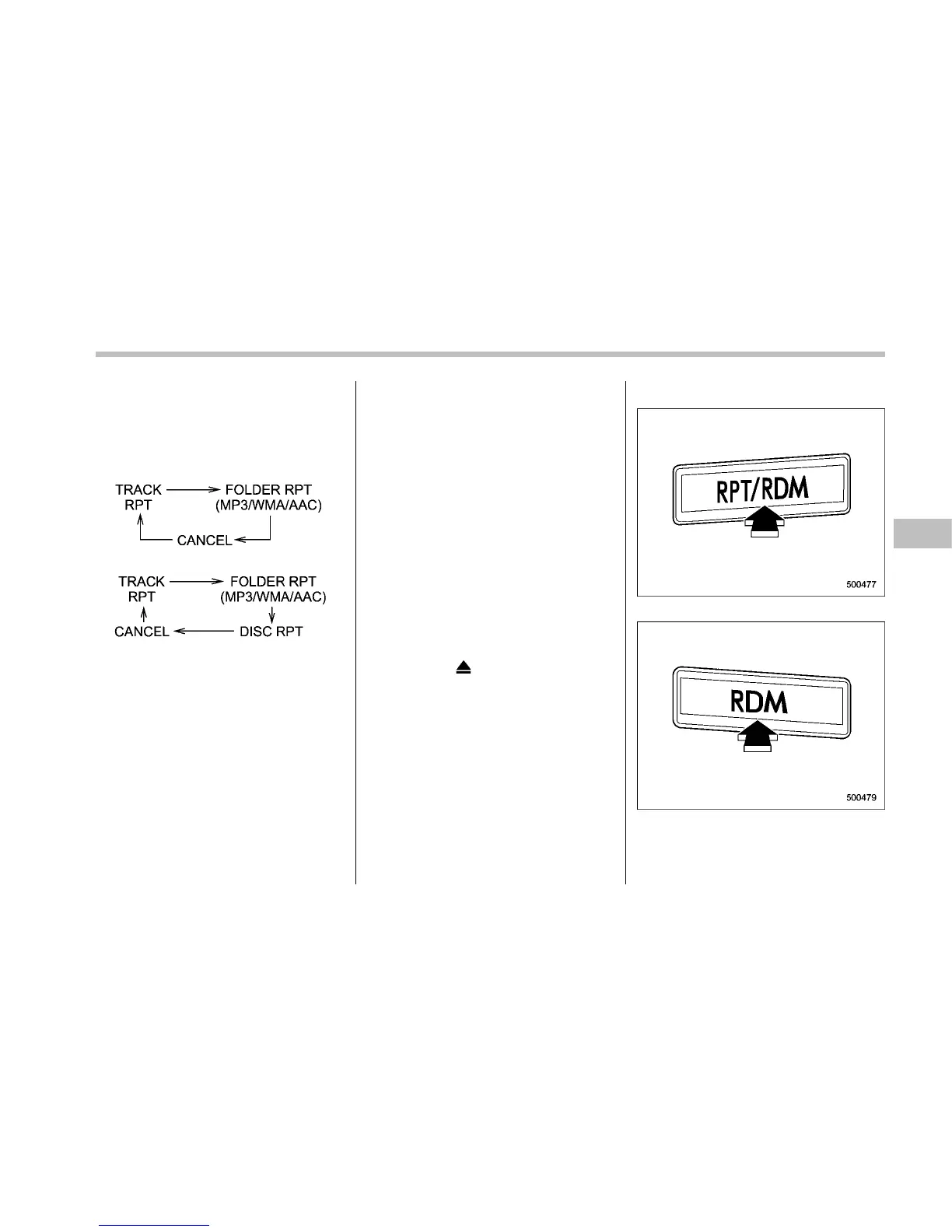
“RPT” button (type B audio) while the
track/file (track) is playing.
Each time you briefly press the button, the
mode changes in the following se-
quences.
Type A audio:
Type B audio:
NOTE
. The “TRACK RPT” indication refers
to the repeat playback of a single track.
It repeats the track that is playing.
. The “FOLDER RPT” indication re-
fers to the repeat playback of a folder. It
repeats the all of the tracks in the
folder. It is possible to select the
function when the MP3/WMA/AAC for-
mat track is playing.
. The “DISC RPT” indication refers to
the repeat playback of a disc. It repeats
the tracks on the CD. It is only possible
to select this function for type B audio.
To cancel the track/file (track) repeat-play
mode, briefly press the “RPT” button and
select CANCEL. The “RPT” indication will
turn off, and the normal playback mode
will be resumed.
NOTE
The repeat-play mode will be cancelled
if you perform any of the following
steps:
. Press the “RPT/RDM” button and
select CANCEL (type A audio)
. Press the “RPT” button and select
CANCEL (type B audio)
. Press the “
” button
. Press the disc select button
. Press the “SCAN” button
. P ress the “LOAD” button when
there is free space in the CD magazine
& Random playback
Type A audio
Type B audio
To play back a track/file(s) at random,
press the “RPT/RDM” button for 0.5
Audio 5-23
– CONTINUED –










 To Next Page