Audio
5-9
–
CONTINUED
–
5
CD changer control (if optional in-dash CD changer is connect-
ed)
An optional CD changer can be connected to this audio unit. Consult the instructions that
accompany the CD changer for operating the CD changer itself (e.g., how to load or un-
load CDs). See your SUBARU dealer for more information.
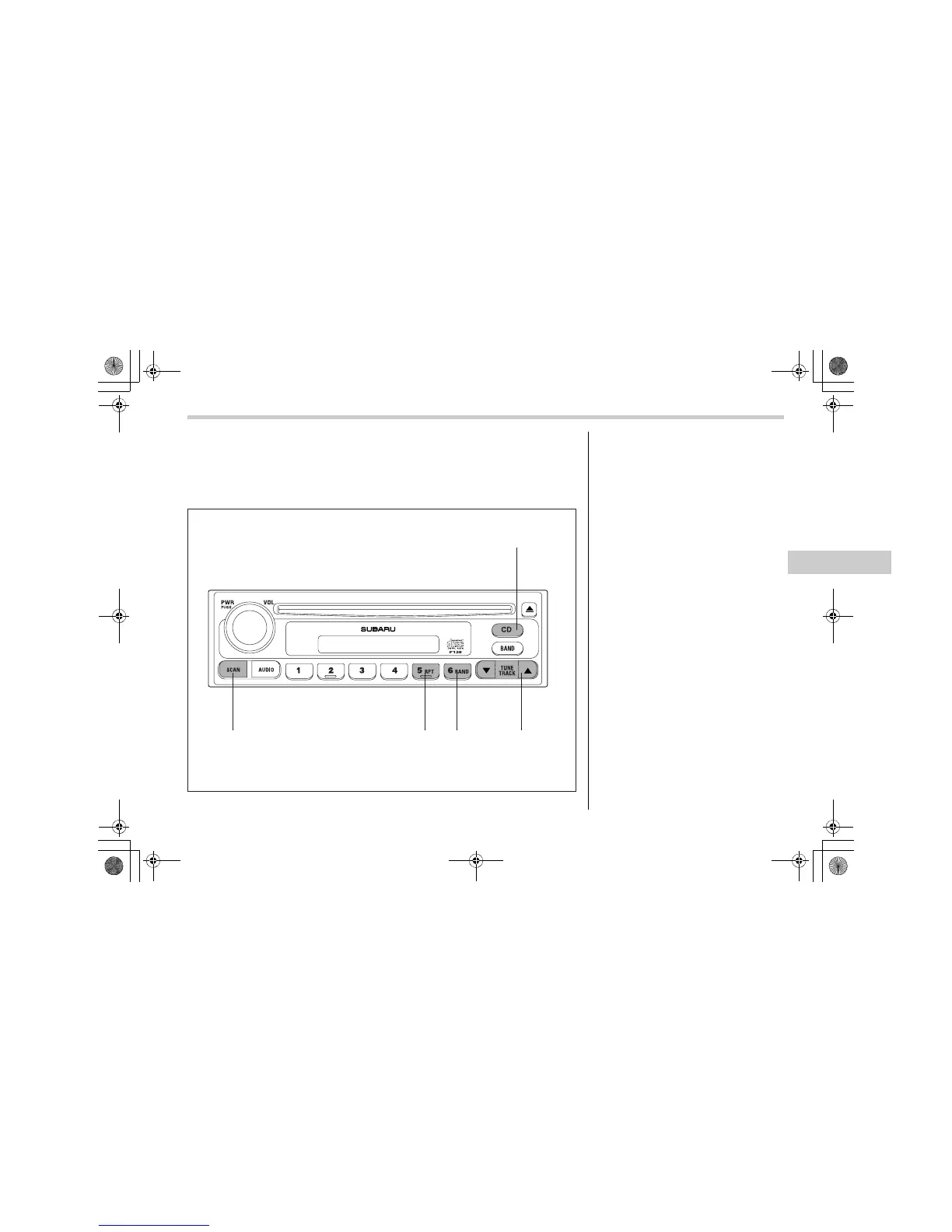
500260
(16)
(17)(18)(19)(20)
(16) CD button
(17) Track selection buttons
(18) RAND (Random) button
(19) RPT (Repeat) button
(20) SCAN button
T To start playback
When the “CD” button (16) is pressed, the
CD changer will start playback. The dis-
play shows the current disc number, track
number and the elapsed time during play-
back.
N
TE
y If a disc is in the player, the “DISC”
button is used to change from CD play-
er operation to DISC changer opera-
tion. Each time the “DISC” button is
pressed, the operating mode will
change alternately.
y At the end of the disc, the player au-
tomatically continues with the next
disc.
y After playback on the last disc finish-
es, playback will automatically return
to the first disc.
y If you have loaded fewer than 6
discs, any missing disc is automatical-
ly skipped.
T Selection of a desired disc
You can select a desired disc from among
A8110BE.book 9 ページ 2006年6月23日 金曜日 午後1時32分









 To Next Page