Black plate (223,1)
北米Model "A3160BE-C" EDITED: 2010/ 11/ 19
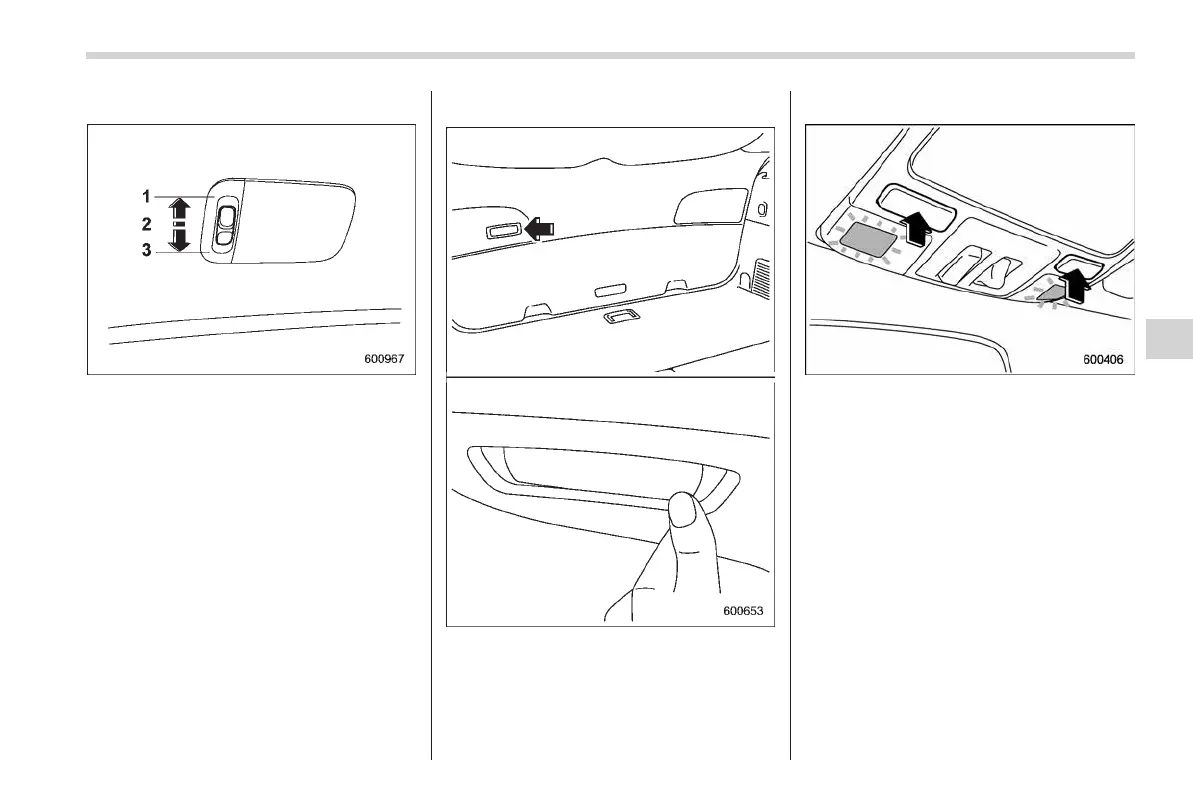
& Cargo area light
1) DOOR
2) OFF
3) ON
The cargo area lig ht s witch has the
following three positions.
DOOR: The light illuminates when the rear
gate is opened. The light remains illumi-
nated for several seconds and turns off
after the rear gate is closed.
OFF: The light remains off.
ON: The light remains on continuously.
& Rear gate light
The rear gate light is located inside the
vehicle on the rear gate. Push the right
side of the switch to turn it on, and push
the left side of the switch to turn it off.
& Map light
To turn on the map light, push the switch.
To turn it off, push the switch again.
When leaving the vehicle, make sure the
lights are turned off to avoid battery
discharge.
Although the map light switches are in the
OFF position, the map lights illuminate
automatically in the following cases.
. Any of the doors or the rear gate is
opened.
– The operational/non-operational
setting of this function can be changed
by a SUBARU dealer. Contact your
SUBARU dealer to change the setting.
– The factory setting (default setting)
for this function is set as “operational”
Interior equipment 6-3
– CONTINUED –
6















 To Next Page