16
Controls
1
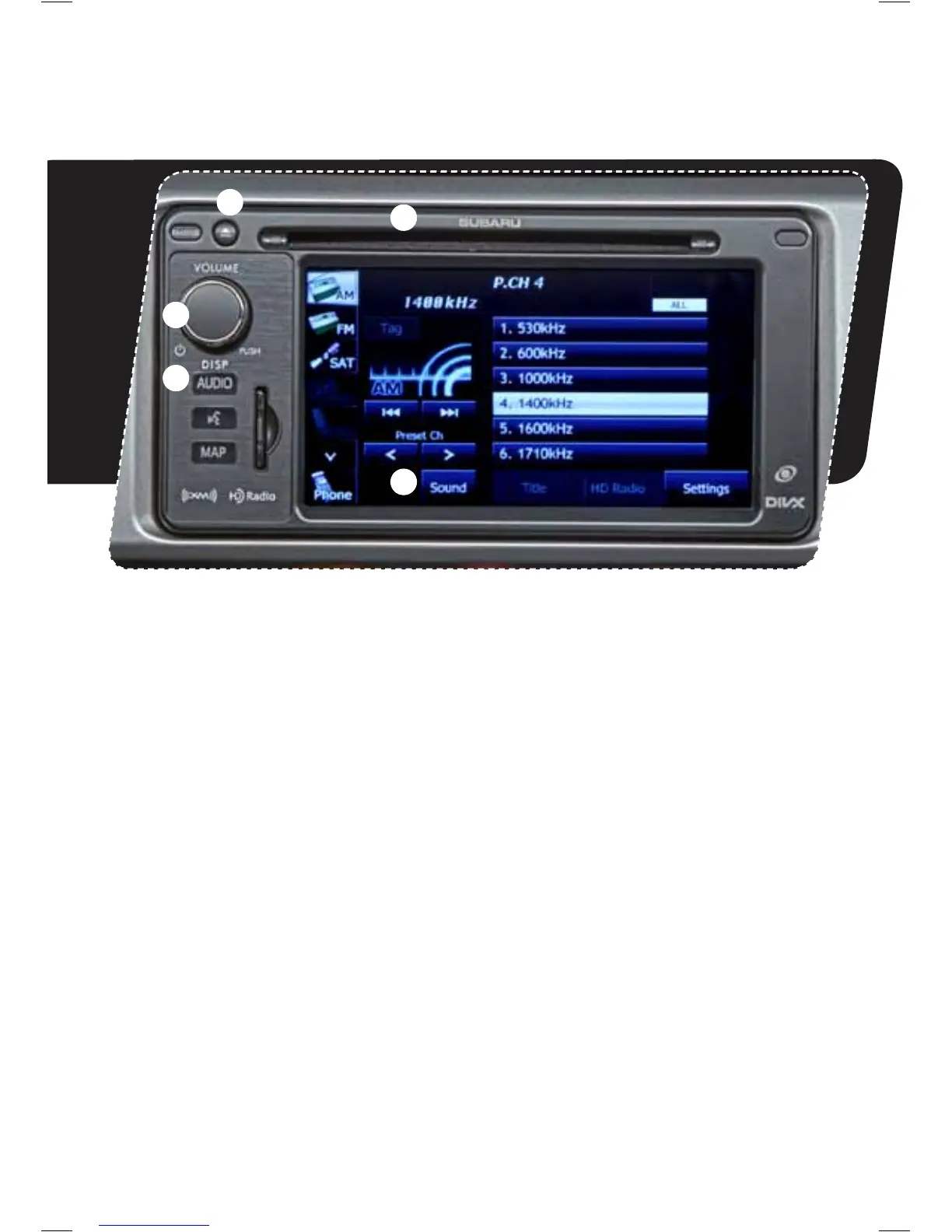
AM/FM Stereo HD Radio
®
with Single Disc CD Player
and Navigation System*
Radio Functions
1. Power/Volume Control
Press the power/volume control knob
for on or off; rotate the knob to control
the volume.
2. Audio Source
Pressthe“AUDIO”buttontodisplaythe
audio screen. Touch the audio source
you want to hear. Use the arrow to scroll
down the list of available sources.
3. Sound Settings
While in an audio operations screen touch
the“Sound”key.Youwillbeabletoadjust
EQ,soundposition,SVC(SourceVolume
Control)andASL(AutomaticSound
Levelizer) settings.
CD Player Functions
4. Load
Insert a disc into the slot. The CD will
automatically be drawn in and will begin
play at the rst track.
5. Eject
Press the button to eject the disc.
5
3
4
2
*For more detailed information on audio
operation, please refer to the Navigation
Owner’s Manual.
1145810_13a_Subaru_BRZ_QRG_030812.indd 16 3/8/12 2:08 PM



 To Next Page