Customizing functions
93
Customizing functions
The following settings can be changed on the combination meter display.
■ How to customize
Operations can be performed when the select
lever is in the position and the ignition
switch is in the ON position while the vehicle
is parked.
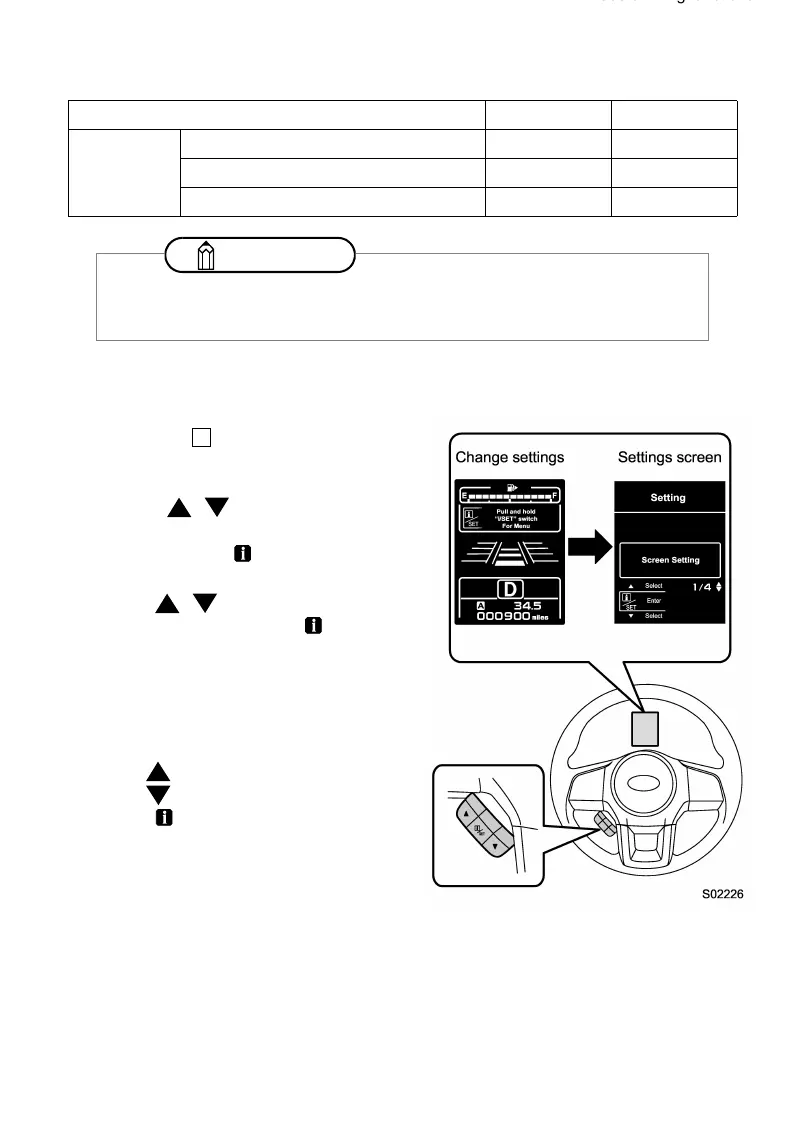
(1) Pull the / switch toward you to
display the “Change settings” screen.
Pull and hold the (Info)/SET switch to
change to the settings screen.
(2) Pull the / switch toward you, select
“EyeSight”, and pull the (Info)/SET
switch to confirm.
The system will then switch to the
EyeSight settings screen.
Operate the following switches according to
the display on the screen.
• Select: (Return) switch/
(Send) switch
• Confirm: (Info)/SET switch
Item Setting Default setting
EyeSight
Warning Volume Max/Mid/Min Mid
Lead Vehicle Acquisition Sound ON/OFF ON
Lead Vehicle Moving Monitor Function ON/OFF ON
NOTE
The following settings can be restored to the factory (default) settings.
⇒ Refer to the Owner’s Manual for your vehicle.
P
B8232BE-A.book 93 ページ 2017年3月9日 木曜日 午前11時4分















 To Next Page