PHONE OPERATION (HANDS-FREE SYSTEM FOR CELLULAR PHONES)
122
WHEN THE CONTACT IS EMPTY
Q FOR PBAP COMPATIBLE Bluetooth PHONES
When “Automatic Contact/History Transfer (Automatic
Contact/History Transfer)” is set to on, contacts are
WUDQVIHUUHGDXWRPDWLFDOO\ĺ3
Q FOR OPP COMPATIBLE Bluetooth PHONES
Contacts can be transferred or added manually.
To transfer, select
Update Contacts from Phone
(Update
Contacts from Phone) at the “Contact/Call History Settings
&RQWDFW&DOO+LVWRU\6HWWLQJV´VFUHHQĺ3
To add, select
New Contact
(New Contact) at the
“Contact/Call History Settings (Contact/Call History
6HWWLQJV´VFUHHQĺ3
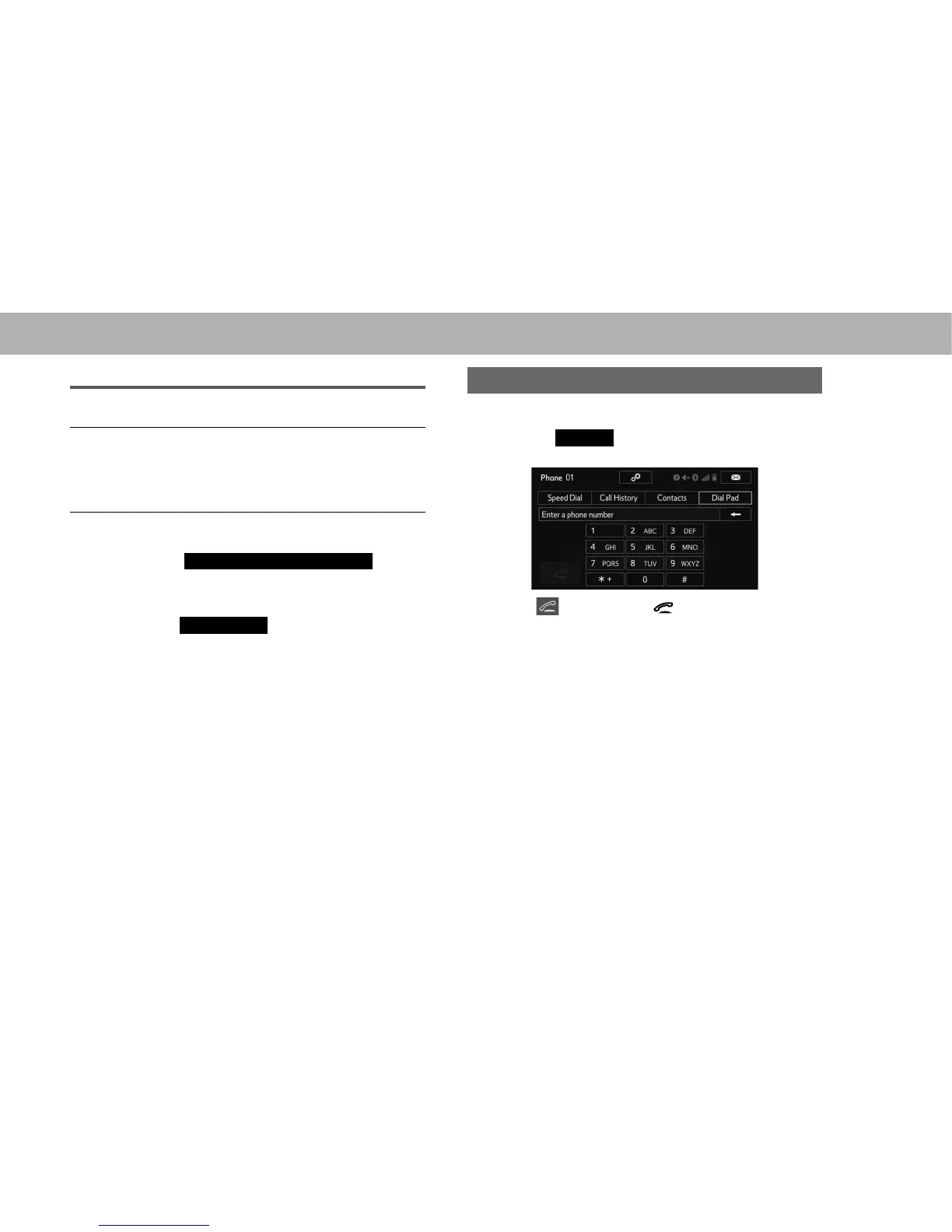
BY DIAL PAD
1. 'LVSOD\WKHSKRQHWRSVFUHHQĺ3
2. Select the
Dial Pad
(Dial Pad) tab and enter the phone
number.
3. Select or press the switch on the steering
wheel.
4. Check that the “Call (Call)” screen is displayed.
NOTE
O Depending on the type of Bluetooth phone being connected, it
may be necessary to perform additional steps on the phone.













 To Next Page