DESTINATION SEARCH
219
NAVIGATION SYSTEM
8
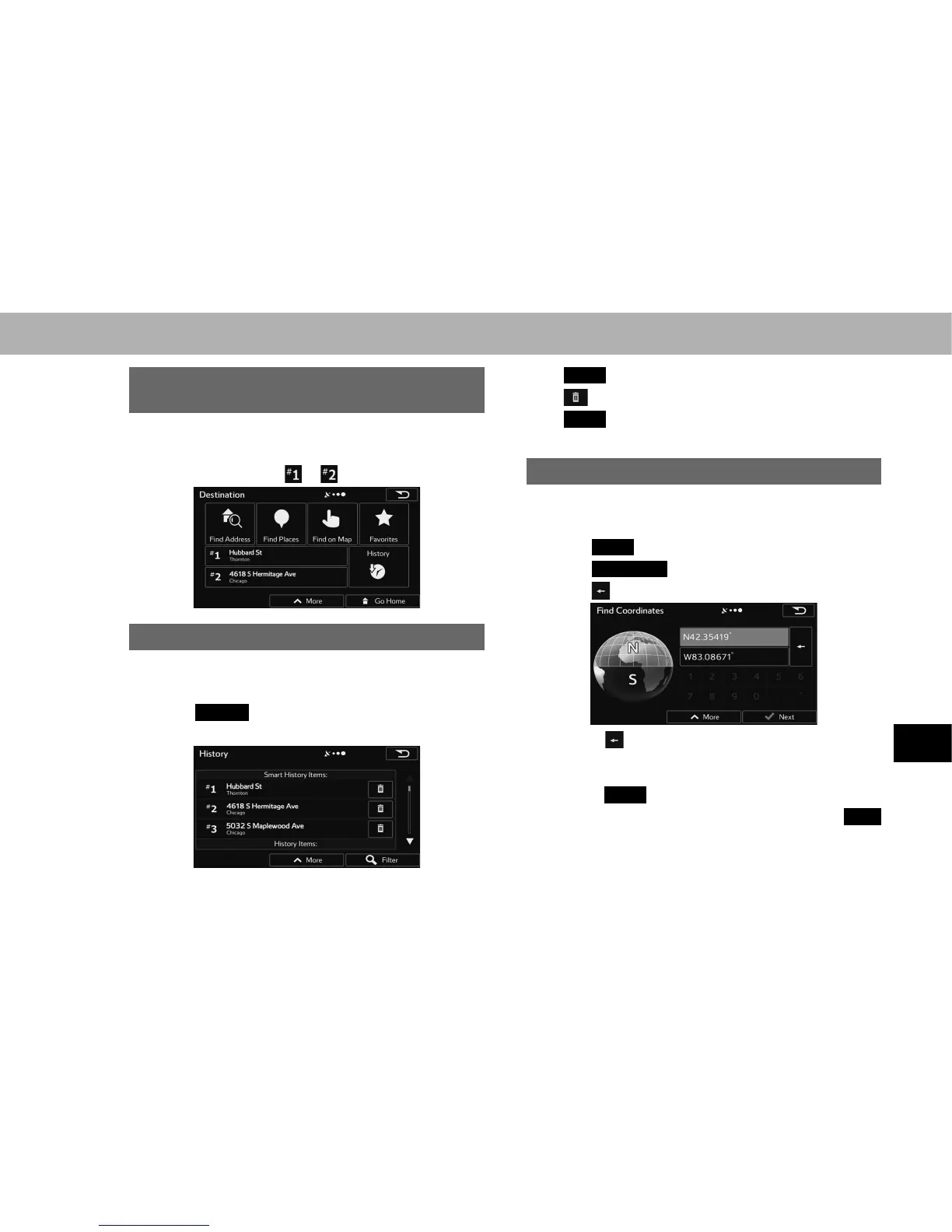
SEARCHING FROM A FREQUENTLY USED
DESTINATION (SMART HISTORY)
1. Display the “Destination (Destination)” screen.
ĺ3
2. Select the destination or .
SEARCHING FROM HISTORY
1. Display the “Destination (Destination)” screen.
ĺ3
2. Select
History
(History).
3. Select the desired destination.
Ɣ
Filter
(Filter): Select to narrow down the list.
Ɣ
: Select to delete the previous destination.
Ɣ
More
(More): Select to delete all destinations on the
list.
SEARCHING BY COORDINATES
1. Display the “Destination (Destination)” screen.
ĺ3
2. Select
More
(More).
3. Select
Coordinate
(Coordinate).
4. Select .
Ɣ Select to enable the numeric keypad input. Since
the second time to erase one character at the cursor
position.
Ɣ Select
More
(More) to set the UTM coordinates.
5. Enter the latitude and longitude and then select
Next
(Next).
















 To Next Page