SETUP
243
NAVIGATION SYSTEM
8
Q EVENT TYPES SETTINGS
1. 'LVSOD\ WKH ³7UDI¿F 6HWWLQJV 7UDI¿F 6HWWLQJV´ VFUHHQ
ĺ3
2. Select
Event Types
(Event Types).
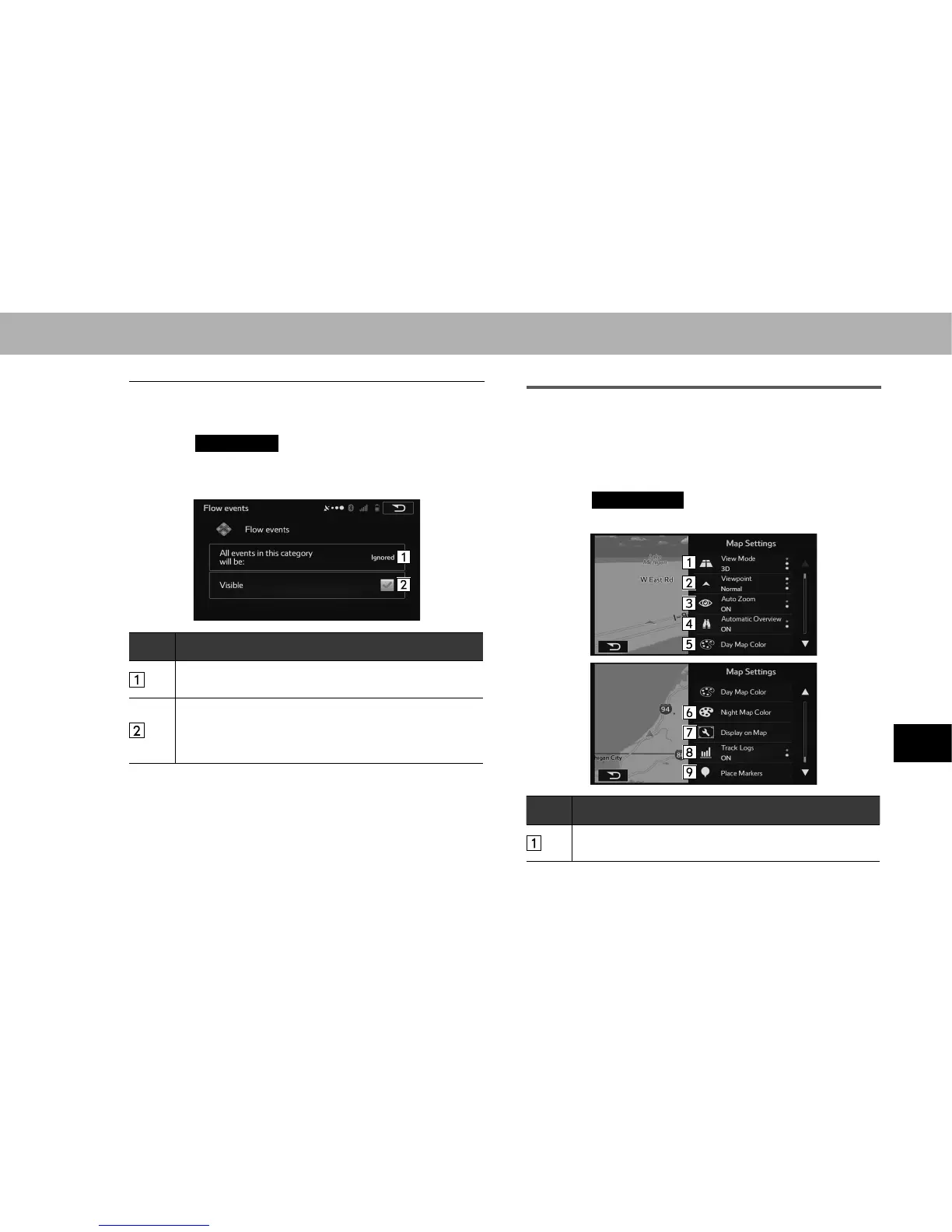
3. Select an item from the event list.
4. Select the items to be set.
No. Function
Select “Considered (Considered)” or “Ignored (Ignored)”
when searching for a route.
Select to turn the icon display on the map on or off.
The icon display does not appear when “Considered
(Considered)” is selected at “All events in this category
will be: (All events in this category will be:)”.
MAP SETTINGS
Fine tunes the map screen appearance. Because the map
is displayed on the screen, you can check the results as you
change settings.
1. 'LVSOD\WKH³6HWWLQJV6HWWLQJV´VFUHHQĺ3
2. Select
Map Settings
(Map Settings).
3. Select the items to be set.
No. Function
Select to select the display mode from 2D north-up, 2D
heading-up or 3D.
















 To Next Page