Auto Vehicle Hold (AVH)
This function automatically holds your Subaru in
place when at a complete stop, such as a traffic
signal, even after you release the brake pedal.
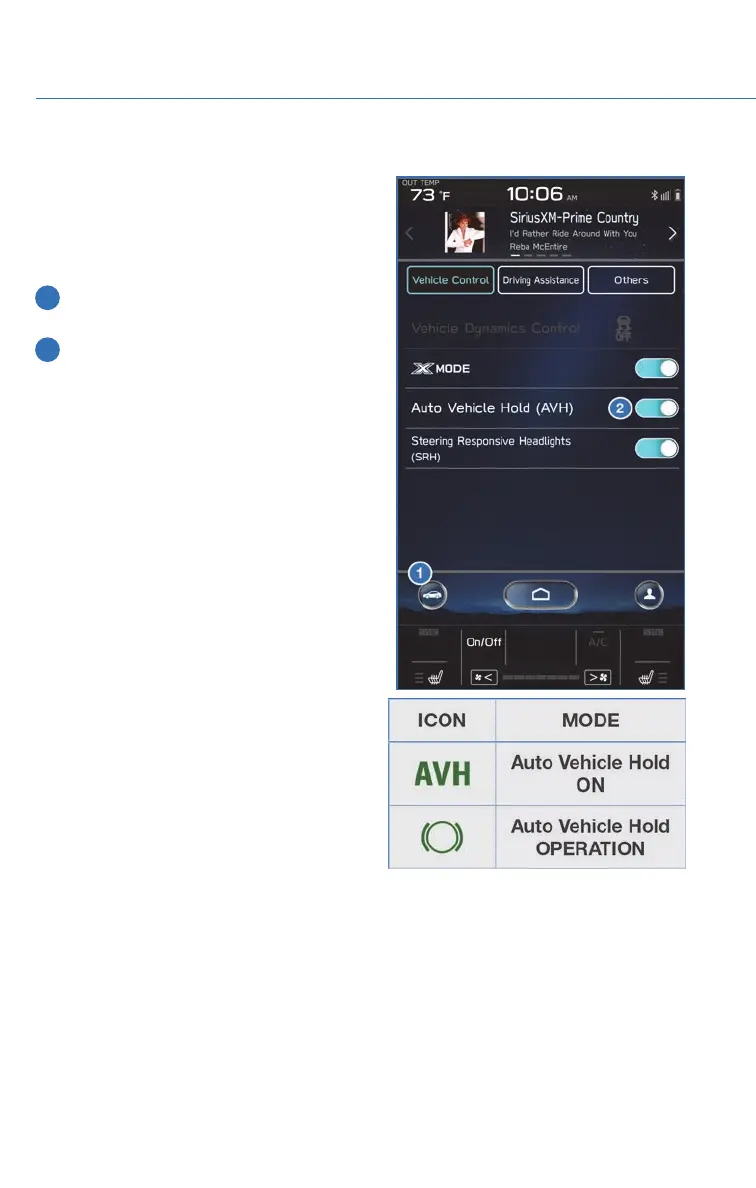
To turn on the Auto Vehicle Hold:
1 From the Home screen select “Car
Settings” button.
2 Next, select “Auto Vehicle Hold”. The
indicator in the combination meter will
illuminate.
While your Subaru is being held by this
function, the operation indicator in the
combination meter will illuminate. The function
is canceled when you depress the accelerator
pedal or the brake pedal.
Select “Auto Vehicle Hold” again to turn it off.
The function works with the select lever in
either the “D” or “R” position.
OPERATING THE VEHICLE
34














 To Next Page