Home
Subaru
Automobile
Outback 2020
Page 66
Subaru Outback 2020 - Page 66
132 pages
Manual
Save Page as PDF
To Next Page
To Next Page
To Previous Page
To Previous Page
Loading...
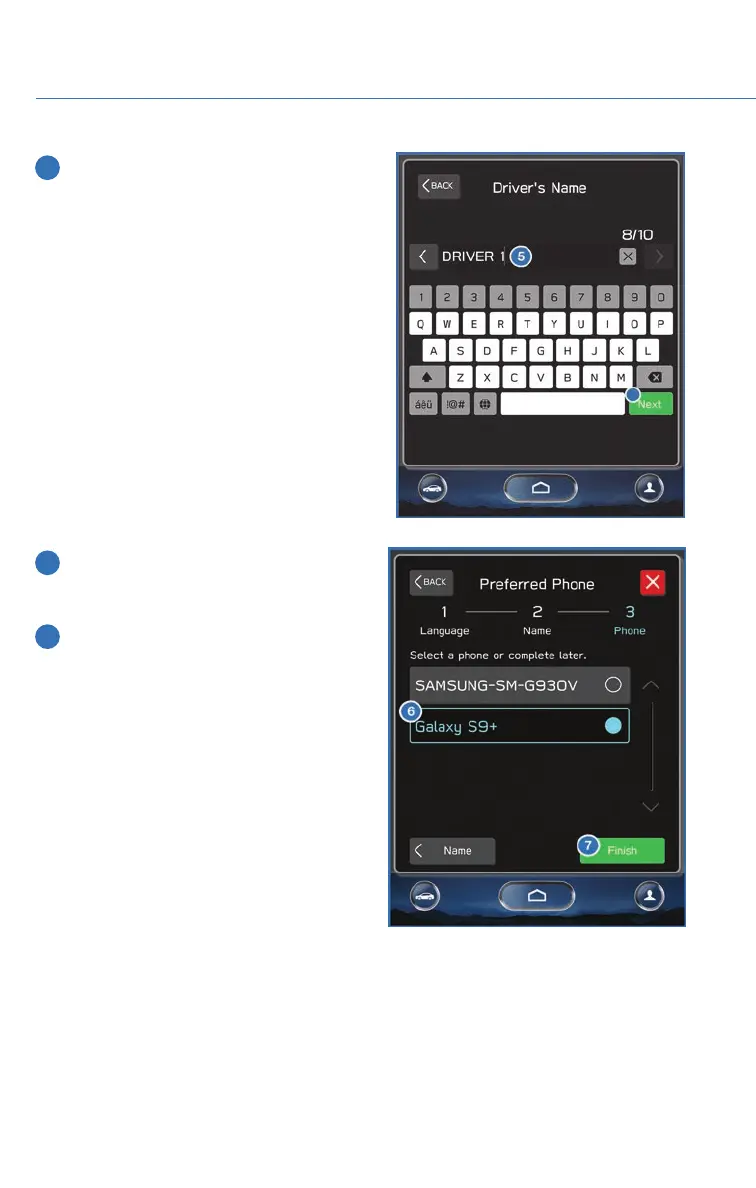
5
T
ype
your
name
in
using
the
keyboard
screen
and
select
“Next”.
6
Select
a
paired
phone,
or
if
the
phone
has
not
been
paired
to
the
system,
you
can
skip
this
step
and
complete
it
later
.
7
Select
“Finish”.
CREA
TING
A
DRIVER
PROFILE
64
65
67
Table of Contents
Main Page
Table of Contents
3
Additional Resources
4
Important Safety Information
4
Purpose of this Guide
4
In Case of Emergency
5
Subaru Roadside Assistance
5
Towing Your All-Wheel Drive Subaru
5
Entry and Exit
6
Keyless Entry
6
Lock/Arm
6
Rear Gate
6
Unlock/Disarm
6
Automatic Door Locking/Unlocking
7
Keyless Access with Push Button Start
7
Locking Using Door Handles
7
Unlock Using Door Handles
7
Hands-Free Power Rear Gate
8
Opening the Rear Gate
8
Locking Using the Rear Gate
9
Instrument Panel
10
Getting Comfortable
12
Manual Seats
12
Power Driver’s Seat
12
Seating
12
Memory Driver’s Seat
13
To Retrieve the Seat Position with a Button
13
To Set a Seat Position with a Button
13
To Set a Seat Position with the Access Key Fob
13
Head Restraint Adjustment
14
Seatbelt Adjuster
14
Tilt and Telescopic Steering Column
14
Power Exterior Mirrors
15
Power Folding Mirrors
16
Auto-Dimming Mirror
17
Homelink 5 Accessory Mirror
17
Rear View Mirror
17
Opening/Closing the Moonroof
18
Power Moonroof
18
Power Windows
18
Tilting the Moonroof
18
11.6–Inch Automatic Climate Control
19
Climate Control System
19
Auto Mode
22
Dual 7–Inch Automatic Climate Control System
23
Remote Engine Start with Climate Control
23
Heated Seats
24
Heated Steering Wheel
24
Rear Seat Heater
24
Ventilated Seats
24
Accessory Connections
25
Power Outlets (12V)
25
Advanced Adaptive Cruise Control
26
Audio Controls
26
Illumination Brightness
27
Light Controls
27
Switch
27
Daytime Running Lights
28
Turn Signals
28
Windshield Wipers
28
Instrument Panel Switches (Lower Left)
29
Rear Window Wiper
29
Overhead Panel
30
Gauges and Warning Lights
31
Warning and Indicator Lights
31
Ignition Switch
32
Operating the Vehicle
32
Push-Button Ignition Switch
32
Starting the Engine
32
Automatic Transmission Shift Mode
33
Driving the Vehicle
33
Normal Mode
33
Paddle Shift Control Switches
33
X-Mode
34
Electronic Parking Brake (Epb)
35
Hill Descent Control (HDC)
35
Auto Vehicle Hold (AVH)
36
Auto Start–Stop System
37
Fuel Saving Display
37
No Activity Detected Indicator Light
37
System Operation
37
Auto Start-Stop Warning Light
38
How to Turn ON/OFF the Auto Start-Stop System
38
Driverfocus
39
Turning off the Vehicle
39
With Push-Button Ignition Switch
39
Without Push-Button Ignition
39
Fuel
40
Fuel Capacity
40
Fuel Filler Lid
40
Refueling
40
Folding the Rear Seats
41
Passenger/Cargo Areas
41
Child Safety Locks
42
Passenger/Cargo Areas
42
Latch/Anchor
43
From the Rear of the Vehicle
44
Power Rear Gate (Prg)
44
Power Rear Gate Button
44
Power Rear Gate Lock
44
Memory Height
45
Cargo Cover
46
Spare Tire
47
Engine Compartment
48
Hood Prop
48
2.5L Engine
49
Engine Compartment
49
2.4L Turbo Engine
50
Additional Specifications
51
Engine Oil
51
Engine Oil Capacity
51
New Vehicle Break-In
51
Tire Pressure Monitoring System (Tpms)
52
Trailer Towing Capacity
52
Overview of Your Multimedia System
54
Screen Layout
54
Starlink Overview
54
Various Systems
54
Buttons
55
Controlling the Volume
55
Touchscreen
56
Steering Wheel Controls
57
Voice Recognition
57
Common Commands
58
Home Screen Icons
60
Starlink Home
60
Rearranging Icons
61
Adding Shortcuts
62
Creating a Driver Profile
64
How to Create a Profile
64
Why You Should Create a Profile
64
Retrieving a Driver Profile
67
To Edit a Driver Profile
67
AM/FM Radio
68
Multimedia
68
Radio
68
Satellite Radio
69
Setting Presets
69
Aux Input
70
Bluetooth
70
CD
70
USB / Ipod
70
Making a Call
71
Pairing a Phone
71
Receiving a Call
73
Text Messages
74
Android Auto
75
Pandora
75
What Are Subaru Starlink Apps?
75
Apple Carplay
76
Siriusxm Travel Link
76
Chimani
77
Quick Guide
77
Subaru Starlink Mobile App
77
Ebird
78
Mysubaru
78
Service Appointment Scheduler
79
Subaru Starlink™ Safety and Security
80
The Subaru Starlink Experience
80
Mysubaru, Making Ownership Easy
81
Subaru Starlink Enrollment
81
Creating Home/Work
83
Maps (if Equipped)
83
Finding a Destination
87
Finding a Destination by Address
87
Finding a Destination by POI
91
Route Options
93
Shortest/Fastest/Economic
94
Saving Destination as a Favorite
95
Guidance Screen Icons
98
Map Zoom
99
Map View/Perspectives
100
Arrival Time/Distance
101
Canceling Guidance
101
Nearest Gas Station
101
Traffic Information
101
Connect to Home Wi-Fi
102
Settings and Updates
102
Performing Software Updates
103
Sound
104
Checking for Updates
106
Maps/Navigation
106
Clock
107
Updating Over-The-Air
107
Updating Using Your PC/MAC
107
Manually
108
Automatically
110
Appendix: How to
112
Bluetooth Pairing
112
Overview
112
Pairing an Android Device
112
Pairing an Ios/Apple Device
115
Cables
118
Connecting an Android Phone
118
Compatible Models
120
Connecting an Iphone
121
Connecting to a Wi-Fi Network
122
Wi-Fi Hotspot Subscription
123
Firmware Software Updates
124
Map Updates
125
Index
126
Related product manuals
Subaru Outback 2021
592 pages
Subaru Outback 2022
180 pages
Subaru Outback 2023
180 pages
Subaru Outback XT 2020
132 pages
Subaru 2015 Outback
16 pages
Subaru outback 2017
610 pages
Subaru 2013 Outback
516 pages
Subaru Outback 2011
495 pages
Subaru Outback 2012
474 pages
Subaru 2008 OUTBACK
444 pages
Subaru Outback 2018
33 pages
Subaru 2001 Outback
448 pages














 To Next Page