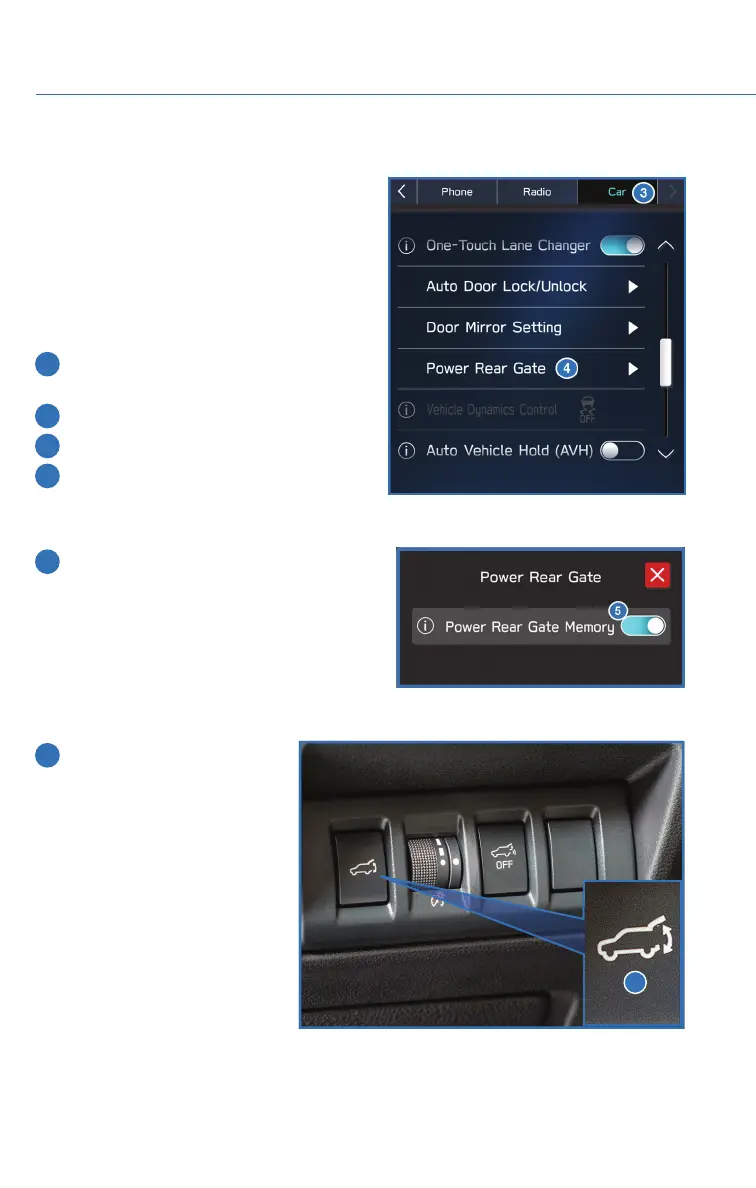
MEMORY HEIGHT (if equipped)
With the Memory Height function, you can set
where the Power Rear Gate gate stops when it
opens. This is a great feature to limit the
upward travel of the rear gate to ensure you
can reach it or to prevent the rear gate from
contacting a garage ceiling.
To set the height:
1 In the Center Information Display (CID)
press the “Home” Button.
2 Select “Settings”.
3 Select “Car”.
4 Select “Power Rear Gate”.
5 Turn on “Power Rear Gate Memory”.
6 Open the rear gate using the
Power Rear Gate Button.
Pause the rear gate when it
reaches the desired height
by pressing the Power Rear
Gate Button on the rear gate,
instrument panel, or key fob.
6
HOW TO APPENDIX
128














 To Next Page