STEERING WHEEL CONTROLS
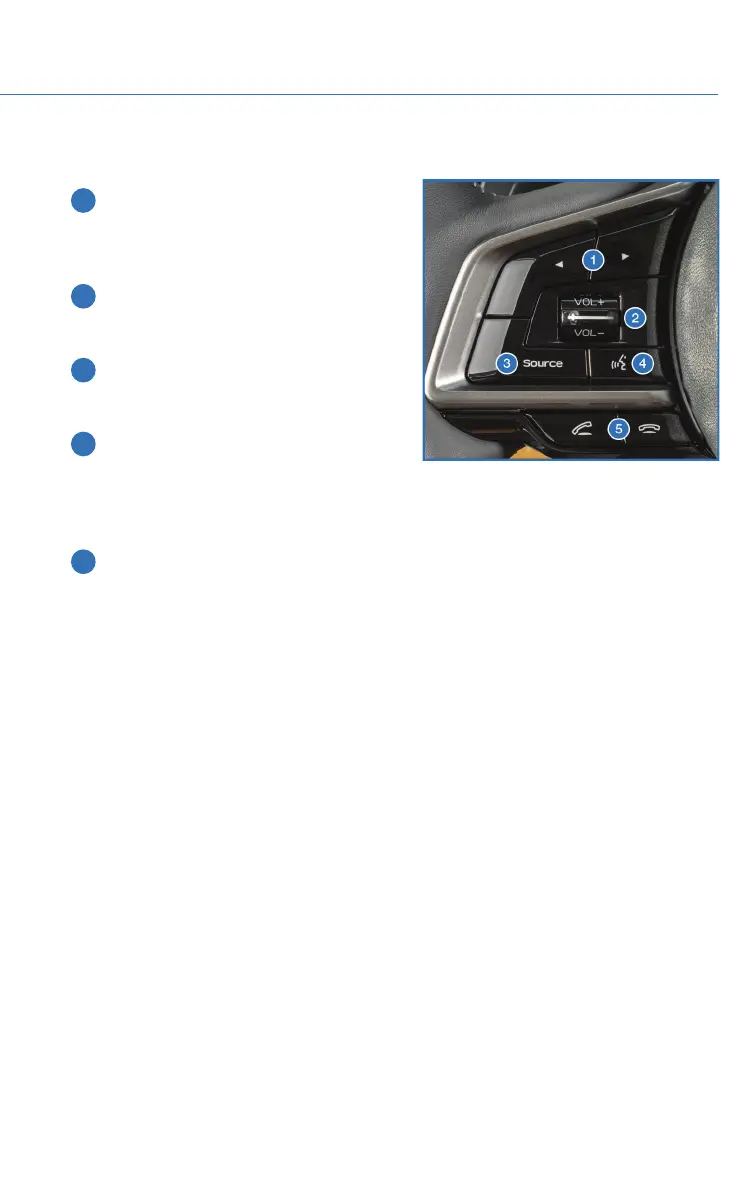
1 Presets/Skip: Press to toggle through
your presets or change a track or media
file. Press and hold to fast-forward or
rewind.
2 Volume: Press the volume switch up or
down to increase or decrease the
volume.
3 Source: Press the source button to
change the audio sources between radio
modes and media modes.
4 Voice Recognition: Press to initiate the
built-in voice recognition system. If you
have an Android or Apple device paired,
press and hold to start the Apple
CarPlay
®
/Android Auto™ voice recognition function.
5 Call/End: Press to receive or end a call without taking your hands off of the steering
wheel.
Starlink Audio Controls
STARLINK OVERVIEW
69














 To Next Page