ROUTE CALCULATION
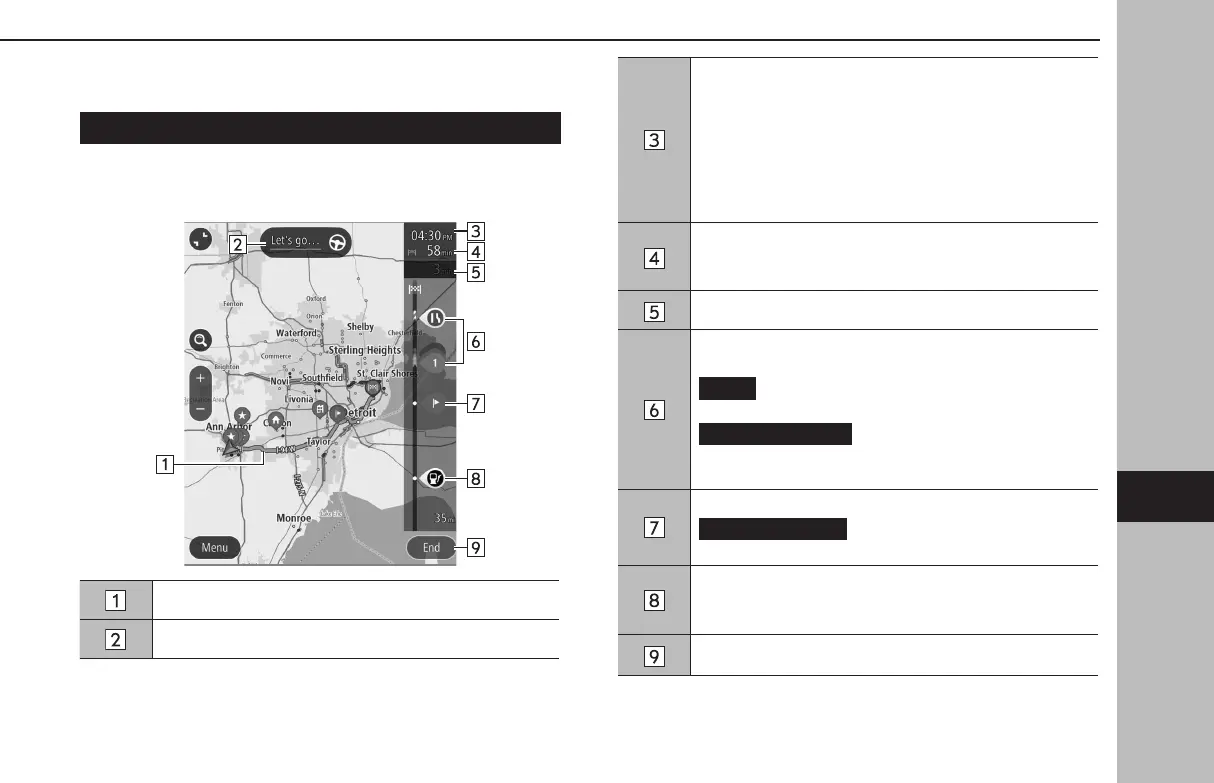
ROUTE CALCULATION SCREEN
After searching for the destination, the route calculation screen
will be displayed.
Displays the route overview.
Select to start route guidance.
Estimated time of arrival
Select to change the displayed information between a
waypoint and the destination.
• Select and hold to turn display of the route bar on/o.
• If “Auto-Hide Route Bar” on the navigation settings
screen is turned on, the route bar will automatically
be hidden and will only be displayed when new route
information is available.
Remaining distance and/or remaining time
The displayed details can be changed on the navigation
settings screen. (→P.207)
Displays the change in travel time.
Trac information icon
Select to display the trac information pop-up.
(Avoid): Select to avoid a section of the current
route based on trac information.
(More Information): Select to
display detailed information for the selected trac
information.
Select to display the waypoint information pop-up.
(Delete This Stop) :Select to delete
the selected waypoint from the route.
Displays a POI on the route.
Select a displayed icon to display the location menu pop-
up. (→P.188)
Select to cancel route conrmation.
BASIC OPERATION
201
Navigation System
GB8_US.indb 201 2020/10/09 7:23:17














 To Next Page