3-14
#7013455 - Revision A - April, 2009
Electronic Control System
International W
International W
ine Storage
ine Storage
(ICBWS)
(ICBWS)
Series
Series
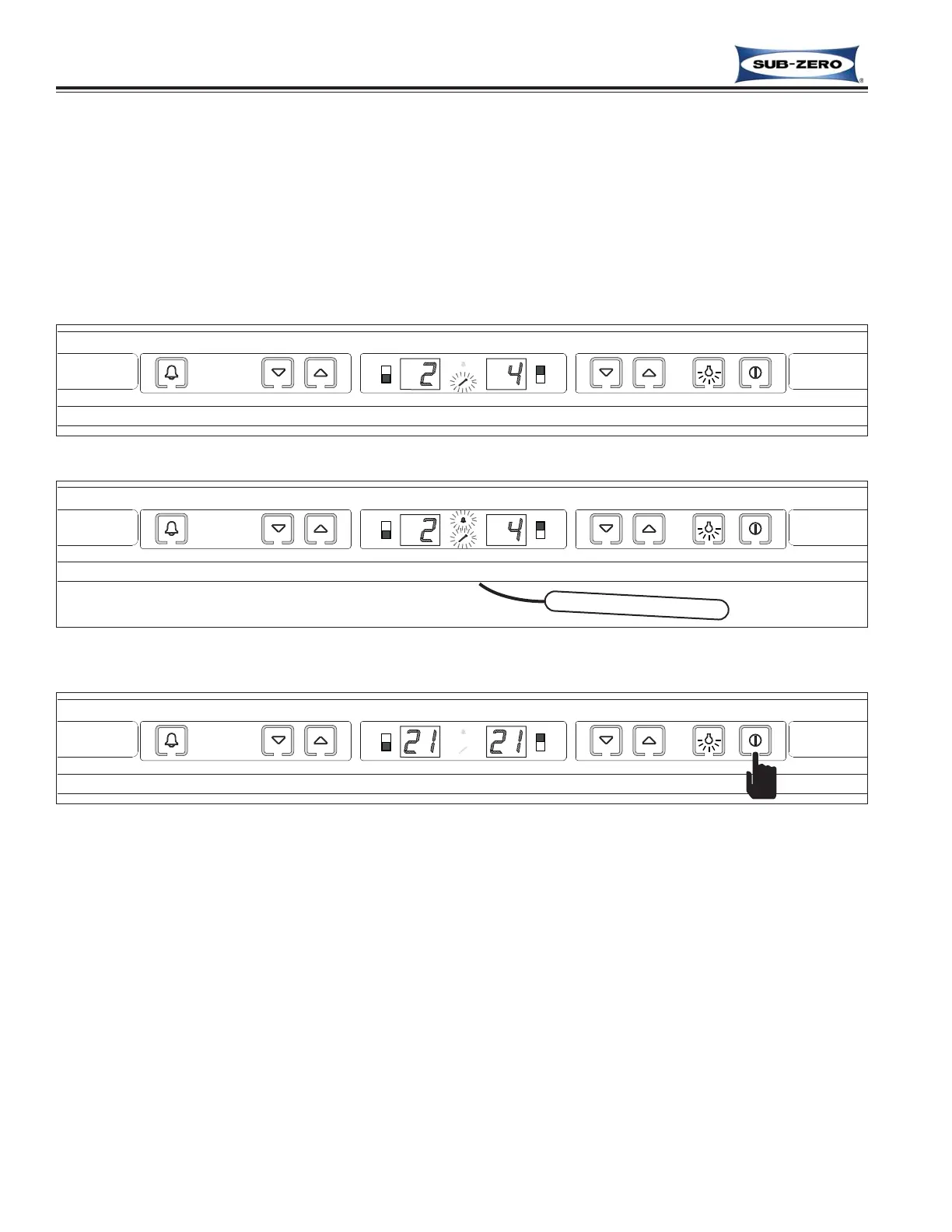
Figure 3-22. Cold Temperature Alarm, Service Icon Flashing
Figure 3-23. Cold Temperature Alarm with Alarm Feature Enabled,
Service and Alarm Icon Flashing with Audible Alarm Beeping
BEEP! BEEP! BEEP!
Figure 3-24. Clear Cold Temperature Alarm, Press POWER Key to Off, Then ON
(Also see Clearing Error Codes, later in this section.)
Cold Temperature Alarm
A cold temperature alarm can occur if either wine storage compartment remains below 38°F (3°C) too long, in con-
junction with several consecutive maximum run-time cycles. A cold temperature alarm situation will cause the serv-
ice icon to flash (See Figure 3-22), and an appropriate error code to be logged; power to the compressor and con-
denser fan is also cut. If the temperature alarm feature has been enabled by pressing the ALARM key on the con-
trol panel, the alarm icon will also flash, and the audible alarm will beep. (See Figure 3-23)
NOTE: To clear the cold temperature alarm, the problem must be corrected, then press the POWER key to switch
the unit OFF, then press it again to switch the unit back ON. (See Figure 3-24) Also see Clearing Error Codes, later
in this section.



 To Next Page