3-17
#7013455 - Revision A - April, 2009
Electronic Control System
International W
International W
ine Storage
ine Storage
(ICBWS)
(ICBWS)
Series
Series
Diagnostic Mode Alerts
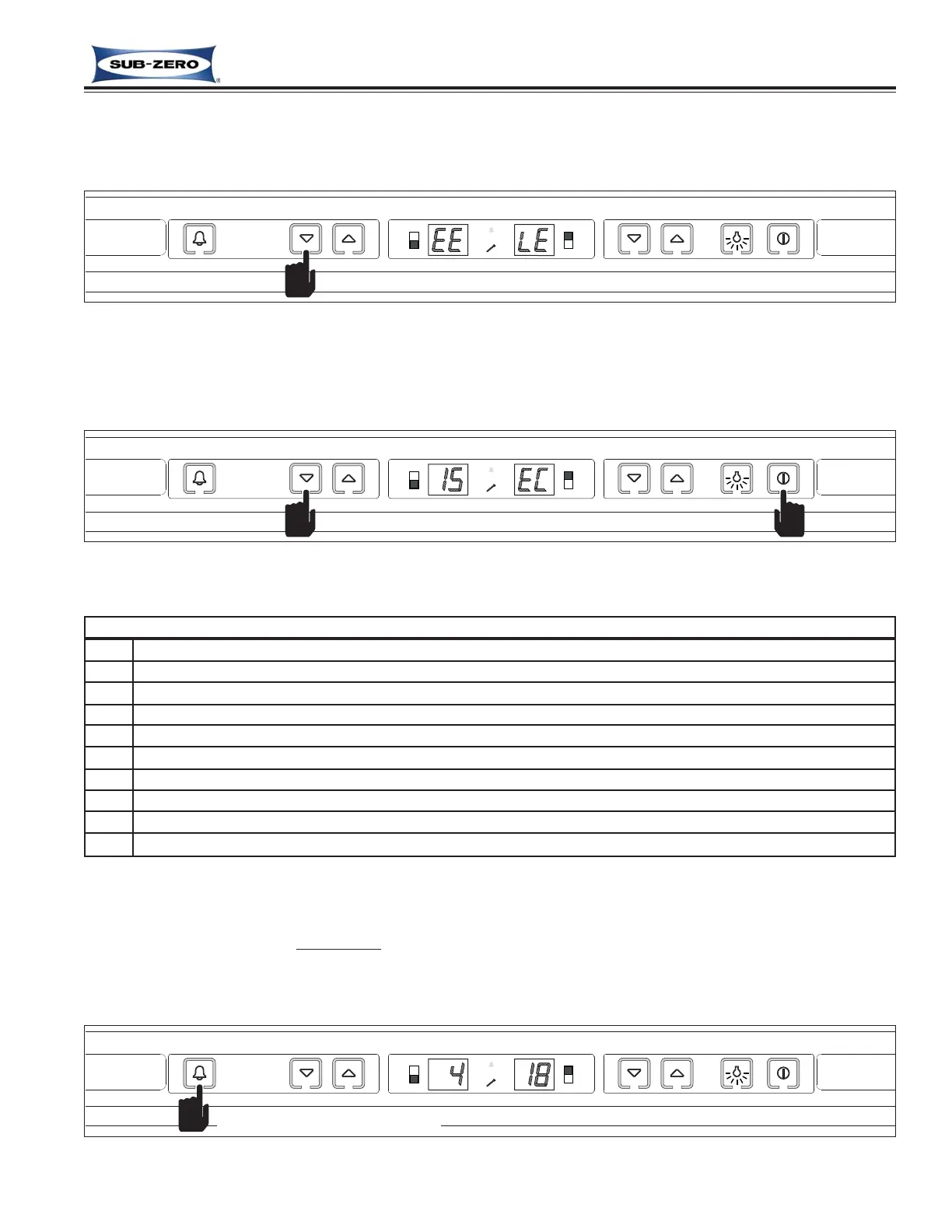
“EE” observed in the left display window during Diagnostic Mode - The thermistor, or its wiring in the location
indicated by the code at right is open or shorted (See Figure 3-32).
Figure 3-32. “EE” Observed in Diagnostic Mode = Thermistor (or its wiring) Fault in Location Indicated
“EC” observed in the right display window Diagnostic Mode - Numbers at left are “Error Codes” (See Figure 3-
33). Error Codes indicate problems logged by specific components. If error codes are logged, they will appear
before temperature readings and can be toggled through with the temperature readings as described on the previ-
ous page. (See Error Code Table below.)
Figure 3-33. Numbers at Left with “EC” at Right = Error Code (See Error Code Table Below)
Wine Storage Error Code Table
CODE INDICATION
05 Upper Cabinet Thermistor read open or shorted for 10+ seconds, or repeatedly read erratic temp’s
06 Upper Evaporator Thermistor read open or shorted for 10+ seconds, or repeatedly read erratic temp’s
07 Lower Cabinet Thermistor read open or shorted for 10+ seconds, or repeatedly read erratic temp’s
08 Lower Evaporator Thermistor read open or shorted for 10+ seconds, or repeatedly read erratic temp’s
10 Upper Cabinet Warm Temperature alarm
11 Upper Cabinet Cold Temperature alarm
12 Lower Cabinet Warm Temperature alarm
13 Lower Cabinet Cold Temperature alarm
15 Sealed System Fault (evap temperature cannot drop 5° in 5 minutes, 3 consecutive valve activations)
Clearing Error Codes
If error codes are observed, a non-flashing
service icon will appear on the display when Diagnostic Mode ends, indi-
cating error codes are still logged. To clear the error codes and non-flashing service icon, the problem must be cor-
rected, then with the unit ON, press and hold the ALARM key for fifteen (15) seconds. The control will emit a short
“beep” when the error codes is cleared and the service icon will de-energize. (See Figure 3-34)
Figure 3-34. Clear Error Code & Non-flashing Service Icon - Press & Hold ALARM Key for 15 Seconds
Press and hold for 15 seconds



 To Next Page