★When the internal temperature is 81℃, the reducing power charging mode which
reduce the charging power of 5%,10%,20%,40% every increase 1 ℃is turned on. If
the internal temperature is greater than 85℃, the controller will stop charging. But
while the temperature decline to be below 75 ºC, the controller will resume.
4.2 Troubleshooting
21
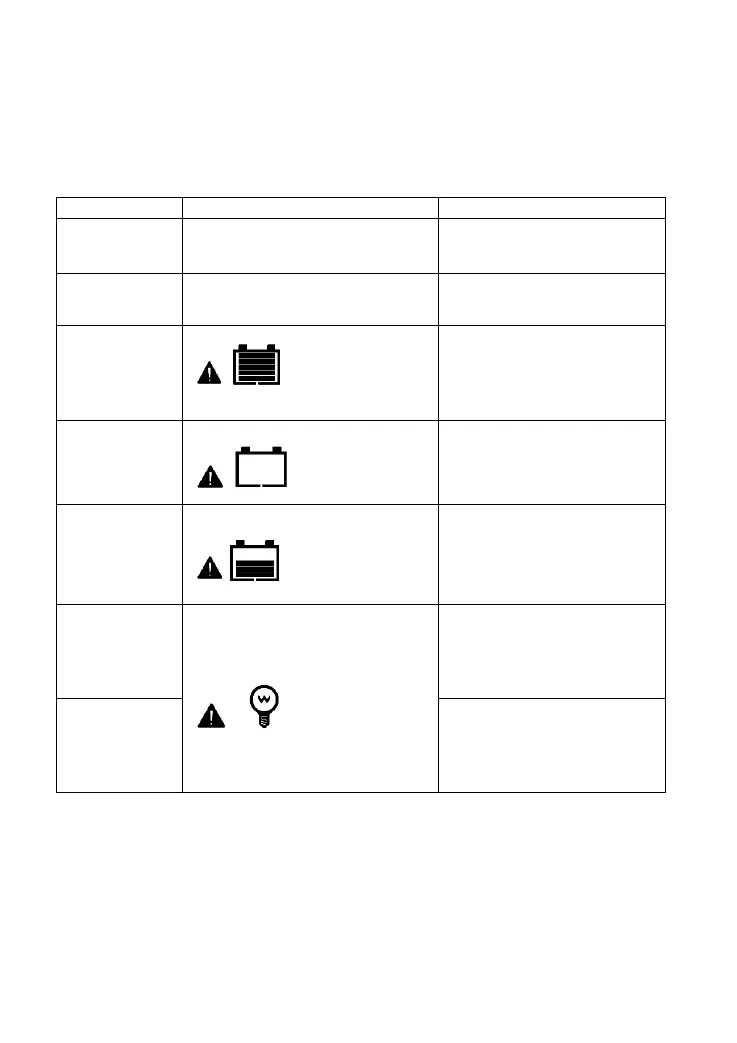
Possible
Faults Troubleshooting
PV array
disconnection
Charging LED indicator off during
daytime when sunshine falls on
modules properly
Confirm that PV and battery
wire connections are correct
and tight
Battery
is lower than
8V
Wire connection is correct, the
controller is not working.
Please check the voltage of
battery. At least 8V voltage to
activate the controller.
Batteryover
voltage
Battery level shows
full, battery frame
blink, fault icon blink
Check if battery voltage is
higher than OVD(overvoltage
disconnect voltage), and
disconnect the PV.
Batteryover
discharged
Battery level shows
empty,
blink, fault icon blink
When the battery voltage is
restored to or above LVR(low
voltage reconnect voltage),
load will recover
Battery
Overheating
Battery level shows
empty,
blink, fault icon blink
The controller will
automatically turn the system
off. But while the temperature
decline to be below 55 ºC,the
controller will resume.
Load Overload
1. The load is nooutput
2.
Load and fault icon blink
①Please reduce thenumber
of electric equipments.
②Restart the controller.
③wait for one night-daycycle
(night time>3 hours).
LoadShort
Circuit
①Check carefully loads
connection, clear thefault.
②Restart the controller.
③wait for one night-daycycle
(night time>3 hours).


 To Next Page