9
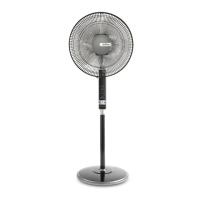
1. Place the pedestal fan on a flat level surface
2. Adjust the height by turning the height
adjustment knob, located on the lower
extension shaft.
Note: Ensure the knob is tightened firmly at all
times. Insert the plug into a 230/240 V power
outlet and turn the power on.
3. Press the on/off button on the fan or the
remote control. The fan will start at ‘medium’
speed for 3 seconds then automatically
change to ‘low’ speed.
Selecting a fan speed
1. To select a fan speed simply press the
‘speed’ button, on either the fan or remote
control, repeatedly to select the desired
speed from the 6 settings available.
The LED lights indicate the graduated speed
on the dial below.
• If you will not be using the fan for a length of
time, it is advisable to turn the power off at
the wall socket and unplug the power cord.
Using Your Pedestal Fan


 To Next Page