EasyManua.ls Logo

SunBeat 8015A - Product Installation; Installation Precautions; Equipment List

Default Icon
37 pages
Print Icon
To Next Page IconTo Next Page
To Previous Page IconTo Previous Page
Loading...
5
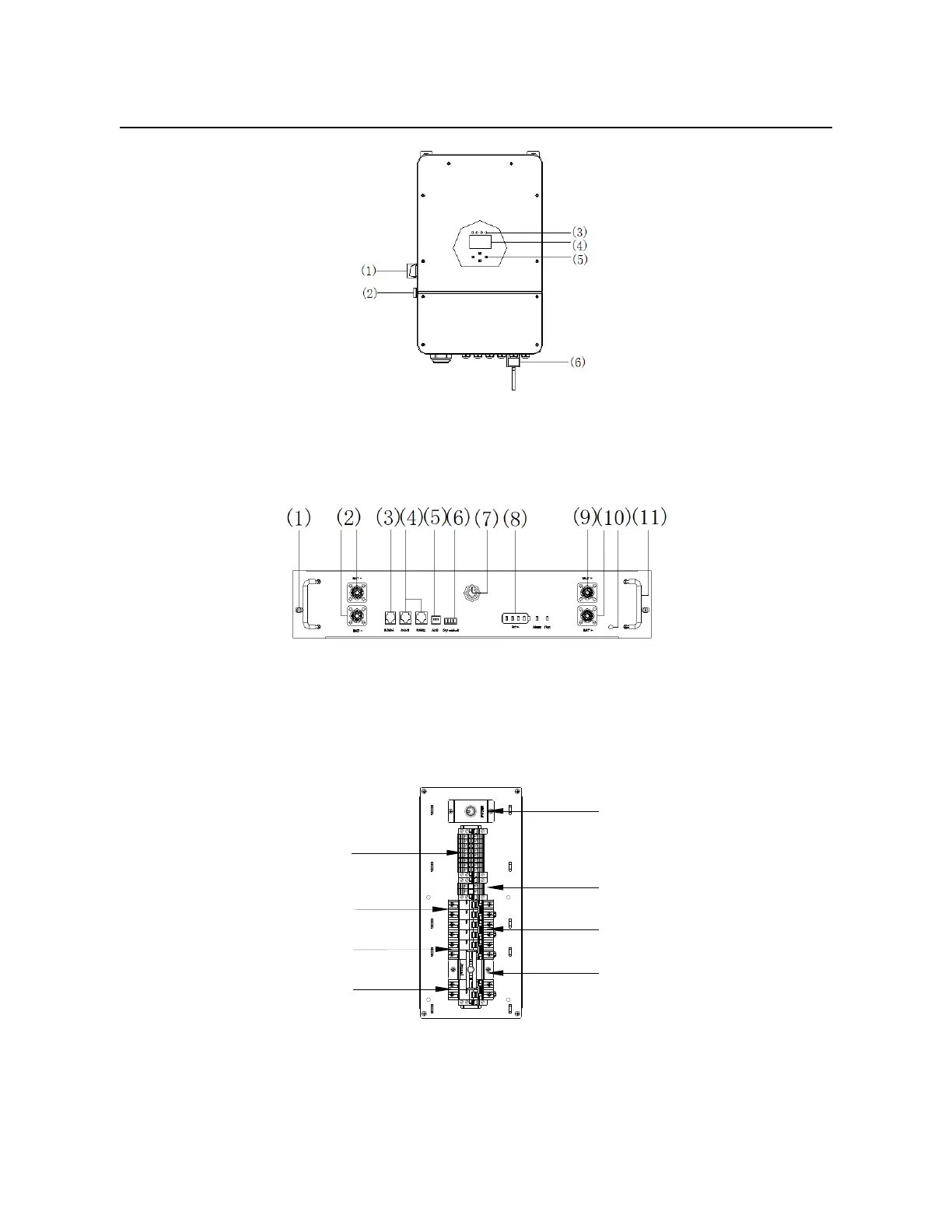
Picture 2-4 Appearance of the inverter
(1) DC Switch
(4) LCD display
(2) Power on/off button
(5) Function Buttons
(3) Inverter Indicators
(6) WiFi Interface
Picture 2-5 Appearance of the battery box
(1) Mounting holes
(7) Button
(2) Input and output negative
(8) Status Display
(3) RS485
(9) Input and output positive
(4) CAN Bus
(10) Grounding hole
(5) Address
(11) Handle
(6) Dry node
Picture 2-6 Internal diagram of the distribution box
(1) Battery start button
(5) GRID switch
(2) PV wiring terminal
(6) Bypass switch
(3) N terminal
(7) Interlocking device
(4) GNE switch
(8) LOAD switch
(1)
(2)
(3)
(4)
(6)
(8)
(5)
(7)

Related product manuals