EasyManua.ls Logo

SunBeat 8015A - User Manual

Default Icon
37 pages
Print Icon
To Next Page IconTo Next Page
Loading...
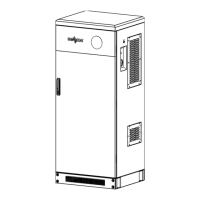
Home Energy Storage System
Model: SunBeat series
SunBeat 5010A/SunBeat 8015A/SunBeat 8020A
Version: V1.4
User Manual

Questions and Answers

  • J
    Jennifer WilliamsAug 10, 2025
    Why does my SunBeat Storage have a short discharge time?
    • K
      Kenneth CallahanAug 10, 2025
      A short discharge time in your SunBeat Storage can be due to several factors: * **Low battery power:** Ensure the product is charged for more than 4 hours until fully charged. * **Product overload:** Check the load status and remove any non-critical products. * **Battery aging:** If the battery is old, its capacity may have declined. Contact the supplier to replace the battery and its components.
  • K
    Kathy SmithAug 15, 2025
    What to do if my SunBeat Storage is unable to charge and discharge?
    • D
      Daniel RossAug 15, 2025
      If your SunBeat Storage is unable to charge and discharge, consider these possible causes: 1. **Internal failure:** Please contact the supplier. 2. **Charge or discharge protection failure:** Refer to the battery indicator function status table to identify the cause. 3. **SOC protection:** If the battery discharged to the SOC protection value, charge it to the restart SOC value (default 50%). 4. **Battery over temperature:** Allow the battery to cool at room temperature for over 3 hours.
  • M
    Melissa ColeAug 21, 2025
    How to fix a SunBeat 8015A that doesn't respond when the start button is pressed?
    • J
      James ArmstrongAug 21, 2025
      If your SunBeat Storage doesn't respond when you press the start button, it could be due to a damaged or poorly installed one-button start wire. To address this, open the side door, close the POWER button on each battery module, and check the turned on status. If that doesn't work, contact the supplier.
  • L
    Laura RamosAug 28, 2025
    What to do if SunBeat 8015A shows battery over temperature?
    • G
      George EdwardsAug 28, 2025
      If your SunBeat Storage indicates the battery is over temperature, allow it to stand at room temperature for more than 3 hours.
  • S
    sarahturnerSep 3, 2025
    How to troubleshoot a red light failure prompt on SunBeat Storage?
    • A
      adelgadoSep 3, 2025
      To troubleshoot a red light failure prompt on your SunBeat Storage, check the indicator function status table using the prompted fault information to determine the cause.

Summary

Safety Instructions

Safety Precautions

List of precautions for safe installation and operation.

Symbol Interpretation

Explanation of safety symbols used in the manual.

Product Introduction

Product Overview

General description of the home energy storage system.

Structure and Composition

Details the internal and external components of the product.

Product Installation

Installation Precautions

Guidelines and warnings before installing the system.

Equipment List

List of components included with the system.

Installation

Procedures and guides for installing the system.

Cable Connection

Instructions for connecting various cables to the system.

Operation Guide

Battery DIP Switch Setting

How to configure battery DIP switches.

Operating Instructions

Steps for powering the system on and off.

LCD Display Icons

Overview of LCD display elements and their meanings.

Battery Status Display

How to interpret LED indicators for battery status.

Display status

Overview of various display statuses and messages.

Maintenance and troubleshooting

Daily Maintenance

Routine maintenance tasks for the system.

Battery Troubleshooting

Common battery failures, reasons, and solutions.

Inverter Troubleshooting

Common inverter errors and troubleshooting steps.

SunBeat 8015A Specifications

General IconGeneral
BrandSunBeat
Model8015A
CategoryStorage
LanguageEnglish

Related product manuals