EasyManua.ls Logo

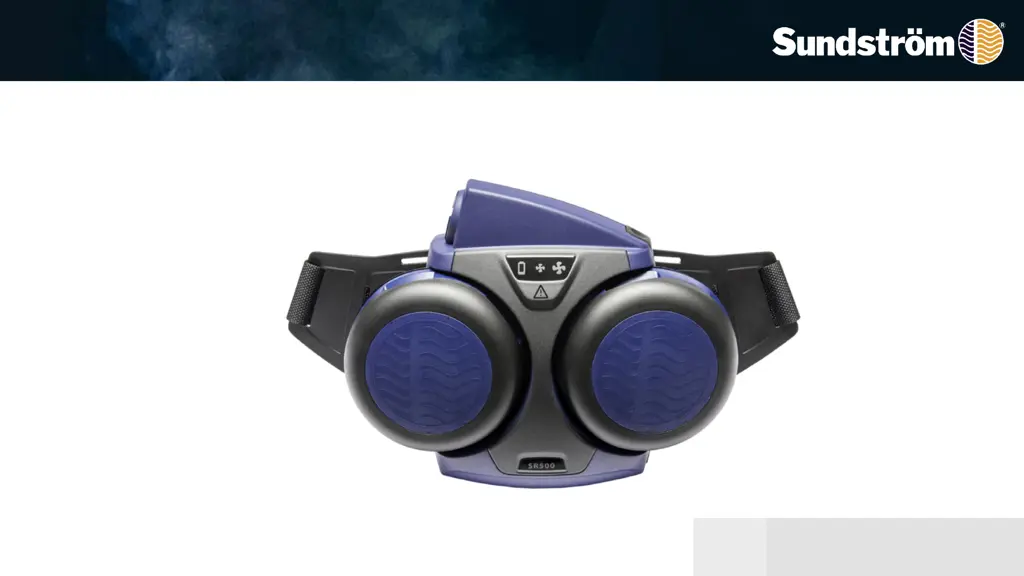
Sundstrom SR 500 - User Manual

Sundstrom SR 500
21 pages
Print Icon
To Next Page IconTo Next Page
Loading...
2020-04-23
OI06H-0118 SR 500 1
Operating instruction
SR 500
Revision: 04

Other manuals for Sundstrom SR 500

Questions and Answers

  • C
    Cassandra FosterJul 25, 2025
    What to do if the red triangle flashes on my Sundstrom SR 500 Respiratory Product?
    • J
      Jose HartJul 25, 2025
      If the red triangle flashes on the display and the fan sounds and vibrates on your Sundstrom Respiratory Product, it's likely due to clogged filters. Try changing the pre-filters and particle filters. Also, check the hose to ensure air flows freely and that it's in good condition. Finally, verify that the exhalation valves with membranes are fitted to your head top.
  • M
    Matthew RiosJul 31, 2025
    How to troubleshoot Sundstrom SR 500 fan unit that fails to start?
    • J
      Jose AndersonJul 31, 2025
      If the fan unit of your Sundstrom Respiratory Product fails to start, first, recharge the battery. If that doesn't work, check for fan-battery contact problems by bending, adjusting, or cleaning the battery terminals and ensuring there are two terminals. Also, check the contact rivets on the fan. If the battery is faulty, replace it with a new one and measure the voltage, which should be 13 – 17 V. Inspect the charger for dirt on the contacts and consider replacing it. If none of these steps work, the fan motor/electronic fault may be the issue, and you should send the fan unit for repair.
  • S
    Samantha WilsonAug 6, 2025
    What to do if the red triangle flashes on Sundstrom SR 500 Respiratory Product?
    • E
      Elizabeth ValenciaAug 6, 2025
      If the red triangle flashes on the display and the fan sounds and vibrates on your Sundstrom Respiratory Product, it's likely due to clogged filters, a damaged hose, or issues with the valves. Try these steps: * Change the pre-filters. * Change the particulate filters. * Check that the air flows freely through the hose and that the hose is in good condition. * Ensure that the exhalation valves with membranes are fitted to your human interface.
  • Z
    zcooperAug 12, 2025
    How to fix Sundstrom SR 500 when the fan fails to start?
    • T
      Tiffany CabreraAug 13, 2025
      If the fan fails to start on your Sundstrom Respiratory Product, there are several potential causes: 1. The battery may be discharged: Recharge the battery. 2. There may be fan-battery contact problems: Bend, adjust, or clean the battery terminals. Ensure there are two terminals and check the contact rivets on the fan. 3. The battery could be faulty: Try a new battery or test another battery. Measure the voltage, which should be 13 – 17 V. 4. The charger might be faulty: Visually inspect the charger and battery contacts for dirt. You may need a new battery charger. 5. There may be a fan motor/electronic fault: In this case, send the fan away for repair.
  • K
    keith77Aug 18, 2025
    Why Sundstrom SR 500 fan does not run smoothly?
    • J
      Jerry EvansAug 18, 2025
      If the fan on your Sundstrom Respiratory Product isn't running smoothly, it might be due to a clogged filter, an incorrect filter combination, or the absence of filters. Check that there are filters in the fan unit and that they are of the same type, such as SR 532 OV/SD/CL/HC/HF + SR 510 P100/HE.

Summary

1. Assembling the Fan Unit and Battery

Battery Installation and Charging Procedure

Guides on fitting the battery, removing protective tape, and connecting the charger for charging.

2. Belt Assembly

3. Particle Filter Installation

Filter Mounting Checks and Adapter Attachment

Checking filter gaskets, snapping the filter onto the adapter, and screwing the adapter into the fan mounting.

Pre-filter and Filter Holder Mounting

Fitting the pre-filter into the holder and mounting the filter holder onto the particle filter.

4. Combined Filter Installation

Attaching Particle Filter to Gas Filter

Snapping the particle filter onto the gas filter, noting arrow direction, and avoiding pressing the filter center.

Filter Mounting Checks and Pre-filter Installation

Checking fan unit filter gaskets and fitting a pre-filter into the filter holder.

5. Operation and Performance

6. Minimum Flow Performance Check

7. Alarm Performance Check

9. Changing Particle Filters

9. Changing Gasfilters and Combined Filters

10. Cleaning and Disinfection

Troubleshooting Schedule

Sundstrom SR 500 Specifications

General IconGeneral
BrandSundstrom
ModelSR 500
CategoryRespiratory Product
LanguageEnglish

Related product manuals