11
System Congurations
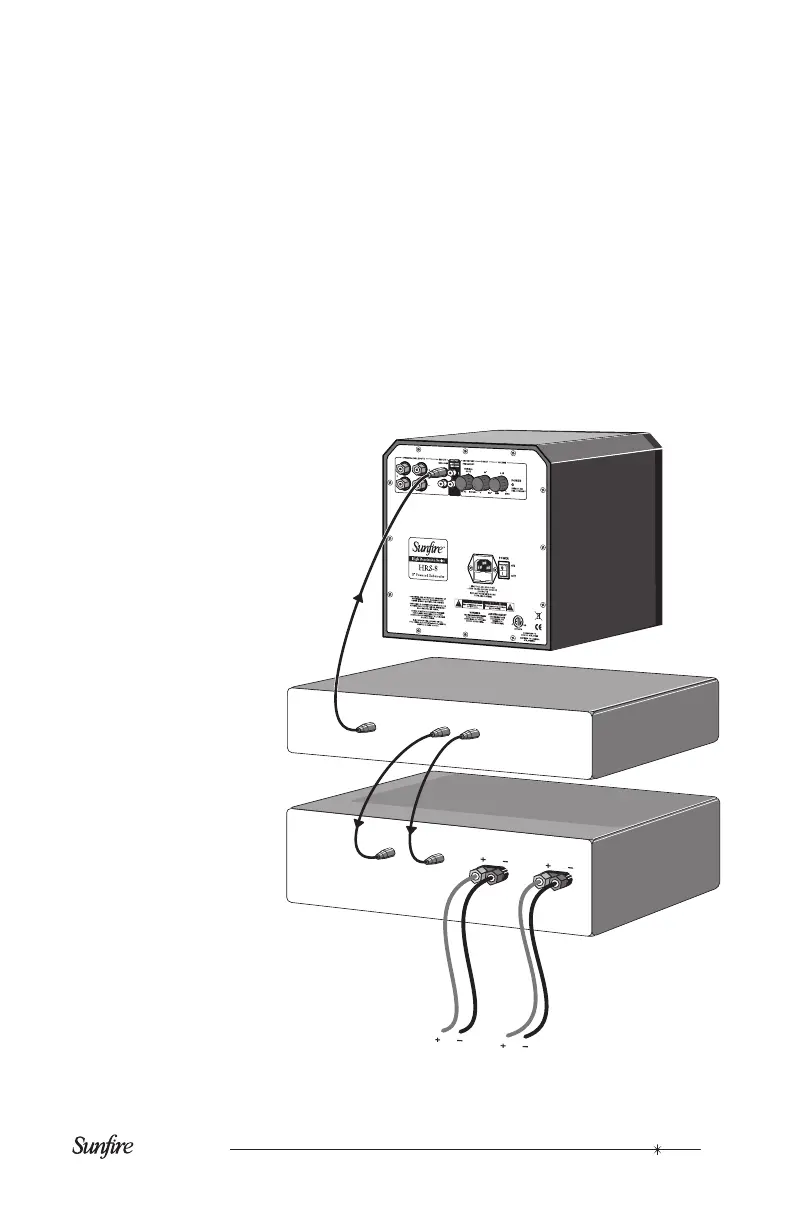
The following pages show some typical
connections that you might make in your
installation. They show how the inputs
and outputs of the Sunre Subwoofer
are co
nnected to your preamplier or
receiver.
If your processor or receiver has
a subwoofer output (Sub/LFE), it
should be connected to the sub-
woofer’s Left input as shown. This
is the simplest and recommended
connection.
If you have a Home Theater pro-
cessor or receiver, it probably has
an independent subwoofer volume
and crossover control. If so, you
should set the subwoofer’s volume
control to 0 dB, the crossover to
Bypass, and use the processor’s
subwoofer level and frequency con-
trols for adjustments.
Connections to a preamplier’s subwoofer output
PREAMPLIFIER
MAIN
OUTPUTS
R
SUB/LFE OUT
R
L
L
AMPLIFIER
INPUTS
TO FRONT SPEAKERS



 To Next Page