5.
6.
7.
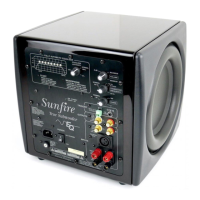
Speaker-Level
Inputs
If
you are using a receiver that only
has
speaker-level
outputs, connect it
using the
speaker-level inputs (see the
hookup diagram on page 14). They can
accept bare wire, banana, or
dual-ba-
nana connectors.
If
you experience excessive noise
or·
hum using the
line-level inputs, try us-
ing the
speaker-level
inputs. This may
lower
the background noise
level.
Line-Level
Inputs
These connect with
RCA
type
cables
from the
line-level
outputs
of
your
receiver or preamp. Here are two
examples:
If
your processor or receiver has a
single
subwoofer output, connect it
to the subwoofer's
left
input jack (see
page
11
).
There is no need to use the
subwoofer's right input jack.
If
your processor does not have a
subwoofer output, use
"Y"
adapters at
the processor outputs (see page 12).
In
this way, you can send the processor's
full-range
output signals
to your main
amplifier and to the subwoofer at the
same time.
High-Pass Outputs
Signals
from these output jacks are a
direct copy
of
the
signals
going into the
input jacks
of
the subwoofer, with the
exception that the bass
below 70
Hz
has been removed by a fixed high-pass
crossover circuit. This handy feature
lets
the subwoofer
control all
the bass
in
your system, and you can use an
external amplifier
and
smaller satellite
speakers to
control the mids and highs.
(See
the hookup diagram on page 13.)
We recommend using this high-pass
function with
small main/satellite
speak-
ers that are not designed to reproduce
low
frequencies.
If
you are used to the
sound from
smaller speakers, this op-
tion
will really bring your system
alive.
8.
9.
If
your main speakers are
capable
of
operating
full
range, you
will
not need
to use the high-pass function.
Crossover Frequency
This
controls
the crossover frequency
between 30
Hz and 1
00
Hz.
If it is set
to
30 Hz for
example,
the subwoofer
will
reproduce those frequencies
below
30 Hz. Rotating the
control clockwise
will smoothly
increase this frequency
range up to
100
Hz.
In
the bypass position, the crossover
control has no effect.
You
should
set
this to bypass if your processor has its
own subwoofer crossover frequency
control.
If
your processor does not have its own
subwoofer crossover frequency
control,
rotate this
control until the bass sounds
natural. If
the mid-bass sounds
natural
but you want more
low
bass, turn the
crossover frequency down a little, then
turn the
volume
up by about the same
amount. This increases the
low-bass
output
while leaving
the mid-bass
output the same.
Phase
This controls
the relative phase of the
subwoofer with respect to your other
speakers. Use this to
help blend
the
subwoofer with the rest
of
your system.
Adjust the
control
in
small increments
as you
I
isten for the most bass at
your
listening
position. As a
final trim,
readjust the crossover frequency and
volume controls
after the phase
control
has been set.
10.Volume
This
control lets
you match the output
level
of the subwoofer to the
level
of your
satellite/main
speakers. The
subwoofer output
will
increase as this
control
is
rotated
clockwise. When
installing
your system, turn this down
first before turning on your subwoofer,
to prevent any
loud
surprises.
Sunjire
User's
Manual
----------------------~--7


 To Next Page