SunFounder GalaxyRVR Kit for Arduino, Release 1.0
lights up. Then, keep moving the obstacle back and forth to check if the indicator light comes on at the desired
distance. If the light doesn’t turn on at the correct distance or if it remains on without going out, you’ll need to
adjust the other potentiometer.
3. Repeat the same process for another module.
Now that our sensors are fully prepared, let’s embark on the next journey!
Step 5: Design an Automatic Obstacle Avoidance System
Now, let’s take a big leap in our space exploration and make use of these messages from the Rover. We’re going to
create an automatic obstacle avoidance system!
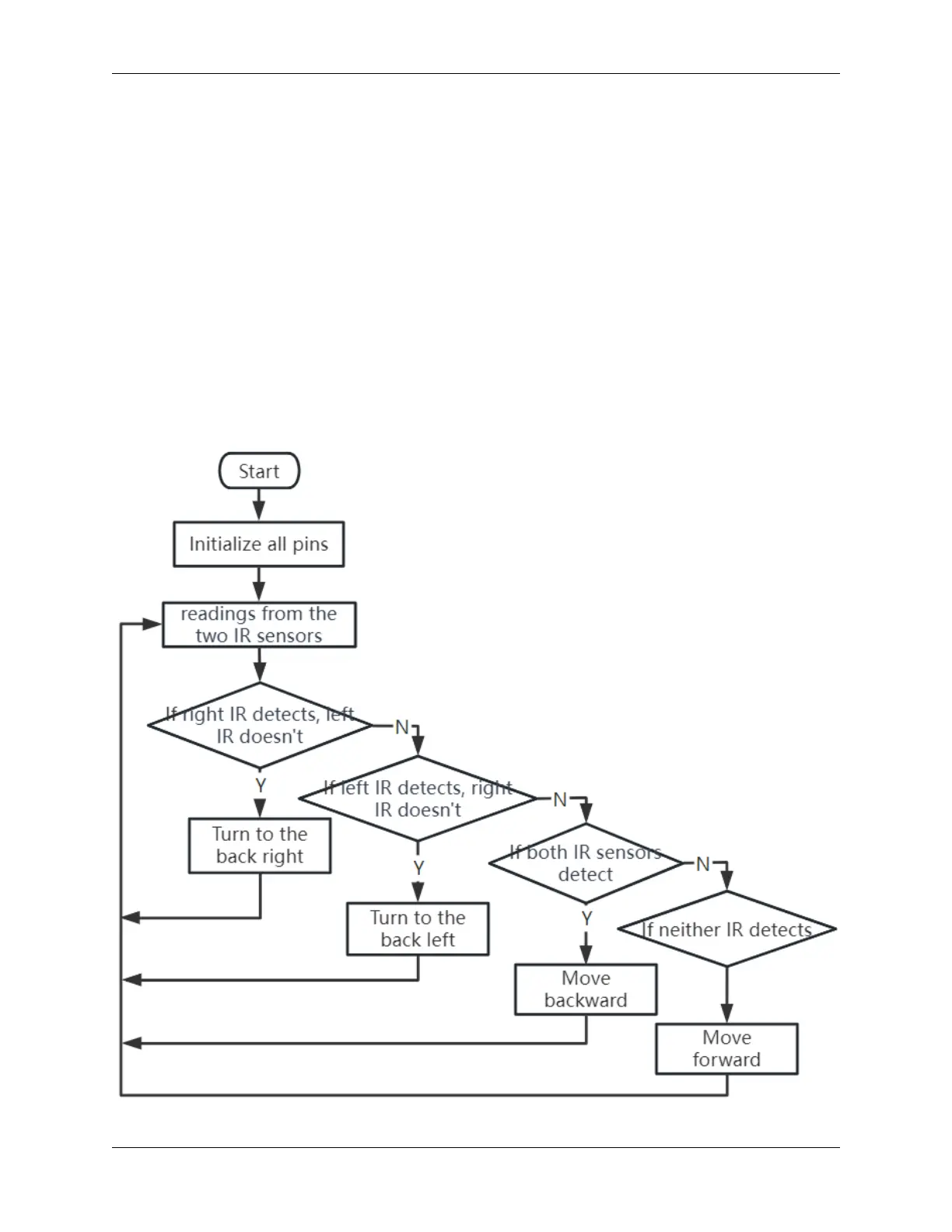
Here’s our plan: If the right sensor detects an obstacle, the Rover will turn to the back right. If the left sensor detects
an obstacle, the Rover will turn to the back left. If both sensors detect an obstacle, the Rover will move backward. If
no obstacles are detected, the Rover will continue moving straight ahead.
Let’s visualize this in a flowchart to make it even more clear. Flowcharts are a great way to logically outline a plan,
especially when it comes to programming!
3.6. Lesson 6: Exploring the Obstacle Avoidance Module 57



 To Next Page