SunFounder GalaxyRVR Kit for Arduino, Release 1.0
// AP Mode #define WIFI_MODE WIFI_MODE_AP #define SSID “GalaxyRVR” #de-
fine PASSWORD “12345678”
• STA Mode: In this mode, the Rover connects to your home WiFi network. Remember that your
controlling device (like a mobile phone or tablet) should also be connected to the same WiFi
network. This mode allows your device to keep its regular internet access while controlling the
Rover, but limits the Rover’s operational range to your WiFi coverage area.
// STA Mode
#define WIFI_MODE WIFI_MODE_STA
#define SSID "YOUR SSID"
#define PASSWORD "YOUR PASSWORD"
3. Upload the code to our Rover and bring our ESP32 CAM to life!
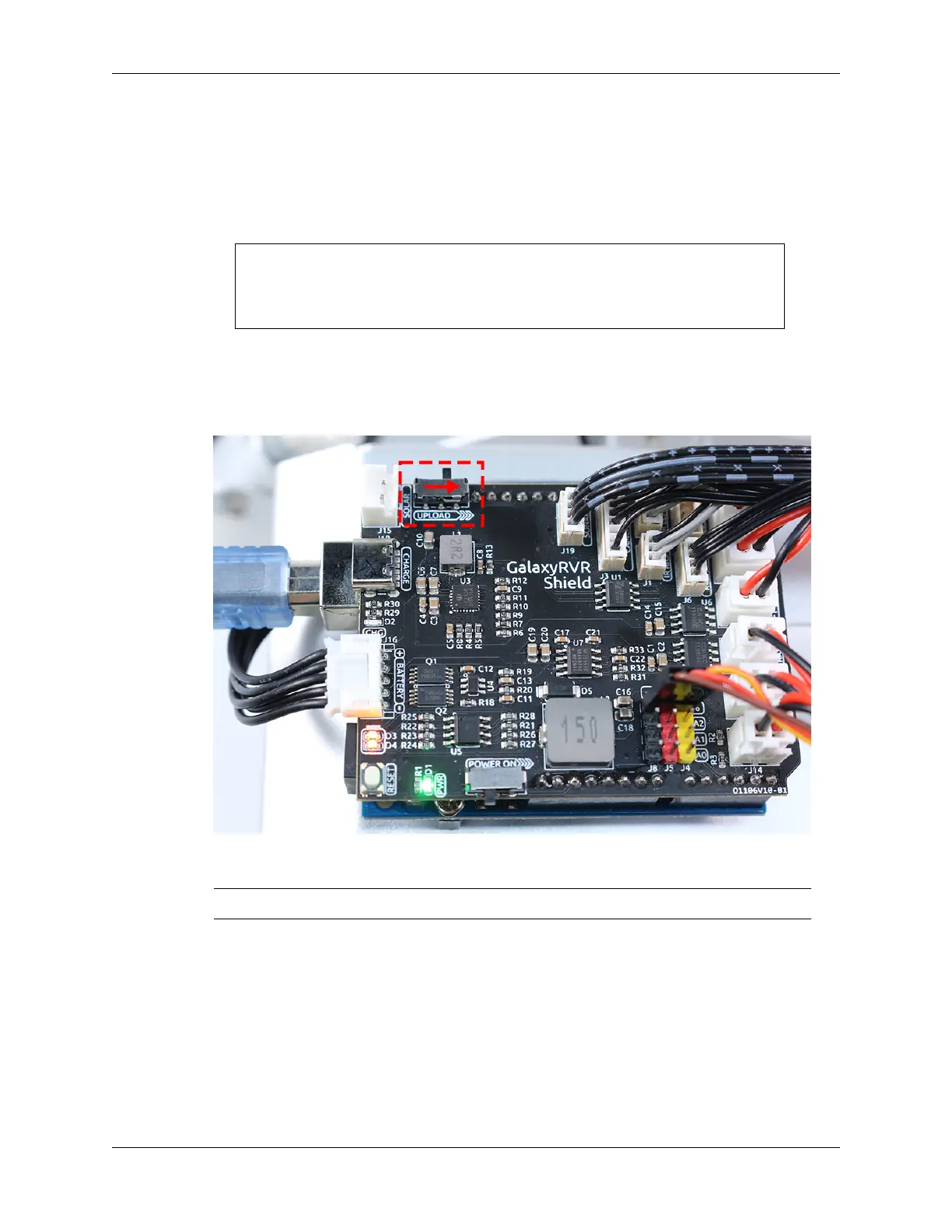
• The ESP32-CAM and the Arduino board share the same RX (receive) and TX (transmit) pins. So, before
uploading the code, you’ll need to first release the ESP32-CAM by slide this switch to right side to avoid
any conflicts or potential issues.
• Once the code has been uploaded successfully, switch it back to the left side to start the ESP32 CAM.
Note: This step and the previous one are required every time you re-upload the code.
3.11. Lesson 11: Exploring the Mars Rover Visual System - Camera and Real-time Control 85


 To Next Page
 Loading...