Guide for quick
installation
Simple
Settings
To start this intelligent devise for commercial use, you only need several steps.
1
Press ON button to light the screen. First entering the startup screen, follow the prompts.
You can choose from two network modes on this device.
2
Wi-Fi
settings
·
Click
“Settings”
button and open WLAN to enter the WLAN-searching
interface.
Wait for the list of available WLAN
hotspots.
·
Click corresponding WLAN. If an encrypted network is selected, the device will not be
connected to the WLAN until the password is entered.
3
LAN
settings
1
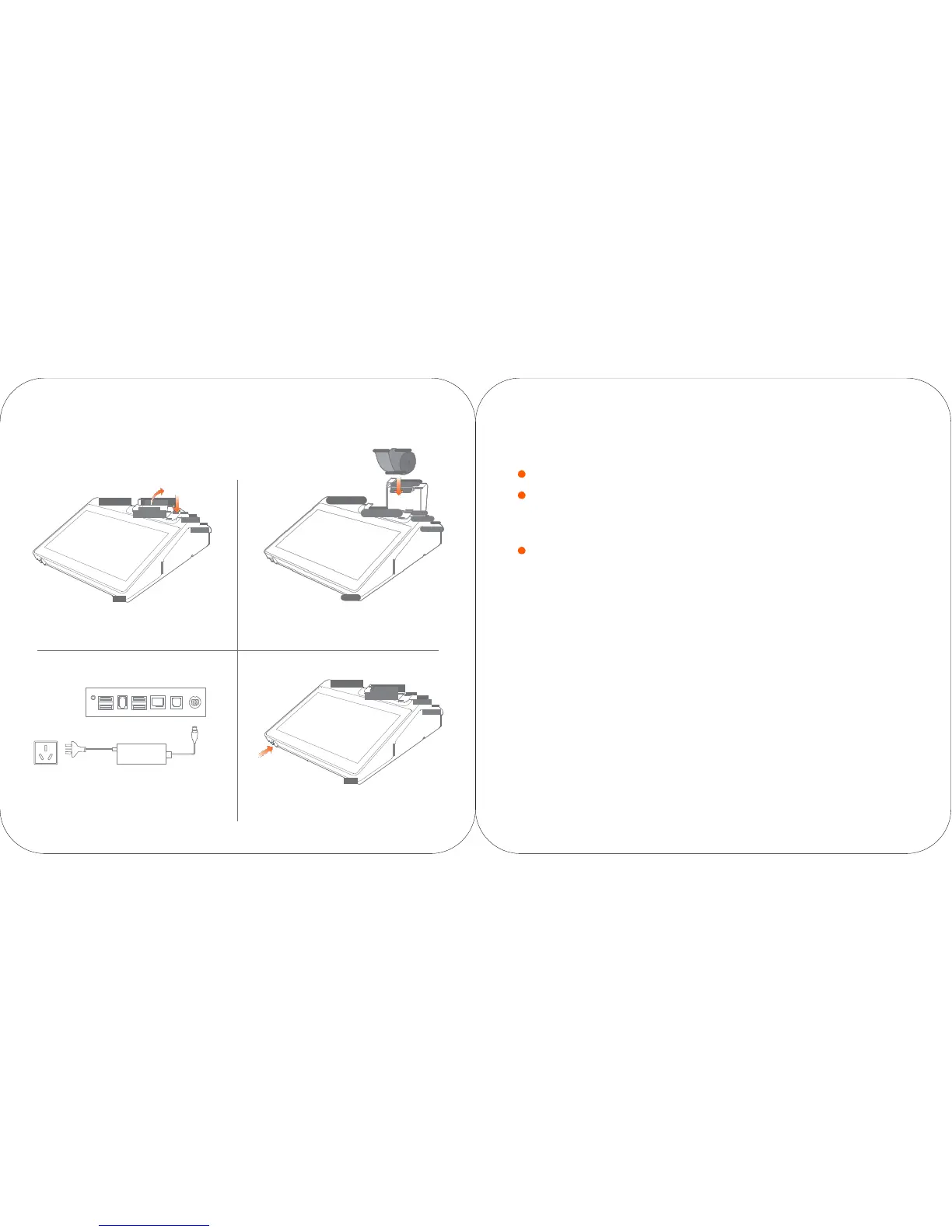
Press the open button to open the cover of the printer.
2
Place the thermal paper in the
printer.
How to
download/use
APPs
Relevant Apps can be downloaded while the network is connected. Open the App market,
and search and download the App to complete the installation.
To inquire detailed information of the above software: select “settings
->
application”, and select corresponding
software to inquire its
information;
how to uninstall the software: select “settings
->
application
->
application management
->
uninstall” to uninstall
the application; or press the icon and drag it into the trash can to uninstall
it.
Connect with the power supply. Press ON button and the printer will be
turned on in two seconds.
For more help, please refer to the Help App inside the device



 To Next Page