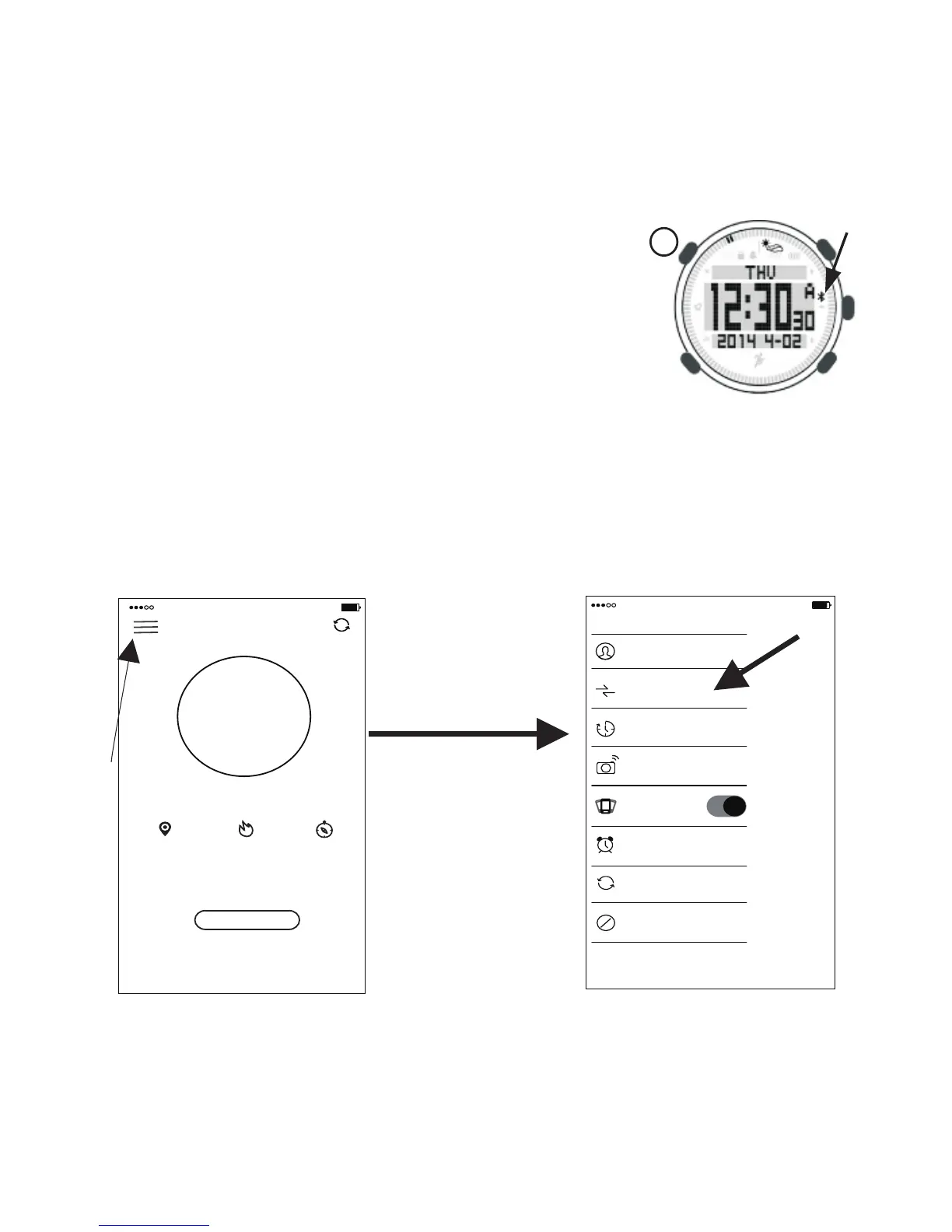
10.Bluetooth ON/OFF
under the time surface Long press button“L”such as
Figure 4 the screen will show the icon that is
bluetooth(the arrow show the position)this icon will blink,
it mean bluetooth on. after that long press again to off it.
Bluetooth connect
1.First scan two-dimension code
. meantime open the Smart phone bluetooth Figure 4
after that press the arrow ( the Figure 5 )show to enter the Basic surface.
(Figure 6),then press “Device” to connect the Smart watch. the blink bluetooth
icon would be stop it. it means connection successful.
PS:you also can search “climbing” at APP store or Google play to download APP
(the code on last page ),
download the apps
0 9 : 3 5
96%
中国移动
4G
Climber
Device
Sync Time
Camera
Incoming Call
Alert Clock
Reset Watch
Unbind
中国移动
4G
0 9 : 3 5
9 6 %
Walk
Step
0
0%
Goal:5000 steps
0.00KM 0.00Kcal 0min
ShenZhen
Figure 5
Figure 6
18
L


 To Next Page