OUTPUT MODE AND OUTPUT OPERATION
6
Notes:1)
2
Hysteresis can be fixed in 8 steps.
Refer to <Hysteresis fixed value selection> in 'PRO MODE' for setting.
' ' is displayed for comparative output 1 and ' ' for comparative output 2.
10
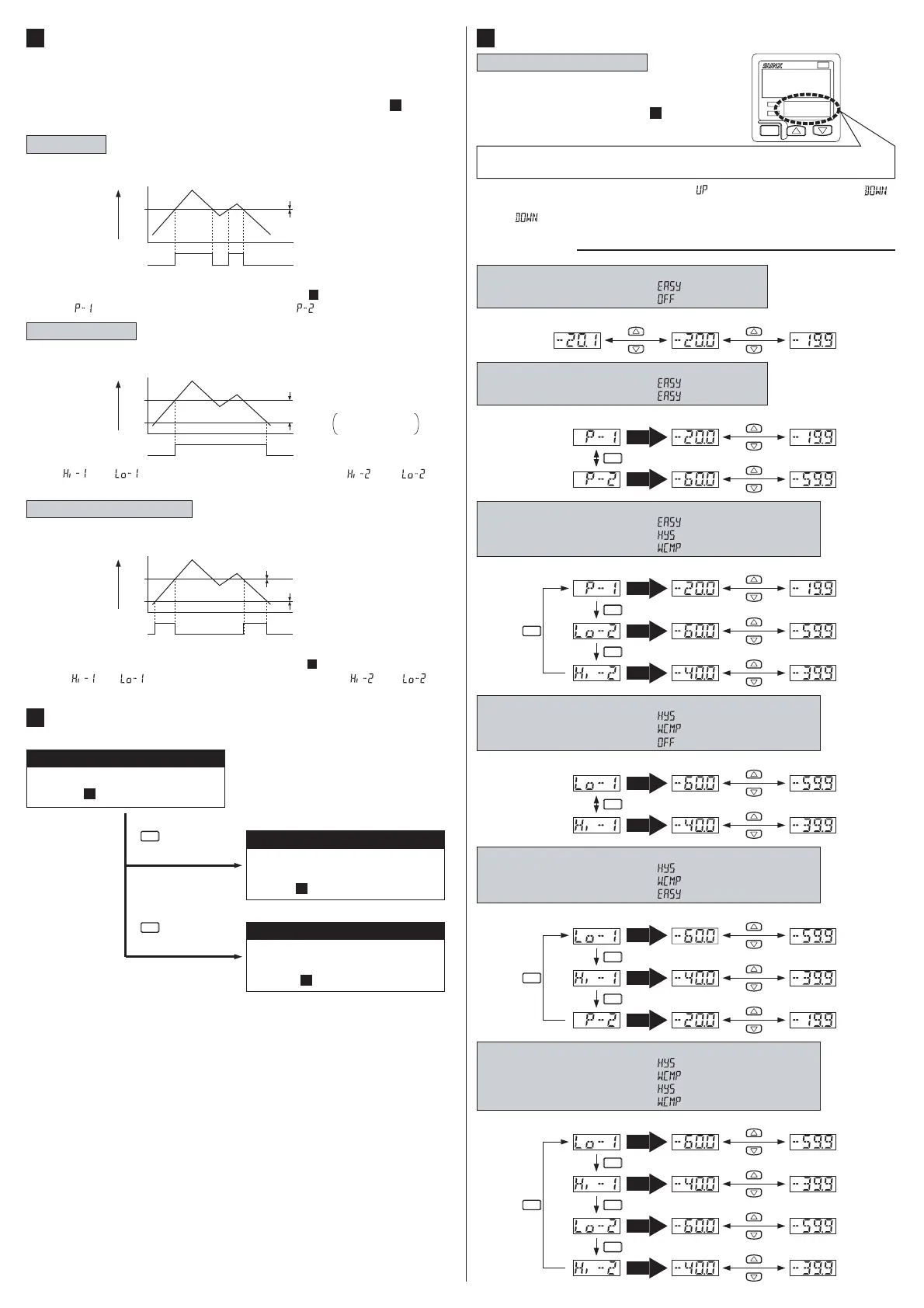
٨ ON / OFF of the comparative output is controlled in this mode.
EASY mode
H (Hysteresis)
H㧦Hysteresis fixed (Note 1)
P
0
ON
OFF
Comparative
output
Pressure
٨
The EASY mode, hysteresis mode or window comparator mode can be
selected as the output mode for comparative output 1 and comparative
output 2.
Refer to 'Comparative output 1/2 output mode setting'in ' 9 MENU
SETTING MODE' for details.
9
SETTING
7
<Setting procedures>
RUN MODE
This is the pressure detection state.
Refer to ' RUN MODE'.
8
MENU SETTING MODE
This is the setting mode for simple
setting.
Refer to ' MENU SETTING MODE '.
9
PRO MODE
This is the setting mode for
detailed setting.
Refer to ' PRO MODE
'.
10
Press for 2 sec.
MODE
Press for 4 sec.
MODE
10
٨ The comparative output ON / OFF state can be controlled with randomly
set hysteresis in this mode.
Hysteresis mode
Lo
Hi
0
ON
OFF
Comparative
output
H (Hysteresis)
Pressure
٨ I
n this mode, the ON or OFF state of the comparative output is controlled
with a pressure in the set range.
Window comparator mode
H (Hysteresis)
H㧦Hysteresis fixed (Note 1)
H (Hysteresis)
Comparative
output
Lo
Hi
0
ON
OFF
Pressure
Note:
' ' or ' ' is displayed for comparative output 1 and ' ' or ' ' for
comparative output 2.
H: 1 digit or more
2 digits or more when
using psi unit
Notes:1)
2
Hysteresis can be fixed in 8 steps.
Refer to < Hysteresis fixed value selection> in 'PRO MODE' for setting.
' ' or ' ' is displayed for comparative output 1 and ' ' or ' ' for
comparative output 2.
<Setting condition 4>
Comparative output 1 output mode: ' ' (Hysteresis mode) or
' '
(Window comparator mode)
Comparative output 2 output mode: ' ' (OFF)
<Setting condition 5>
Comparative output 1 output mode: ' ' (Hysteresis mode) or
' '
(Window comparator mode)
Comparative output 2 output mode: ' ' (EASY mode)
RUN MODE
8
Setting the threshold value
٨
Refer to 'Comparative output 1/2 output
mode setting' and 'Analog voltage output /
external input selection'in' 9 MENU SET-
TING MODE' for setting conditions.
9
Standard type
<RUN mode state>
<Setting condition 1>
Comparative output 1 output mode: ' ' (EASY mode)
Comparative output 2 output mode: ' ' (OFF)
<Setting condition 3>
Comparative output 1 output mode: ' ' (EASY mode)
Comparative output 2 output mode: ' ' (Hysteresis mode) or
' '
(Window comparator mode)
<Setting condition 2>
Comparative output 1 output mode: ' ' (EASY mode)
Comparative output 2 output mode: ' ' (EASY mode)
Note: If the set pressure range is exceeded, ' ' (exceeds the upper limit) or ' '
(exceeds the lower limit) will appear on the sub-display.
' ' will also appear if the Hi side threshold value exceeds the Lo side threshold
value when setting the ' hysteresis mode / window comparator mode ' threshold value.
<RUN mode state>
<RUN mode state>
<RUN mode state>
<RUN mode state>
<Setting condition 6>
Comparative output 1 output mode: ' ' (Hysteresis mode) or
' '
(Window comparator mode)
Comparative output 2 output mode: ' ' (Hysteresis mode) or
' '
(Window comparator mode)
DP-100
Since only the sub-display changes in the threshold setting, the following
shows only the sub-display.
MODE
Automatic
Automatic
Automatic
Automatic
Automatic
Automatic
Automatic
MODE
<RUN mode state>
Automatic
Automatic
Automatic
Automatic
MODE
MODE
MODE
MODE
Automatic
Automatic
Automatic
MODE
MODE
MODE
MODE
MODE
MODE


 To Next Page
 Loading...